Winisd help?

For the mechanical aspect of the drivers we will assume the the parameter shifts are linear throughout stroke and that all aspects are linear ideally for sake of understand simplicity..
Electro/mechanical aspects/parameters of loudspeakers.

QMS- This is how the drivers suspension and moving parts damp the oscillations of the speakers moving mass.


A lower number means its more resistant to oscillation. IE it wants to stop the oscillations faster/earlier. The parameters that affect this primarily are CMS and MMS and RMS.


This leads to how controlled the mechanical aspect of the driver is. very low QMS designs can use larger alignments to take advantage of the huge transfer function and efficiency benefits of not only larger boxes but larger ports.

-----------------------------------------------------------------------------------------------------------------------

CMS- This is a measure of the stiffness of the suspension(spider/surround). The lower the number the less the diaphragm will more for a given amount of Force applied. realistically You will see figures between .15mm/N for very soft suspensions to as low as .02 for pur SPL drivers. note that drivers like dd 9515s SPL builds use very light moving parts in combination to get very low QMS to use very large enclosures and get HUGE transfer function gains.


In this case they are nearly identical in CMS and

-----------------------------------------------------------------------------------------------------------------------

MMS- is the moving mass of the driver. its the weight of the parts. IE the mass of the the moving parts of the driver.. pretty simple. The higher the harder it is to move and harder it is to stop moving.

-----------------------------------------------------------------------------------------------------------------------

RMS- is The mechanical resistance/impedance of the suspension. think of it as ohm of a electrical circuit. its a resistance to movement. the suspensions topology and material plays a huge role in this. The higher the RMS the hgiher the resistance. Higher numbers mean higher LOSSES.

so lower numbers mean a less losses and mean less damping/control for a given stiffness.

-----------------------------------------------------------------------------------------------------------------------

QTS- this is the total damping of the driver which accounts for QMS and QES.. The lower the number the more damped the driver is as a unit.. the lower the number The more powerful the resonation but the narrower the bandwidth of the resonation.


for example if you model these two drivers up you will see the FI peaks harder but the peak is much more narrow for a given box size you will also notice that the low end frequency extension and output is much more limited. Think of a higher Q as a inductor and a low Q as a capacitor of sorts


The capacitor is high energy high discharge in nature but limits low frequency from the natural properties of the frequency/wavelength.


While the higher Q speakers are more like a coil with a AC inductance on it. it resistive to higher frequency and has and inductive nature so it suffers from high frequency extension from the extremely fast polarity changes but is IDEAL for lower frequency and lower polarity changes offering a more natural movement and more efficient reproduction of the lower frequency production.

++++++++++++++++++++++++++++++++++++++++++++++++++++++++++++++++

FS- The is the resonance frequency of the driver. In essence its the natural frequency in which all hte aspects of the driver combine to make the signal input and signal output close as possible to mimic the natural reproduction of that frequencies oscillations.

drivers play more accurately as the driver nears its FS. the further from FS the less ideal the oscillation is and the more losses you have trying to reproduce the oscillations!

================================================================

Vas- is the compliance of the drive. its basically the acoustic variation of the mass ove surface area of hte loudspeaker. kinda like hte density of the driver in respect to the area of that or air. IE the more compressed the air is in a given airspace the lower the "vas" as compared to the loudspeaker suspension CMS and surface(SD) area as well as MMS.

 
This info gives me something to digest... I can see now how one affects the other... but I am only trying to run Winisd at this point... eventually It'll make sense!.. LOL!

 
This info gives me something to digest... I can see now how one affects the other... but I am only trying to run Winisd at this point... eventually It'll make sense!.. LOL!
if you understand the parameters and what they do and what to look for winisd is a brees(saints).. you have to know what you dealing with before you can program it so to speak. jeff is gonna cover the program ill cover the driver fundamentals and the box fundamentals.

 
if you understand the parameters and what they do and what to look for winisd is a brees(saints).. you have to know what you dealing with before you can program it so to speak. jeff is gonna cover the program ill cover the driver fundamentals and the box fundamentals.
I need a break for about an hour... my inputs are clipping!...LOL!.. Let me digest this for a minute or two.

 
No... since Mms and Qts were given... I assumed that it was auto-calculated... at least that is how I read the tutorial... http://www.hometheatershack.com/forums/diy-subwoofers-general-discussion/6330-winisd-pro-tutorial-download-detailed-guide-how-use-winisd-pro.html ... at this point I have about 7 or 8 windows open and my computer is locking up... (I just had to close this tab and reopen it!)... I'm walking away to keep my sanity... Maybe later tonight!
maybe its time for a processor upgrade on your computer and maybe some more ram.. lol. If its an older model you can get an old school flagship processor upgrade for dirt cheap on ebay.

I'm at 109 tabs + 9 other programs running.

 
This IS cool... I just was playing around with vol/port with a driver from the database... Soundstream SPL 12 and watched the curve change... looks like it is not quite as hard as I originally thought until I realized there are about a million things missing... but I'm sure that understanding why changes occur between different drivers/boxes will be a long time coming... I'm just happy that I can get it to close at this point, save a project, do screenshots for advice and somewhat understand how to use the tutorial/program... it's a lot more involved than I thought and I still have not figured out where port velocity is or how to introduce a crossover slope to the program... Input power is important I'm sure but there are other fields to be entered there and I do not understand them...
kgoMrn.jpg
...I like using this but it does not mean I know what I'm doing yet!..LOL!

 
nice yeah you are getting it more and more lol.

Normally I just look at the transfer function magnitude for freq response and rear air velocity mainly. I normally dont use subsonic filters so its not really important to me. sometimes when A lot of port area, power and airspace is involved i look at cone excursion as well.

For high SQ builds you'll have to factor in group delay. Cant have good group delay with high spl, somethings gotta give.

 
nice yeah you are getting it more and more lol.
Normally I just look at the transfer function magnitude for freq response and rear air velocity mainly. I normally dont use subsonic filters so its not really important to me. sometimes when A lot of port area, power and airspace is involved i look at cone excursion as well.

For high SQ builds you'll have to factor in group delay. Cant have good group delay with high spl, somethings gotta give.
I noticed that I was getting no curve on the front velocity but a curve that went off the graph for the rear...
cxV5sg.jpg
... and that means what?..

 
I noticed that I was getting no curve on the front velocity but a curve that went off the graph for the rear... ... and that means what?..
Front is when you have a 6th order, dont even bother with it. Always look at rear velocity. You want it under 100 meters per second or 30 meters per second.

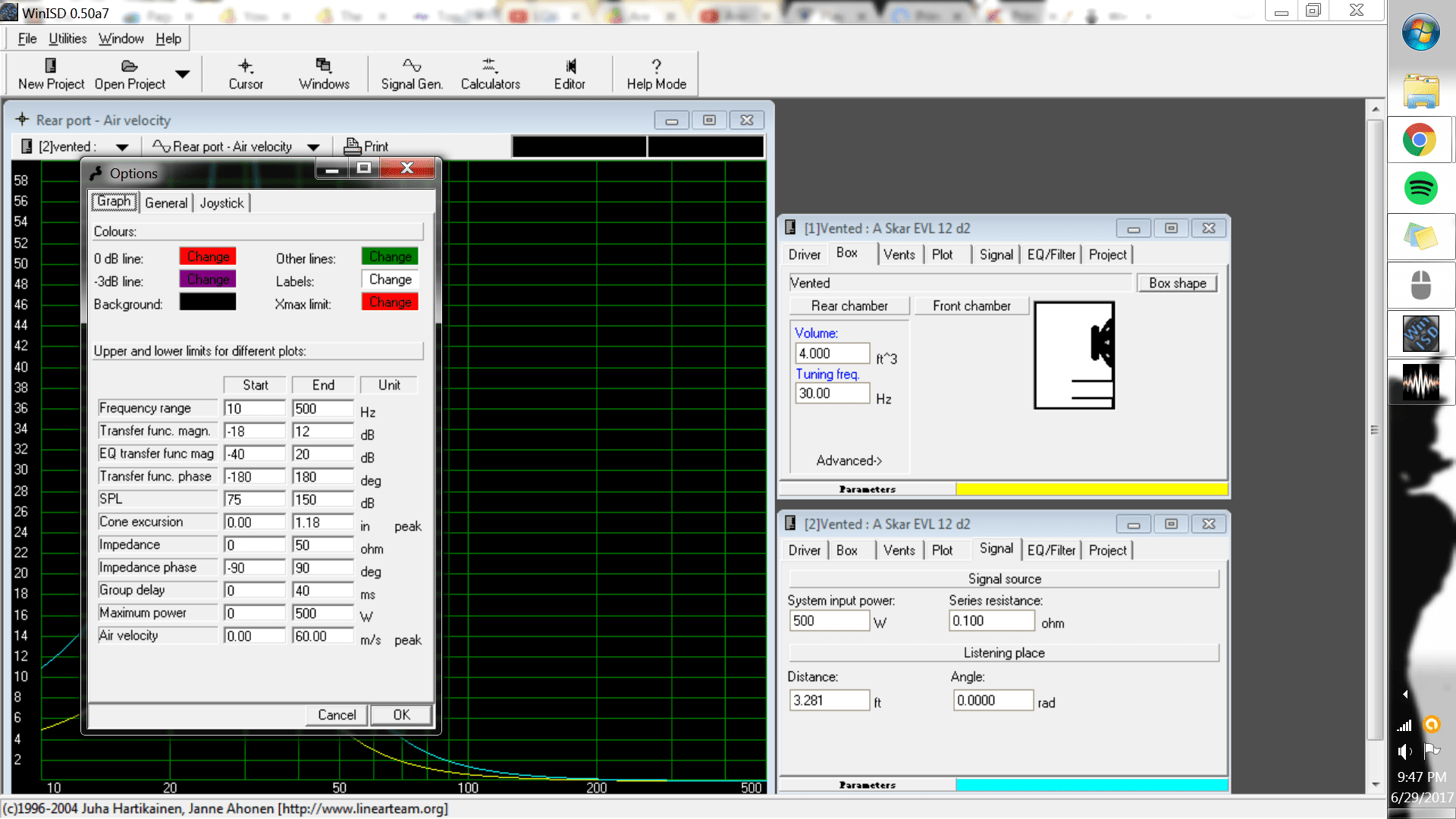
now to optimize your ranges, go to your options and set it up like mines. so you can actually see your sh*T where it says m/s you can click the m/s and it'll change to ft/s you can do the same with any of the values. when entering in ts specs make sure you have the proper value in meters or liters or cubic feet or N/A

Di3NZM.jpg


I think I got the options to take... I tried to screenshot all of it together like you did but only got this...
3kKgx7.jpg
... I was looking at a transfer magnitude graph with driver,box,vent... etc all together when I tried but got only the options as you saw... how do you get the box and vent sections to display in separate windows at the same time?.. and get a screenshot of it all together like you did... I tried 5 times BTW... Yeah.. I almost forgot... I did carefully enter parameters using the proper measurements and changing the type of value when needed...

 
Now those option changes did make a difference... 2 lines on the graph now... I don't know what they mean...

Qm7Wks.jpg


This 2 CV Stroker 15 in 10ft3 box... about 101in2 tuned to 36hz... what am I looking for here to optimize the response?.. oops that's 18's I'll try again...

 
I am sorry for monopolizing your time with this never ending series of questions but I an really tired of using the factory recommended boxes or making wild assumptions when designing boxes... I AM really trying to learn what to look for when using this program and how to optimize the results...

 
This was only inputting the box size, vent size and tuning...
u70il2.jpg
... there has to be far more I can input to get where I need to be.

 
Now those option changes did make a difference... 2 lines on the graph now... I don't know what they mean...
This 2 CV Stroker 15 in 10ft3 box... about 101in2 tuned to 36hz... what am I looking for here to optimize the response?.. oops that's 18's I'll try again...
the red line means 0 db more than this is a more emphasized response on the frequencies that are above it. purple line is -3db when you start falling off below tuning and its a sharp drop of output from there. Your curve by the red line looks perfectly fine. It doesnt have to be a straight line. Just know that a flat curve is not the loudest its just the smoothest and flattest sounding which means it gives up some output mainly losing the peakiness.

check rear air velocity and see if you are under the proper figures.

 
I think I got the options to take... I tried to screenshot all of it together like you did but only got this...
3kKgx7.jpg
... I was looking at a transfer magnitude graph with driver,box,vent... etc all together when I tried but got only the options as you saw... how do you get the box and vent sections to display in separate windows at the same time?.. and get a screenshot of it all together like you did... I tried 5 times BTW... Yeah.. I almost forgot... I did carefully enter parameters using the proper measurements and changing the type of value when needed...
go to options again and where it says air velocity. CLICK the FT/S yes click the tiny words. It'll turn to meters per second.

You can do this with ALL the tiny words values. even in the TS specs.

 
Activity
No one is currently typing a reply...
Old Thread: Please note, there have been no replies in this thread for over 3 years!
Content in this thread may no longer be relevant.
Perhaps it would be better to start a new thread instead.

About this thread

shredder1

10+ year member
CarAudio.com Elite
Thread starter
shredder1
Joined
Location
AZ
Start date
Participants
Who Replied
Replies
109
Views
6,646
Last reply date
Last reply from
Papermaker85
IMG_20260516_193114554_HDR.jpg

sherbanater

    May 16, 2026
  • 0
  • 0
IMG_20260516_192955471_HDR.jpg

sherbanater

    May 16, 2026
  • 0
  • 0

New threads

Top