
Winisd help?

shredder1
10+ year member

CarAudio.com Elite
Thank you in advance for taking the time to help me in this learning process... Winisd is something I've been trying to learn with a vengeance and I believe/hope that I'm almost there...I've finally got it running!.. I've learned to enter parameters into Winisd in a certain order... it actually works now!.. I can use or enter a new or pre-existing driver and create a project and save it... of course I have to learn to use the menus, features, graphs and everything else... H:*******:eek:wever when I tried a Sundown X-12 d2, all was well until I tried to run in order to to play with the box and tuning... it appears to pause for about 3 seconds before I get a message that Winisd is no longer working and Windows will now close the program and notify me if a fix is available!.. am I using the correct version for my Windows 7 software?.. it appears to be Winisd-07x... It is the only version that I could get and have it close and run so far... is there another version available?.. I am trying to learn this... and for it to work briefly then stop with this driver is maddening to say the least... it runs OK with drivers from it's database and the drivers I've entered so far except the Sundown!.. is this a software issue relating to my versions compatibility with Windows 7?.. or is the Sundown just so awesome that it does not compute... LOL!

 
Is there a trick to using it?.. I tried the alpha version and it would NOT exit unless I restarted my computer... I went with this one i'm currently using mainly because it exits when told to do so... I'm not familiar with all the keyboard shortcuts available... computers are not my forte... a lifetime of labor/construction did not prepare me for this... I've looked online for a fix and the best I've encountered is the Winisd-07X is this "Beta"?.. What does THAT mean?.. Thank You for the information in advance!

 
Is there a trick to using it?.. I tried the alpha version and it would NOT exit unless I restarted my computer... I went with this one i'm currently using mainly because it exits when told to do so... I'm not familiar with all the keyboard shortcuts available... computers are not my forte... a lifetime of labor/construction did not prepare me for this... I've looked online for a fix and the best I've encountered is the Winisd-07X is this "Beta"?.. What does THAT mean?.. Thank You for the information in advance!
control+alt+delete and choose task manager then select winisd and click end task. You dont need to restart the computer.

 
If I do install "Alpha" should I uninstall the current version I'm using first?.. It even says that a newer 0.4x version is available for a more stable tool... I'm assuming that this means it is better?...

 
Iv'e got it working... however the transfer magnitude graph does not seem to be displaying correctly... the top of the graph begins at -6 db and even if I drag the window down to expand the graph... the top stays at -6... it should read 5-6 db correct?... is there a shortcut or menu button that will allow me to center the graph correctly?..

 
Iv'e got it working... however the transfer magnitude graph does not seem to be displaying correctly... the top of the graph begins at -6 db and even if I drag the window down to expand the graph... the top stays at -6... it should read 5-6 db correct?... is there a shortcut or menu button that will allow me to center the graph correctly?..
DUH!.. It has a scroll on the right margin that I missed... allright, I'll try modeling the CSCstang box for my car to start to see if I am doing the editing correctly.

 
Iv'e got it working... however the transfer magnitude graph does not seem to be displaying correctly... the top of the graph begins at -6 db and even if I drag the window down to expand the graph... the top stays at -6... it should read 5-6 db correct?... is there a shortcut or menu button that will allow me to center the graph correctly?..
besides the scrolling bar.... you can go to the file > options menu and change values to whatever you need.

Keep in mind that even though the response is kinda peaky, your vehicle cabin gain should smooth a lot of it out and net you more or less low end output than modeled depending on the car. The graph is just a baseline.

 
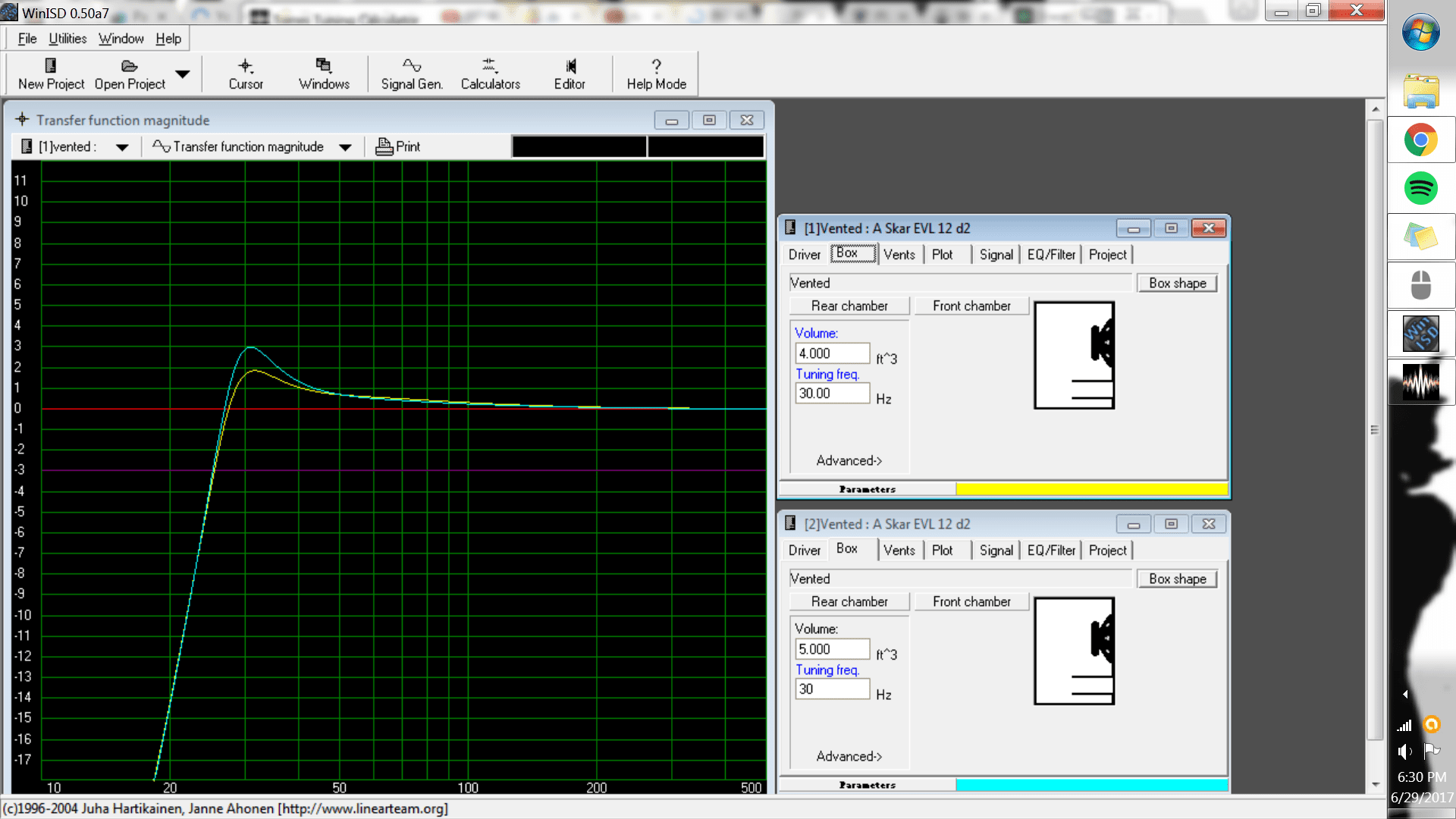
I modeled the same box that CSCstang designed for my car... the curve looks close but not as smooth on the low end... then I noticed that the parameters really changed... I think I might have entered the impedance incorrectly... it asked for Re and it was a dual 4, I entered 1.8 ohms off the list not thinking that maybe I should have entered 3.8 ohms instead... as the list is for a dual 2... also the Znom... is that something that I should correct as parallel and series will be different and just use the nominal number?.. looks like the only real change I can see is the Bl ... all the others seem OK... I can not screenshot so I took a picture... http://i.imgur.com/X31YxtJ.jpg ... I suppose the differences in parameters are not allowing me to duplicate the design... the ACTUAL port is 81in2/ 32" or so long tuned to 30 hz in a 5 ft3 net box... the program as it is seeing the driver parameters presently is telling me to go over 40" long for the same net vol with the same vent... any ideas or advice that might make this easier especially with Re, Znom and parallel/saries and what to look for?

 
I modeled the same box that CSCstang designed for my car... the curve looks close but not as smooth on the low end... then I noticed that the parameters really changed... I think I might have entered the impedance incorrectly... it asked for Re and it was a dual 4, I entered 1.8 ohms off the list not thinking that maybe I should have entered 3.8 ohms instead... as the list is for a dual 2... also the Znom... is that something that I should correct as parallel and series will be different and just use the nominal number?.. looks like the only real change I can see is the Bl ... all the others seem OK... I can not screenshot so I took a picture... http://i.imgur.com/X31YxtJ.jpg ... I suppose the differences in parameters are not allowing me to duplicate the design... the ACTUAL port is 81in2/ 32" or so long tuned to 30 hz in a 5 ft3 net box... the program as it is seeing the driver parameters presently is telling me to go over 40" long for the same net vol with the same vent... any ideas or advice that might make this easier especially with Re, Znom and parallel/saries and what to look for?
it has minimal effect. Like i said main 4 is QTS, QES, QMS, VAS. actually FS as well so 5 Nothing else has an impact on the curve. It makes no difference what your RE or Znom is. Every other stat is basically almost useless or has an extremely minimal unnoticeable effect on how the graph looks. BTW you can click on the values as well to change from liters to cubic feet to w/e.

winisd and torres always has almost identical port lengths for me.

 
In that case what could I possibly doing incorrectly... I am just trying to find the correct questions to ask... I know it it probably impossible to say what is causing the difference without really seeing it in person but are there some common mistakes/misconceptions that cause user errors... I even googled this query and came up with nothing even remotely close to help... a lot of confusion was the result and a lot of extraneous reading leading to no real answers. I'm sure I'll get it but any help with what to look for would be appreciated... Winisd SEEMS involved but I don't want to buy trouble if you what I mean. Am I on the right track?

 
In that case what could I possibly doing incorrectly... I am just trying to find the correct questions to ask... I know it it probably impossible to say what is causing the difference without really seeing it in person but are there some common mistakes/misconceptions that cause user errors... I even googled this query and came up with nothing even remotely close to help... a lot of confusion was the result and a lot of extraneous reading leading to no real answers. I'm sure I'll get it but any help with what to look for would be appreciated... Winisd SEEMS involved but I don't want to buy trouble if you what I mean. Am I on the right track?
so i just ran up a 5 cubic foot net box with 81 sq inches of port area 32 inches long and got 31.5 hz tuning on torres. so you arent tuned at 30hz bud.

 
In that case what could I possibly doing incorrectly... I am just trying to find the correct questions to ask... I know it it probably impossible to say what is causing the difference without really seeing it in person but are there some common mistakes/misconceptions that cause user errors... I even googled this query and came up with nothing even remotely close to help... a lot of confusion was the result and a lot of extraneous reading leading to no real answers. I'm sure I'll get it but any help with what to look for would be appreciated... Winisd SEEMS involved but I don't want to buy trouble if you what I mean. Am I on the right track?
hit print screen shot on the keyboard or prnt scrn and paste onto this website then copy and paste the website using "ctrl + V" then use the forum's insert image tool (the one next to the film strip, smiley faces etc... paste that site link in and you can post images like that.

https://snag.gy/

for example

ZChMJG.jpg


Activity
No one is currently typing a reply...
Old Thread: Please note, there have been no replies in this thread for over 3 years!
Content in this thread may no longer be relevant.
Perhaps it would be better to start a new thread instead.

About this thread

shredder1

10+ year member
CarAudio.com Elite
Thread starter
shredder1
Joined
Location
AZ
Start date
Participants
Who Replied
Replies
109
Views
6,608
Last reply date
Last reply from
Papermaker85
IMG_20260515_202650612_HDR.jpg

sherbanater

    May 15, 2026
  • 0
  • 0
IMG_20260515_202732887_HDR.jpg

sherbanater

    May 15, 2026
  • 0
  • 0

New threads

Top