Emanuel Rodriguez
CarAudio.com Recruit
- Thread Starter
- #16
The enclosure is .9 cuft and it is a sealed box. There is enough depth in the box too for the subWhat's the specs on the enclosure? Cubic feet, and sealed or ported ?
I had set my head unit to 35 and the max is 40. I was messing around with the gain at that volume and it still sounded like thatAt what volume on the head unit did you set the gain on the amp? How did you set the gain on the amp?
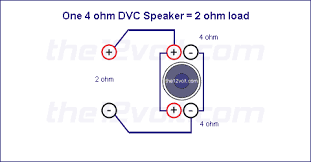
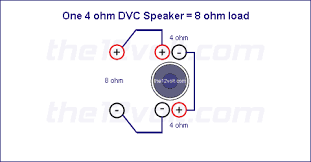
I already checked the wiring and it’s all good. I am using rca cables straight from the stereo. I also tried the rca cables for my door speakers from my other amp and it was still the sameMuffled..... Hmmm. Pull that sub and make sure the positive wire is going from one positive terminal on the speaker to the other positive on the speaker. Make sure the wire from the negative is going from one negative terminal on the speaker to the other negative terminal. These should then be run to the terminal cup... positive to positive, negative to negative... 2ohm. Like the first pic... not the second. The second pic will make the sub quiet. It's free to double check. Also, are you using RCA cables from the head unit to the sub amp?

Yes I did this also. Whenever sub output is off it is completely offFIrst aftermarket I installed, I had to enable the sub output in the head unit. I don't remember if it was Pioneer or Kenwood, but it was one of them.
Is the head unit in Network mode or Standard mode?I am using a pioneer avh-x1500dvd
Go to settings, Tools, Restore Settings. The unit will reset. Select the language and the next screen should be Network mode or standard... Select standard and finish the rest of the setup... try the radio and see if it fixed it.How do I check this
It didn’t give me the option to do all of thatGo to settings, Tools, Restore Settings. The unit will reset. Select the language and the next screen should be Network mode or standard... Select standard and finish the rest of the setup... try the radio and see if it fixed it.