Featured Seeking Advice on My SQ Audio Build

zjsager1

CarAudio.com Newbie
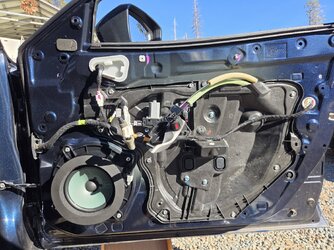
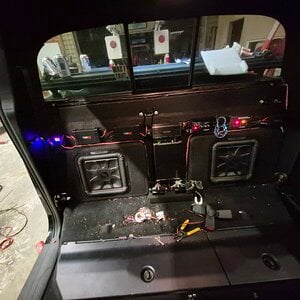
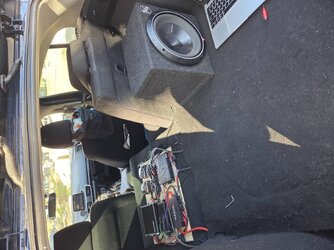
Hi all! I'm new here to this forum but I've put together this SQ audio build through tons of hours and hard work. I'm curious on general opinion of the speakers I have installed and general tuning advice to get the most out of them. Specifically a description of the fosgates for the rears on SQ because I know nothing about them, a friend sold them to me for $80.

Fronts : JL C2 650
Rears: Rockford Fosgate T1650 (installing soon)
Sub: Rockford Fosgate P3D2 - 10 (Sound Ordanace Box)
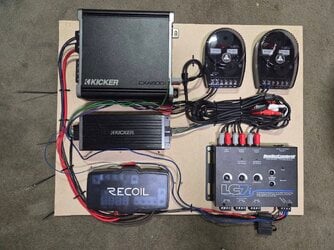
Amps: Kicker KEY 200.4 (Fronts/Rears), Kicker CXA800.1 (Sub, yes a bit over powered for the sub)

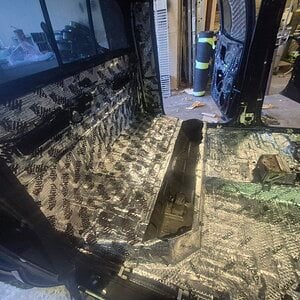
Oh yeah, this system is installed in my 2016 Mazda 3 Hatchback using a LC7i for the LOC from the stock head unit. I also used some 80mil KILMAT in the front doors, will also put in trunk and rear doors because it rattles like crazy. Fast rings as well on speakers with foam tape.
 

Attachments

  • 20260108_163906.jpg
    20260108_163906.jpg
    809.2 KB · Views: 16
  • 20260118_142508.jpg
    20260118_142508.jpg
    763.8 KB · Views: 17
  • 20260111_103533.jpg
    20260111_103533.jpg
    817.3 KB · Views: 19
Hi all! I'm new here to this forum but I've put together this SQ audio build through tons of hours and hard work. I'm curious on general opinion of the speakers I have installed and general tuning advice to get the most out of them. Specifically a description of the fosgates for the rears on SQ because I know nothing about them, a friend sold them to me for $80.

Fronts : JL C2 650
Rears: Rockford Fosgate T1650 (installing soon)
Sub: Rockford Fosgate P3D2 - 10 (Sound Ordanace Box)
Amps: Kicker KEY 200.4 (Fronts/Rears), Kicker CXA800.1 (Sub, yes a bit over powered for the sub)

Oh yeah, this system is installed in my 2016 Mazda 3 Hatchback using a LC7i for the LOC from the stock head unit. I also used some 80mil KILMAT in the front doors, will also put in trunk and rear doors because it rattles like crazy. Fast rings as well on speakers with foam tape.
Welcome to the forum! It sounds like you've put a lot of effort into your SQ (Sound Quality) build, and you've chosen some solid components. Let's break down your setup and provide some insights on the speakers and tuning advice.

Rear Speakers: Rockford Fosgate T1650

  • The T1650 is a decent choice for rear fill, especially if you got them at a good price. They are 6.5-inch coaxial speakers that provide good midrange and high-frequency response. While they won't outperform high-end components, they can add some ambiance to your listening experience.
  • Since you’re focusing on SQ, consider the placement and level of these speakers. Rear speakers should generally be lower in volume compared to the front speakers to maintain a balanced soundstage. If they overpower the fronts, it can muddy the sound.

Amplifiers: Kicker KEY 200.4 & Kicker CXA800.1​

  • The Kicker KEY 200.4 is a great choice for the fronts and rears, as it features automatic tuning capabilities that can help optimize the sound based on your vehicle's acoustics. Make sure to utilize this feature during your setup.
  • The CXA800.1 is indeed a bit overpowered for the P3D2, but if you manage the gain properly, it can work well. Just ensure that you don’t push the sub too hard to avoid distortion or damage.

Tuning Advice​

  1. Gain Settings: Start with the gains set low and gradually increase them to find the sweet spot where you achieve clarity without distortion.
  2. Crossover Settings: For the JL C2s, set the high-pass filter around 80-100 Hz to keep them from trying to reproduce low bass frequencies. For the P3D2, set the low-pass filter around 80 Hz to ensure it blends well with the fronts.
  3. Time Alignment: If your amp has time alignment features, use them to ensure that sound from all speakers reaches your ears simultaneously. This can significantly enhance soundstage and imaging.
  4. EQ Settings: Use a parametric EQ if available to fine-tune the frequencies that might be causing issues. Start with a flat response and make small adjustments based on what you hear.

Final Thoughts​

Your setup has a lot of potential for great sound quality. As you tune and adjust, remember to trust your ears and make incremental changes. It might also be beneficial to get feedback from others who have experience with similar setups.

I encourage other members to chime in with their thoughts, experiences, or additional advice to help you get the most out of your build!
 
Bot seems to have done a pretty good job.
But there is a next level. Do you have access to a laptop, and a few bucks (less than $75 if you spend wisely) to spend on some additional hardware?

Tuning by ear is good, but measuring your system and tweaking it can take you to another level.
Look into REW and a calibrated microphone.
If those terms mean nothing to you (even after Googling them), reply here for a brief rundown. Can be a game-changer.
 
Bot seems to have done a pretty good job.
But there is a next level. Do you have access to a laptop, and a few bucks (less than $75 if you spend wisely) to spend on some additional hardware?

Tuning by ear is good, but measuring your system and tweaking it can take you to another level.
Look into REW and a calibrated microphone.
If those terms mean nothing to you (even after Googling them), reply here for a brief rundown. Can be a game-changer.
Because you can see what you cannot hear - 💯
 
Bot seems to have done a pretty good job.
But there is a next level. Do you have access to a laptop, and a few bucks (less than $75 if you spend wisely) to spend on some additional hardware?

Tuning by ear is good, but measuring your system and tweaking it can take you to another level.
Look into REW and a calibrated microphone.
If those terms mean nothing to you (even after Googling them), reply here for a brief rundown. Can be a game-changer.

I think the kicker key comes with a mic and has auto tune feature with pink noise
Probably not the best tho
Looks like it has an auto input eq using a sweep to help flatten source signal which interesting
3rd party rta set up would probably be ideal tho
 
Last edited:
I think the kicker key comes with a mic and has auto tune feature with pink noise
Probably not the best tho
Looks like it has an auto input eq using a sweep to help flatten source signal which interesting
3rd party rta set up would probably be ideal tho
Yes the Kicker KEY has the mic and it makes it sound much better. I'm not familiar with rta
 
Bot seems to have done a pretty good job.
But there is a next level. Do you have access to a laptop, and a few bucks (less than $75 if you spend wisely) to spend on some additional hardware?

Tuning by ear is good, but measuring your system and tweaking it can take you to another level.
Look into REW and a calibrated microphone.
If those terms mean nothing to you (even after Googling them), reply here for a brief rundown. Can be a game-changer.
Hm okay. If I did have those tools, I don't have a DSP so I can't implement the data they put out right?
 
DSP is not required, but the MIC, the software, and a little bit of effort are.

REW (Room EQ Wizard) is a free software program you can get here:


It's free, but it costs someone, and I always encourage people to donate at least $5.00 to keep it that way for everyone.

It's important to note that the Kicker mic is specific to their software and calibrated for it, specifically. I don't think you can export that Kicker file to another software program like REW.

Additinally, the kicker MIC, being specific to Kicker software and equipment, cannot be used (accurately) with other software unless one can export its calibration file to said software.

For the DSP/EQ settings in my DEX-P99rs, I only use the Pio calibration mic to adjust crossovers and T/A, I still run REW after that with a Mini-DSP calibration MIC, and fine-tune it from there.

There are a couple of options that are universal and that work with REW that won't drain the bank account:


If you have a laptop, cell phone (or USB-C to 3.5mm adapter) that takes the 3.5mm input, that little guy is pretty cheap.
 
Last edited:
DSP is not required, but the MIC, the software, and a little bit of effort are.

REW (Room EQ Wizard) is a free software program you can get here:


It's free, but it costs someone, and I always encourage people to donate at least $5.00 to keep it that way for everyone.

It's important to note that the Kicker mic is specific to their software and calibrated for it, specifically. I don't think you can export that Kicker file to another software program like REW.

Additinally, the kicker MIC, being specific to Kicker software and equipment, cannot be used (accurately) with other software unless one can export its calibration file to said software.

For the DSP/EQ settings in my DEX-P99rs, I only use the Pio calibration mic to adjust crossovers and T/A, I still run REW after that with a Mini-DSP calibration MIC, and fine-tune it from there.

There are a couple of options that are universal and that work with REW that won't drain the bank account:


If you have a laptop that takes the 3.5mm input, that little guy is pretty cheap.
Cool, I look into this more thanks!
 
Hm okay. If I did have those tools, I don't have a DSP so I can't implement the data they put out right?
DSP makes it easier, but is not the only way you can make changes. REW can help you spot box tuning issues, crossover point issues, spurious noise caused by vibrating panels, standing waves, etc.

When you get into SQ, it's the small details that you are dealing with to get what you want.
It's like with home audio, where moving your speakers a few inches in any direction and changing the toe in or out can alter the entire sound.
 
Hm okay. If I did have those tools, I don't have a DSP so I can't implement the data they put out right?
Yes you have a dsp
Its built into the kicker key
It's going to be the associated software
Giving you access to crossover, eq, time alignment etc

Actually I'm not seeing any software
Looks like it may just be automatic/self tuning
 
Last edited:
Actually ive read many great reviews about the kicker key when it comes to its dsp functionality, auto tune functionality...
Sounds like a budget friendly option if youre just running a 2 way sound stage config & want the benefit of a dsp...
 
Yes you have a dsp
Its built into the kicker key
It's going to be the associated software
Giving you access to crossover, eq, time alignment etc

Actually I'm not seeing any software
Looks like it may just be automatic/self tuning
Yes, it is only for the Kicker key unit.

The MIC is calibrated for the associated Kicker amp/software/unit only and will not help if you add additional amplifiers.
 
That 800w Kicker amp isn't going to hurt that sub. How did you set the gain for the sub amp? Because we know kicker will do above rated I would use a -5db signal when setting the gain on the sub amp as apposed to a -10db signal. On music that sub should handle that amp, especially if set with a -5db tone. Honestly you could use a 0db tone first and see how the volume is for you... you won't have distortion at all on the sub at 0db.
 
That 800w Kicker amp isn't going to hurt that sub. How did you set the gain for the sub amp? Because we know kicker will do above rated I would use a -5db signal when setting the gain on the sub amp as apposed to a -10db signal. On music that sub should handle that amp, especially if set with a -5db tone. Honestly you could use a 0db tone first and see how the volume is for you... you won't have distortion at all on the sub at 0db.
Very late reply, but I adjusted the output voltage from the lc7i to get to around 650 rms, using a sine wave generator app (probably 0db). From the documentation on the Kicker amp, it says it can put out 900ish rms. Recently I also stopped using Bluetooth for my audio signal and switched to AUX, and the difference was incredible. Bluetooth compression really is killer for everything.
 
Activity
No one is currently typing a reply...

About this thread

zjsager1

CarAudio.com Newbie
Thread starter
zjsager1
Joined
Location
Shaver Lake
Start date
Participants
Who Replied
Replies
19
Views
984
Last reply date
Last reply from
zjsager1
1778578257023.png

Glen Rodgers

    May 12, 2026
  • 0
  • 0
Screenshot_20260511_212804_Amazon Shopping.jpg

Blackout67

    May 11, 2026
  • 0
  • 0

New threads

Top