Featured Seeking Advice on My SQ Audio Build

Actually ive read many great reviews about the kicker key when it comes to its dsp functionality, auto tune functionality...
Sounds like a budget friendly option if youre just running a 2 way sound stage config & want the benefit of a dsp...
Yes, it sounds pretty good. Going down the path of dedicated DSP and REW sounds nice though, just expensive.
 
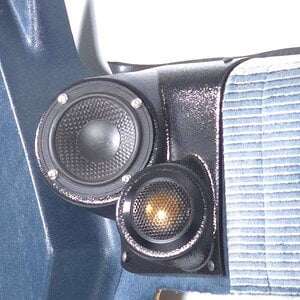
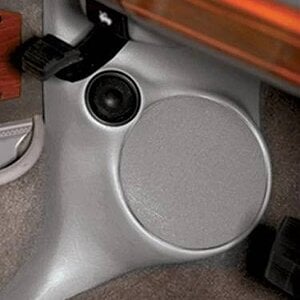
Hi all! I'm new here to this forum but I've put together this SQ audio build through tons of hours and hard work. I'm curious on general opinion of the speakers I have installed and general tuning advice to get the most out of them. Specifically a description of the fosgates for the rears on SQ because I know nothing about them, a friend sold them to me for $80.

Fronts : JL C2 650
Rears: Rockford Fosgate T1650 (installing soon)
Sub: Rockford Fosgate P3D2 - 10 (Sound Ordanace Box)
Amps: Kicker KEY 200.4 (Fronts/Rears), Kicker CXA800.1 (Sub, yes a bit over powered for the sub)

Oh yeah, this system is installed in my 2016 Mazda 3 Hatchback using a LC7i for the LOC from the stock head unit. I also used some 80mil KILMAT in the front doors, will also put in trunk and rear doors because it rattles like crazy. Fast rings as well on speakers with foam tape.
UPDATE: The T1650's are installed and sound deadening is being put in (Mazda rear doors REALLY need it).

When dialing in gain for the sub with 40hz, I noticed very noticeable crackling coming from the rear speakers at high volume. I assumed it was because I was pushing them too hard, but this doesn't make sense since they amp can only do 50 RMS and the speakers are rated for 75 RMS. I checked out the amp, but no clip light was on. So I unplugged all the other speakers' low level signal RCAs except for the rears to isolate the issue, in which something strange was happening.

When ONLY the rear left speaker was connected and playing, the rear right speaker was crackling? Yet the rear left speaker sounded clean. When ONLY the rear right speaker was connected and playing, the rear left speaker was crackling. With BOTH connected and playing, both crackle and play the 40 hz. I have my crossover at the Kicker Key amp at 80 hz.

Do I have a bad amp? It only happens when the amp is pushing 75% of it's power before clipping. Thanks.
 
Could the HU be the source?

Get one of these (if for no other reason, it's great to test things with),

https://www.amazon.com/dp/B0FC6K3GNR/?tag=caraudiocom-20

Plug it into your phone or laptop and see if, after doing the same test, you still get rattling,

When testing, use 1 RCA for the channel/speaker you're testing.

If, after doing these things, you still have noises emanating from the speakers in any fashion. Undo all the connections, clean it up using a microscope to make sure something isn't hanging around on the power/ground/remote or the RCA/Hi-level inputs (if applicable). And for the last thing, make sure that the RCA inputs are not shorting or lose, giggle them a bit, see if anything changes.

After that, yeah, I'd say it's internal to the amp.

This could be tested by disconnecting all the speakers too, connecting one of the speaker terminal leads to a bookshelf speaker or anything really, listen for the noise. If it's the amp, it should show up on another speaker too.
 
Could the HU be the source?

Get one of these (if for no other reason, it's great to test things with),

https://www.amazon.com/dp/B0FC6K3GNR/?tag=caraudiocom-20

Plug it into your phone or laptop and see if, after doing the same test, you still get rattling,

When testing, use 1 RCA for the channel/speaker you're testing.

If, after doing these things, you still have noises emanating from the speakers in any fashion. Undo all the connections, clean it up using a microscope to make sure something isn't hanging around on the power/ground/remote or the RCA/Hi-level inputs (if applicable). And for the last thing, make sure that the RCA inputs are not shorting or lose, giggle them a bit, see if anything changes.

After that, yeah, I'd say it's internal to the amp.

This could be tested by disconnecting all the speakers too, connecting one of the speaker terminal leads to a bookshelf speaker or anything really, listen for the noise. If it's the amp, it should show up on another speaker too.
Okay, so it ended up being the lc7i that was clipping. I might be picking up the RCA adapter though, that's a good idea!
 
Alright, I tried out bi-amp mode with the Key amp and it is quite good. The separation for time alignment for the tweeters and the woofers helped its vocal clarity and overall detail tremendously. I did have to disconnect the rears to run the fronts active, but it was well worth it. Probably just going to power them through the stock head unit, I will lose all gain control though :(

Also curious on any opinions for better suited fronts with a 50 watt power budget, the JL's are nice and smooth but missing that really impactful vocal feel.
 
Speakers are not the issue; power is.

You can go with a more efficient driver, say the Stevens Audio MB6s, they will definitely improve the output (roughly 25-30%), around 35-40% if you go with the 2-ohm versions (provided the amp increases it's output at 2 ohms), but they also suffer a bit on the bottom end, not much doing between 70-95 hz, comparativley.

The JL is pretty efficient as component drivers go; you need more power, regardless.

As a rule of thumb, you want to have spare power on hand to deal with headroom, which means at least RMS plus 50%, or 90-100 watts for the JLs.

There is a way to do this while utilizing the Kicker Keys DSP.


You run it in 4-channel mode as you have done, but instead of running the amp 2 leads to the midbass, you run them to a separate 2-ch or 4-ch bridged amplifier.

I know this seems wasteful, but the truth is, you're fine with 50 watts to the tweeters, not doing anyone any favors with running 50 watts to ANY midbass, so the 50 x2 you'll not be using isn't a loss at all.

Running one of these in bridged mode gives you ample power to the 6.5s (260x2),


220x2,


125x2


180x2


Any of these will absolutely fix your "speaker" problem.

 
Speakers are not the issue; power is.

You can go with a more efficient driver, say the Stevens Audio MB6s, they will definitely improve the output (roughly 25-30%), around 35-40% if you go with the 2-ohm versions (provided the amp increases it's output at 2 ohms), but they also suffer a bit on the bottom end, not much doing between 70-95 hz, comparativley.

The JL is pretty efficient as component drivers go; you need more power, regardless.

As a rule of thumb, you want to have spare power on hand to deal with headroom, which means at least RMS plus 50%, or 90-100 watts for the JLs.

There is a way to do this while utilizing the Kicker Keys DSP.


You run it in 4-channel mode as you have done, but instead of running the amp 2 leads to the midbass, you run them to a separate 2-ch or 4-ch bridged amplifier.

I know this seems wasteful, but the truth is, you're fine with 50 watts to the tweeters, not doing anyone any favors with running 50 watts to ANY midbass, so the 50 x2 you'll not be using isn't a loss at all.

Running one of these in bridged mode gives you ample power to the 6.5s (260x2),


220x2,


125x2


180x2


Any of these will absolutely fix your "speaker" problem.
Interesting idea, I didn't think of that. Currently a dedicated DSP is out of my budget, so this path forward is tempting. Thanks!
 
Yes, but why would you care?

Because I've dropped a bunch of coin into the project and want the best out of it?

Why wouldn't you care?

You should always strive to start from a position of flat response, as intended by the artist and mixing engineer. Unless you're blessed with perfect pitch, which is very rare, you need to mic your in-cabin response

Ears don't accurately convey, tell you what's missing, only what they can perceive as present. Seeing it allows you to tune correctly, listen, augment the sound from a flat starting point, and then decide if it's preferable; otherwise, you're just guessing.
 
Because I've dropped a bunch of coin into the project and want the best out of it?

Why wouldn't you care?

You should always strive to start from a position of flat response, as intended by the artist and mixing engineer. Unless you're blessed with perfect pitch, which is very rare, you need to mic your in-cabin response

Ears don't accurately convey, tell you what's missing, only what they can perceive as present. Seeing it allows you to tune correctly, listen, augment the sound from a flat starting point, and then decide if it's preferable; otherwise, you're just guessing.
As I understand it, when you "tune" the system to a relatively flat response it is now basically uncolored and when you play music, you will hear it the way the engineer recorded and EQ'd the music or "produced" the music. If you set your system to an old school like EQ setting like the "Rock" smilely face setting, for all music, then the music is going to sound harsh.

A microphone and REW using pink noise is a great way to go. Or a mic and RTA.
 
As I understand it, when you "tune" the system to a relatively flat response it is now basically uncolored and when you play music, you will hear it the way the engineer recorded and EQ'd the music or "produced" the music. If you set your system to an old school like EQ setting like the "Rock" smilely face setting, for all music, then the music is going to sound harsh.

A microphone and REW using pink noise is a great way to go. Or a mic and RTA.
Almost, close enough. ;)

It's likely the original is closer to how you or others change it after tuning it flat.

The flat response is to eliminate the cabin nulls and peaks, which are environmental, not mixed in. A good example is the use of a really good set of headphones on a home system.

Usually, there is very little that needs to be changed when high-end headphones are used on a high-end source, and it will sound as intended, as there are very few environmental aspects affecting the sound.

By measuring it and flattening it out, you address the environmental stuff as best you can, then you tailor it to the sound you like.

It just ensures that you're starting from a non-colored full-range foundation, eliminating nulls (as best one can) that underperform, and no peaks that overemphasize; you know it's all there.

In doing this, you are also likely to find that changes are needed in the crossover(s) that may be contributing to nulls and peaks as a result of cabin gain or reflections, lobing, beaming, and all manner of muck.

That and time alignment for the win.
 
Activity
No one is currently typing a reply...

About this thread

zjsager1

CarAudio.com Newbie
Thread starter
zjsager1
Joined
Location
Shaver Lake
Start date
Participants
Who Replied
Replies
27
Views
2,571
Last reply date
Last reply from
Doxquzme
20260903_221224.jpg

Giles

    Sep 4, 2026
  • 0
  • 0
20260903_221030.jpg

Giles

    Sep 4, 2026
  • 0
  • 0

New threads

Top