
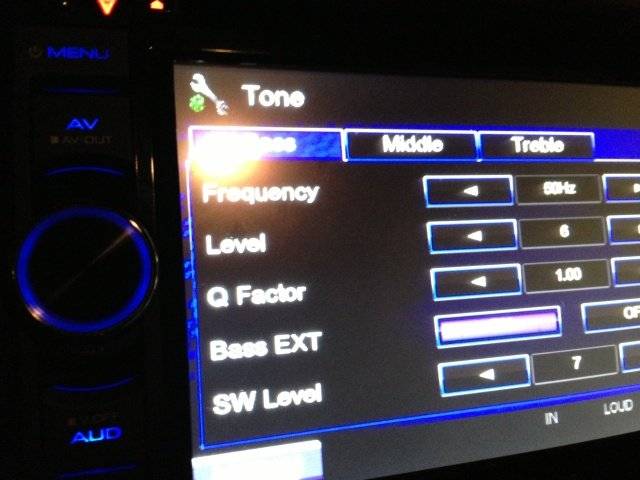

What is the Q Factor setting?

Staynlean
10+ year member

Senior VIP Member
Have no idea if this pic is going to work, if not give me a minute...

rc348j.jpg


Somebody break this down for me, I need the Kindergarten explanation from beginning to end with all the details of what Q Factor does for my radio.

 
It would basically be how much frequency above and below your center frequency your boosting or cutting
What is this "center" frequency? You guys got to explain this stuff to me as though I am completely unfamiliar with car audio, (which I pretty much am)
For my sub, what should it be set at and what is the difference between 1.0 and 2.0


---------- Post added at 11:14 PM ---------- Previous post was at 11:13 PM ----------


Q Factor and Bandwidth in EQ: what they mean | How to EQ
does this help? theres a graphic representation
Reading now, thanks
 
Equalization is used to boost and cut frequencies within your system to flatten out the overall response of all the ferquencies. In a well tuned system, every frequency from the lows of your subwoofer to the very high frequencies reproduced by tweeters will all be very close in decibel level. Your center frequency will be the peak in those pictures i showed you, thats what is being boosted or cut in order to flatten your response. The frequencies around that center value that are affected are affected in different ways based on Q factor which is also explained. You cant know exactly how to set eq properly without using a real time analyzer to find where the peaks and valleys are within your system

 
I understand the theory now, what do you guys "listen" for when setting Q?

Do sub stages compared to the door speakers generally need a specific Q?

 
^ Thanks man, good explanation. So basically, in my case, leave it alone. Basically, changing the Q value while listening to any type of music makes no difference in sound quality what so ever imo.

 
^ Thanks man, good explanation. So basically, in my case, leave it alone. Basically, changing the Q value while listening to any type of music makes no difference in sound quality what so ever imo.
well no, it will make a difference and you can play around with it but in order to properly set EQ you need to know what needs to be boosted and cut, which in turn means you need to do more extensive testing. You can just play with the EQ to set to what sounds good to your ear if interested

 
Thanks, I will keep reading and playing with the Q setting.

Also, if anybody is still reading this thread. There is another setting on the main screen that is T1 or TI I think, I can turn it on and off, seems to make some kind of sq difference but can't tell.

If I remember, when I turn it either on or off the icon illuminates orange I think.

 
Activity
No one is currently typing a reply...
Old Thread: Please note, there have been no replies in this thread for over 3 years!
Content in this thread may no longer be relevant.
Perhaps it would be better to start a new thread instead.

About this thread

Staynlean

10+ year member
Senior VIP Member
Thread starter
Staynlean
Joined
Location
Memphis, TN
Start date
Participants
Who Replied
Replies
11
Views
7,607
Last reply date
Last reply from
Staynlean
20260423_214720.jpg

BP1Fanatic

    May 14, 2026
  • 0
  • 0
20260419_124349.jpg

BP1Fanatic

    May 14, 2026
  • 0
  • 0

New threads

Top

