should be liters. Gotta press tab a lot too so the program auto calculates .I tried loading the info from him into winisd and there's like 6 inconsistencies, as well as a few of the parameters being nowhere near what's fu lists them as. Any idea what unit they're using for VAS?
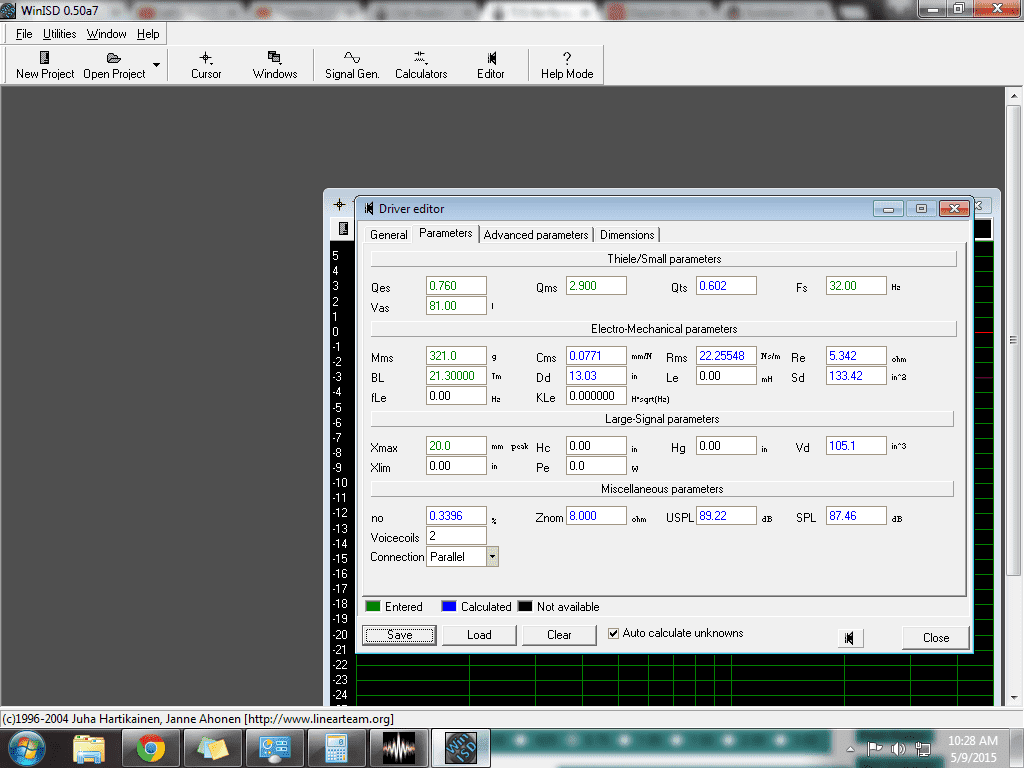
I had no issues entering it in, you also cannot enter it straight like that, you have to enter a number in, hit TAB on your keyboard and let the program do its calculations. You cannot enter things in manually and expect it to work.That's the problem, there's an issue with the numbers I got from them. It can't auto calculate because one or more of the measurements aren't right or something. I turned autocalculate off and only entered the info from fu, and it still has half a dozen inconsistencies.
What would you do? The punk I listed to is almost no bass at all, so when I want bass I put on some older dr dre or something with a good bass line. SOmetimes even techno. Just want to get loud more than sq, but that 28hz at 5cu has a hell of a resp. curve, waaay better down low. How many sq in per cu ft for the port? I was trying to stay around 15 per...the box specs given by FU audio are good for daily loud. For an SQ flat response box, I see a 5 cubic feet box tuned to 28hz.
At 20mm xmax I'd go higher. 16 would be better imo.What would you do? The punk I listed to is almost no bass at all, so when I want bass I put on some older dr dre or something with a good bass line. SOmetimes even techno. Just want to get loud more than sq, but that 28hz at 5cu has a hell of a resp. curve, waaay better down low. How many sq in per cu ft for the port? I was trying to stay around 15 per...
Leave on annotationsWhat would you do? The punk I listed to is almost no bass at all, so when I want bass I put on some older dr dre or something with a good bass line. SOmetimes even techno. Just want to get loud more than sq, but that 28hz at 5cu has a hell of a resp. curve, waaay better down low. How many sq in per cu ft for the port? I was trying to stay around 15 per...
I had the same problem. It was driving me crazy. Every time I ran the numbers it would give me a message that the numbers was wrong. I checked and rechecked with no change. Now if I can get a chance to try it again I can get this box finished.. Wish I would have seen this sooner. Thanks for the info Jeff.I had no issues entering it in, you also cannot enter it straight like that, you have to enter a number in, hit TAB on your keyboard and let the program do its calculations. You cannot enter things in manually and expect it to work.
Here's what i got. Green numbers entered in; Blue numbers are auto calculated after pressing tab,
![]()