Computer fan constantly running.......How to get it to stop?

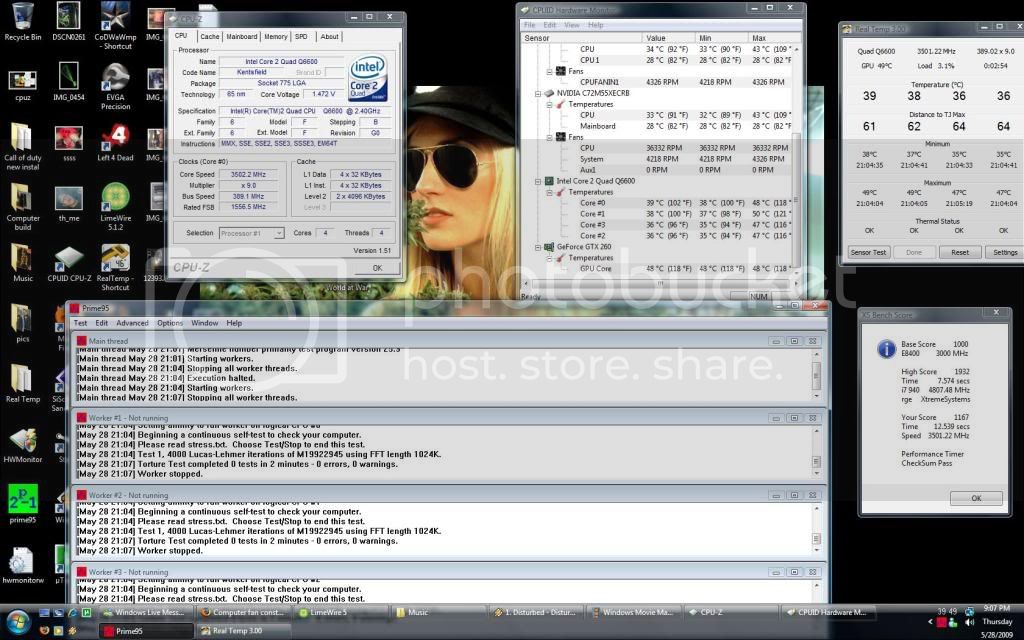
O really your heat sink does 1.48Vcore loading at 50C in prime....I would love to see that. . please post a picture....Quad core of course. . .
I am at 45C with 100% CPU utilization at stock voltage, so yes, at that voltage I would still be very close to you. Don't feel like doing it as I don't give a shit about it.

 
lilmaniac2

Check out my avatar that's a quad core q6600 at 1.48vcore loading at 50C....You never replaced OEM thermal paste lol....OP just open the case blow on the heatsink check your temps with HW montior and report back
That's a pretty high VCore... you need to go back to tweaking again.

I run a Q9300 at a safe quad 3.33ghz on a low 1.31vcore. 1776 FSB safely stable.

I can boost up to a 3.6ghz on a 1.38vcore with 1920 FSB for about 30 minutes before it becomes unstable.. I never cared for tweaking at that level due to cpu temps.

Under load means nothing without specifics...

Were you Priming the cpu, playing games, video transcoding?

I can run my safe 3.33 setup at a core average of 42C and gaming usage average of 53C. Priming average is 62C.

The Q9300s are more prone to damage due to higher temps because their TMAX value is lower than the Q6600. This is why i chose to stay safe at 3.33.

This is a heads up, u need to lower your vcore immediately.

Go to Intels website and download the thermal manual specifications and get the info you need to know. Running that high will guarantee that chip will fail prematurely to excessive voltage.

 
That's a pretty high VCore... you need to go back to tweaking again.
I run a Q9300 at a safe quad 3.33ghz on a low 1.31vcore. 1776 FSB safely stable.

I can boost up to a 3.6ghz on a 1.38vcore with 1920 FSB for about 30 minutes before it becomes unstable.. I never cared for tweaking at that level due to cpu temps.

Under load means nothing without specifics...

Were you Priming the cpu, playing games, video transcoding?

I can run my safe 3.33 setup at a core average of 42C and gaming usage average of 53C. Priming average is 62C.

The Q9300s are more prone to damage due to higher temps because their TMAX value is lower than the Q6600. This is why i chose to stay safe at 3.33.

This is a heads up, u need to lower your vcore immediately.

Go to Intels website and download the thermal manual specifications and get the info you need to know. Running that high will guarantee that chip will fail prematurely to excessive voltage.
No I can't get it stable at 1.45 at 3.5@ Sec i will post a a ss here in afew seconds

 
I think I call braging rights this is only 2 mins of prime its pretty much maxed 24 hours of prime will only raise the temps about 3C more. . . I hit 4.0 on this chip at 1.53Vcore for benching

ssofvoltages.jpg


Is your board full of tweakin options, such as a board geared toward OCing like an ASUS board for example?

There are voltage holes just like FSB holes when tweaking.

If that doesn't help, skewing the cpu or memory may help.

From my experience, the majority of OC crashes is geared toward RAM issues.

How high u got the ram voltage?

I run Corsair Dominators with 3 fans on the sticks. I can run the sticks up to 2.4v but NOT recommended for longtime use. 2.2v for longterm only. I could only get the 1066 sticks up to like 1114 before they were goin crazy for running weeks at a time. so i had to drop em back to around 1100 to remain stable.

 
Hey chase, also post up your ambient temp in the room, because mine is in an 80F room ATM and still running cool.
Its about high 60s or low 70s in my room. I'm on liquid so ambient temps is really nothing to me. . .

Is your board full of tweakin options, such as a board geared toward OCing like an ASUS board for example?
There are voltage holes just like FSB holes when tweaking.

If that doesn't help, skewing the cpu or memory may help.

From my experience, the majority of OC crashes is geared toward RAM issues.

How high u got the ram voltage?

I run Corsair Dominators with 3 fans on the sticks. I can run the sticks up to 2.4v but NOT recommended for longtime use. 2.2v for longterm only. I could only get the 1066 sticks up to like 1114 before they were goin crazy for running weeks at a time. so i had to drop em back to around 1100 to remain stable.
My ram is low to stock I just got a new Oc last night and im still stressing my cpu...I only have 1.9V in my ram thats max my manufacture says..I would only go for 2.1 max on theses g skills...Ram really isn't a issue with me most of my games don't pop more then 70% with vista

 
i noticed your FSB is extremely low for such a high OC.

Run a higher FSB and lower your cpu speed just slightly.

You will need to start tweaking the north bridge voltage settings and GPL, skewing, anything and everything possible.

I had to pull up research information for my chip and board for months, about 4 months actually before i got enough info to go by to ensure i could safely OC without fear of failure.

It's also true that higher FSB will result in faster pc. CPUs today are way fast but the rate of information transfer still lacks. Increasing this, FSB, you'll be very happy.

Only downside is ya gotta have some **** good capable memory of maxing out the FSB or it's impossible.

 
I feel like I just took a computer class, no sh!t.

I just learned alot even though you guys were arguing.

Thanks guys, no sarcasm intended. //content.invisioncic.com/y282845/emoticons/smile.gif.1ebc41e1811405b213edfc4622c41e27.gif

 
Activity
No one is currently typing a reply...

About this thread

Captain_Ahab

5,000+ posts
BUCK FAMA
Thread starter
Captain_Ahab
Joined
Location
Da Dirty Souf
Start date
Participants
Who Replied
Replies
137
Views
2,436
Last reply date
Last reply from
chase007
PXL_20260603_003713914.jpg

Old_risk

    Jun 23, 2026
  • 0
  • 0
PXL_20260603_003713914.jpg

Old_risk

    Jun 23, 2026
  • 0
  • 0

New threads

Top