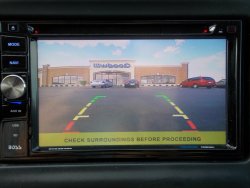
Boss BV800ACP Rear View Camera Question

NITRO2

CarAudio.com Newbie
Hey everyone, hoping y'all can help me out. I've got a Boss BV800ACP Head Unit and I was wondering if anyone knows of a way to disable the large yellow banner on the rear view camera that reads "CHECK SURROUNDINGS BEFORE PROCEEDING"? Unfortunately the way my rear view camera is positioned from the factory it blocks a good portion of visibility. I didn't know if there's a secret menu I can access to disable it.

Thank you everyone
 
No, there is not. Just reposition the camera.
 

Attachments

  • DSCN1843_zps0t3tc3sr.jpg
    DSCN1843_zps0t3tc3sr.jpg
    105.8 KB · Views: 236
Activity
No one is currently typing a reply...
Old Thread: Please note, there have been no replies in this thread for over 3 years!
Content in this thread may no longer be relevant.
Perhaps it would be better to start a new thread instead.

About this thread

NITRO2

CarAudio.com Newbie
Thread starter
NITRO2
Joined
Location
Florida
Start date
Participants
Who Replied
Replies
2
Views
4,097
Last reply date
Last reply from
NITRO2
IMG_20260516_193114554_HDR.jpg

sherbanater

    May 16, 2026
  • 0
  • 0
IMG_20260516_192955471_HDR.jpg

sherbanater

    May 16, 2026
  • 0
  • 0

New threads

Top