
Setting gains with multimeter :PICS:

OoMesKoO
10+ year member

Me > Newbs. :fyi:
Whats up guys. I want to attempt to set my gains with a multimeter today. But theres so many **** dials on this thing, i dont know where to set it! Or even where to plug the probes in! Theres 3 little slots to put the probes in, on the bottom right. And way too many dials to pick. Where do i put the settings to properly get a reading? Also, i have a ZRS10. Which is 2500w @ 1 ohm. What do i set the voltage to? I know you have probably got this question a million times, i just wanted to put a picture of the MM for reference.
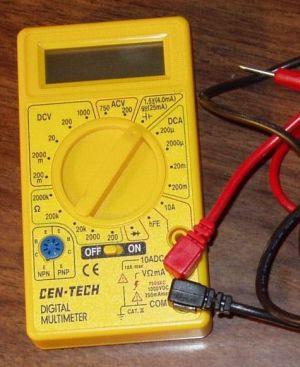
cen-tech_multimeter.jpg


Thanks for the help guys!

 
Make sure your sub is unplugged, you use the sqrt (rmsXohm) to get your voltage. So in your case 2500x1=2500 sqrt is 50v. You have to use a test tone as well though to set it. 0 or -3db at 50hz is what you need to use. Then set your volume 3/4 of what you would listen to it full blast at and your good to go.

 
eh, dont waste your time with 0db test tones.

just use a 50hz -6db test tones. most of the music i have checked (hip hop) has only been as high as -6.8db or so. so your best bet is to use a -6db test tone.

btw: exactly how your dmm probes are now is perfect. and set it to ACV 200

 
I was having a little trouble with this also.. When i have all the options to the lowest setting on the amp, (Gain/LPF/SSF/BB/Phase) I would only get a readout of a little over 4 volts. However when I turn the LPF or SSF (can't remember which one) it would go up about ~30 volts. On the sticky where it shows how to set your gains it says turn all the other dials down and thats what my voltage is.. What am I doing wrong?

 
i set my eq to flat, use a 0db test tone and then tweak my eq as much as i like

its can be like using a -6db or -10db tone for certain fqs, cause i cant stand how it sounds when all bands are set to 0

 
Is there an online manual or something to help me fine-tune my head unit? The manual it comes with doesn't really tell you what it does, just how to adjust it.

Btw sorry for the thread jacking - just need a little help //content.invisioncic.com/y282845/emoticons/biggrin.gif.d71a5d36fcbab170f2364c9f2e3946cb.gif

 
Activity
No one is currently typing a reply...
Old Thread: Please note, there have been no replies in this thread for over 3 years!
Content in this thread may no longer be relevant.
Perhaps it would be better to start a new thread instead.

About this thread

OoMesKoO

10+ year member
Me > Newbs. :fyi:
Thread starter
OoMesKoO
Joined
Location
Rhode Island
Start date
Participants
Who Replied
Replies
13
Views
1,417
Last reply date
Last reply from
skrilla22
1778578257023.png

Glen Rodgers

    May 12, 2026
  • 0
  • 0
Screenshot_20260511_212804_Amazon Shopping.jpg

Blackout67

    May 11, 2026
  • 0
  • 0

New threads

Top
