
need someone GOOD in sketch-up, to cut out sub hole

orangecounty1
10+ year member

CarAudio.com Veteran
im pretty good in sketch up, but being that the baffle is angled and crap, i cant see to get the sub holes cut out without messing up the rest. anyone wanna try?
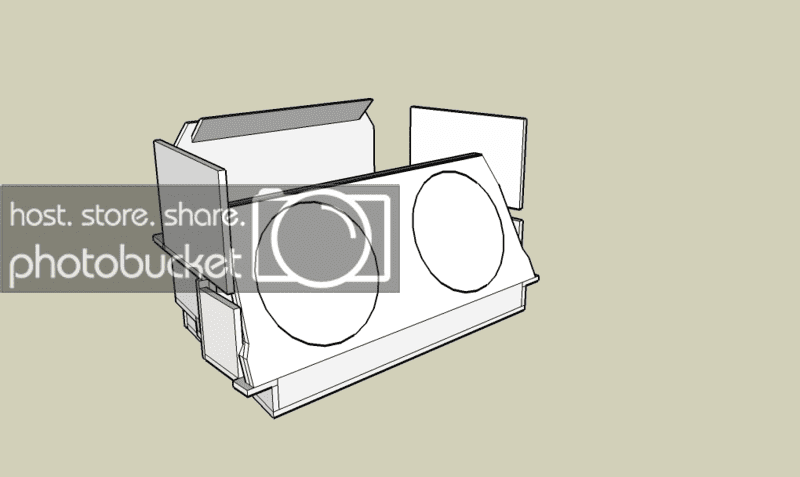
miniwallv2edit2222eee.png


wont work unless im not doing something right. would you mind trying email you the skp file? PM me if you dont mind trying //content.invisioncic.com/y282845/emoticons/smile.gif.1ebc41e1811405b213edfc4622c41e27.gif

 
yo

gottado it one layerat a time

gotta get rid of one of the layers

then copy it using the pull tool + ctrl (after holes are cut)

then edit the angle on the new piece to fit properly.

 
yo
gottado it one layerat a time

gotta get rid of one of the layers

then copy it using the pull tool + ctrl (after holes are cut)

then edit the angle on the new piece to fit properly.
yea thats what I figured....since you did a double baffle in the sketchup you needed to do one baffle, put holes, then another baffle, and put holes. Its not letting me do it since the first baffle has no holes...

 
Activity
No one is currently typing a reply...
Old Thread: Please note, there have been no replies in this thread for over 3 years!
Content in this thread may no longer be relevant.
Perhaps it would be better to start a new thread instead.

About this thread

orangecounty1

10+ year member
CarAudio.com Veteran
Thread starter
orangecounty1
Joined
Location
Tampa, FL
Start date
Participants
Who Replied
Replies
11
Views
802
Last reply date
Last reply from
orangecounty1
IMG_20260516_193114554_HDR.jpg

sherbanater

    May 16, 2026
  • 0
  • 0
IMG_20260516_192955471_HDR.jpg

sherbanater

    May 16, 2026
  • 0
  • 0

New threads

Top


