Heh...lame *** amp wont power on.

Or you wake up to someone backing into the front of your car and driving away and now your stuck paying 500 to get it fixed for something you didnt even do to it.... thats how my day went today. Id much rather have my amp not turn on because i didnt have the remote wire connected.
//content.invisioncic.com/y282845/emoticons/smile.gif.1ebc41e1811405b213edfc4622c41e27.gif

PS: I hate when that happens, thats why when i buy socks i buy a whole bunch of the same kind so it give me better odds...
I'm just saying, that's a dumb thing to say "everything has gone wrong" about, when it's your own fault. //content.invisioncic.com/y282845/emoticons/rolleyes.gif.c1fef805e9d1464d377451cd5bc18bfb.gif

PS: It's worse when you don't have full coverage insurance that will cover it for the cost of a deductible, and instead have to pay for it out of pocket. //content.invisioncic.com/y282845/emoticons/crap.gif.7f4dd41e3e9b23fbd170a1ee6f65cecc.gif

 
I'm just saying, that's a dumb thing to say "everything has gone wrong" about, when it's your own fault. //content.invisioncic.com/y282845/emoticons/rolleyes.gif.c1fef805e9d1464d377451cd5bc18bfb.gif
PS: It's worse when you don't have full coverage insurance that will cover it for the cost of a deductible, and instead have to pay for it out of pocket. //content.invisioncic.com/y282845/emoticons/crap.gif.7f4dd41e3e9b23fbd170a1ee6f65cecc.gif
Who cares just gtfo and quit trying to troll. Used it as a phrase of frustration of dealing with this stupid thing. Dont even see why you bothered posting...OK YOU GOT SOME ATTENTION NOW GO AWAY.

If the deck has RCA outputs it has I have a remote wire. Try the blue and white one, that's typically the color of the remote wire.
I will say it again...that is the antenna/motor wire. You know...the thing that makes the antenna go up and down. WELL it would go up and down if the retarded previous owner didnt snap it off.

LOL if your HU won't accept remote wire then you need a new one that does.
Well thats really helpful now aint it?

where are you at in ky
SE...not in crestwood or near...used to live their though.

We need pics of the install also
Why would that help? Its just an amp, subs, a battery, and some wire ran from one end of the car to the other. I explained it pretty **** good...dont know how pics would fix anything. Sorry for the smartassness but but that ly4f dude has done went and got me all pissed off lol.

 
Ok just thought of it...but what gauge wire does the remote wire need? I will just run a **** toggle switch..even though the HU has the option of turning subs on and off according to the manual...even though the manual is also for 5 other HUs...**** lazy people...not able to make specific manuals for specific players.

 
It has tto have a remote wire if it had rca outputs and it has a sub on/off switch, atleast I would expect it to. Have you tried hooking up the remote wire to the other wires despite what they're labeled?

 
You say your power antenna isn't working anyway, so what's the problem with using that wire? That wire merely raises the antenna when the head unit is powered on, so if you hook that up to your remote terminal on your amp, it will be turned on when the head unit is powered on. Still have any questions? The remote wire doesn't need to be big at all, and if you purchased an amp kit, it would include a large run of remote wire. 18, 20, 22 gauge should be fine for this, it's simply a "turn on" run, there's not much power being run through it.

 
How to convert MTS, TS, M2TS to Apple TV on Mac?

You are going to edit your AVCHD (mts) files with Final Cut Pro, the files look great on the computer. But problem may arise if you want to convert a high capacity high-definition (1280*720) MTS file to play on Apple TV which is still a high-definition file. There may be some content loss during the process. Then how to tackle with this problem perfectly and efficiently.

Some warm-hearted people have already came up with a solution relating to this issue, that is, convert MTS file to Apple TV supported format.

MTS format, as we know is a High-definition MPEG, AVC, H.264 transport stream video format, which is commonly called "AVCHD", and Apple TV is a network device that allows consumer to play digital content originating from the iTunes store, YouTube, Flickr, MobileMe or any Mac OS X or Windows computer running iTunes onto a enhanced-definition and high-definition widescreen television.

By converting MTS to popular Apple TV format, with our powerful and intuitive MTS to Apple TV converter for Mac, you will be relieved of any worries of content loss about your MTS file, besides you are also allowed to customize your file like Encoder, Resolution, Frame Rate and Bitrate at your selection.

Tutorial

Guidance on how to convert MTS to Apple TV on Mac

Step 1: Download and install MTS to Apple TV Converter for Mac

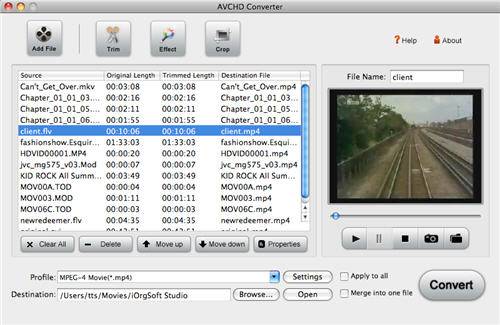
Free download the software and install it on the specific location on your computer, and then run a test. The main interface is as follows:

Step 2: Load file

Click Add File on the top of the panel to browse your computer hard disk to import MTS file you want to convert. As it supports batch conversion, you can import more than one files at one time.

load-mts.jpg


Step 3: Select output format and the directory

Click the drop-down list of Profile beside Settings tab on the top of the panel to select the output format.

Tips: There are many Apple TV formats, like Apple TV Video H.264 1280*720 etc, choose the one you need to convert to.

Meanwhile, click Browse beside Open button to browse your computer hard disk to specify a location to store the converted file.

Step 4: Video effect

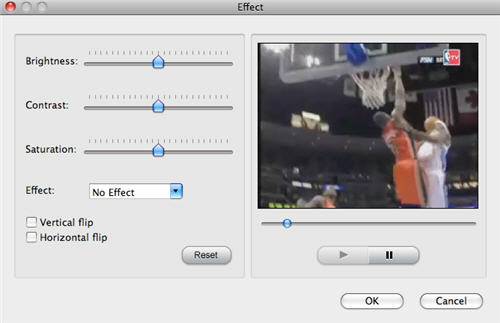
Click Effect on the top of the panel to set the video effect as you wish in the pop-up Effect window: Brightness, Contrast, Saturation etc. You can also choose the effect such as No Effect, Gray, Emboss, Old film according to your project. The whole process can be seen in the preview window on the right.

video-effect.jpg


Step 5: Conversion

After all the desirable settings have been done, click Convert to start converting automatically. If you don't want to take time to wait or have no idea when it finished. Just tick "Open output folder when conversion finished" you will be directed to the location of the converted file.


 
Who cares just gtfo and quit trying to troll. Used it as a phrase of frustration of dealing with this stupid thing. Dont even see why you bothered posting...OK YOU GOT SOME ATTENTION NOW GO AWAY.
I DID help. //content.invisioncic.com/y282845/emoticons/fyi.gif.9f1f679348da7204ce960cfc74bca8e0.gif If your HU doesn't have a remote wire, you can run the remote for the amp to the dash fuse for the radio, or whatever.

 
You say your power antenna isn't working anyway, so what's the problem with using that wire? That wire merely raises the antenna when the head unit is powered on, so if you hook that up to your remote terminal on your amp, it will be turned on when the head unit is powered on. Still have any questions? The remote wire doesn't need to be big at all, and if you purchased an amp kit, it would include a large run of remote wire. 18, 20, 22 gauge should be fine for this, it's simply a "turn on" run, there's not much power being run through it.
It works good enough to pick up some local channels...getting a new antenna soon or later. Couldnt I splice into the the antenna wire and have it power both the antenna and the remote wire? Also so I just run a single wire without grounding it for the remote wire? Btw I didnt get an amp kit...you cant buy a 4 gauge amp kit anywhere around where I live...no ones really into audio enough to be running decent systems...most systems are sony, dual, and legacy. Sony+dual cause thats the main 2 walmart sells...and an audio shop in the flea market sells legacy stuff.

 
You say your power antenna isn't working anyway, so what's the problem with using that wire? That wire merely raises the antenna when the head unit is powered on, so if you hook that up to your remote terminal on your amp, it will be turned on when the head unit is powered on. Still have any questions? The remote wire doesn't need to be big at all, and if you purchased an amp kit, it would include a large run of remote wire. 18, 20, 22 gauge should be fine for this, it's simply a "turn on" run, there's not much power being run through it.
It works good enough to pick up some local channels...getting a new antenna soon or later. Couldnt I splice into the the antenna wire and have it power both the antenna and the remote wire? Also so I just run a single wire without grounding it for the remote wire? OR maybe splice into the antenna motor itsself which means I dont have to run a wire from the radio to the trunk. Btw I didnt get an amp kit...you cant buy a 4 gauge amp kit anywhere around where I live...no ones really into audio enough to be running decent systems...most systems are sony, dual, and legacy. Sony+dual cause thats the main 2 walmart sells...and an audio shop in the flea market sells legacy stuff. WELL their is another audio shop that sells several things...and one thats about 15-20 miles away that sells even more crap than the shop in town...most of the people that actually gets subs and crap usually gets their parents to buy it...so yea surprised the audio shops can stay open.

 
you mentioned earlier you have 2 blue wires. one is the antenna, the other is remote. use the remote, hook it up to your amp.. problem solved.

ur making this waaaayyyyy more difficult than it really is.

 
you mentioned earlier you have 2 blue wires. one is the antenna, the other is remote. use the remote, hook it up to your amp.. problem solved.
ur making this waaaayyyyy more difficult than it really is.
Doesnt work...talked to dad about it and he was so confident it was the blue wire...so he ran the wire and stuff and HAH didnt work. The blue wire has no power going through it or some crap like that. Anyways I split into the antenna motor power wire and ran it to the amp with a toggle switch in the front seat. Ty for the help yall...wouldnt have thought about the radio wire thing if I didnt post.

 
Problem you may see by using the antenna wire is that it may shut the amp off when you play a CD/MP3, some radios turn off power to that wire when not using the radio tuner to bring the antenna down cause your not using it. You dont really need the toggle switch, just tap the remote wire into the red (switched) wire for the headunit, then your amp will turn on/off with the key.

 
Activity
No one is currently typing a reply...
Old Thread: Please note, there have been no replies in this thread for over 3 years!
Content in this thread may no longer be relevant.
Perhaps it would be better to start a new thread instead.

About this thread

Lonnie

10+ year member
6'6 White Giant
Thread starter
Lonnie
Joined
Location
Paducah, Kentucky
Start date
Participants
Who Replied
Replies
36
Views
4,234
Last reply date
Last reply from
Lonnie
design.jpeg

WNCTracker

    May 22, 2026
  • 0
  • 0
IMG_2118.jpeg

WNCTracker

    May 22, 2026
  • 0
  • 0

New threads

Top