unOfficial 2008 alpine iDA-X--- series HU thread

Thanks for the links Kai. I had already read and copied USCFAN's instructions into a MS Word document for later use. Very good information.

I looked at all the wallpapers on the Pride Rock site and found a few that look great (and much more professional than my hand-drawn picture). I noticed that the site says that those images don't work with the X001. Is the X100 updated somehow to allow their use? Also, it wasn't clear to me from reading the website, but were all those images converted and submitted by members, or did the members just submit .jpg images and someone running the website converted them?

Finally, I made a couple more wallpapers (I'm home sick today and bored). I found a number of good photos, but I'm finding that with the white letters on the display, most photos don't work well. Out of 9 I tried, only 2 look good (they look better on my computer - these are digital photos taken of my computer screen)...

Red E30 M3 tail light and emblem:

photo.jpg


Red fireworks:

photo.jpg


Does anyone else here have custom wallpapers installed and willing to post pictures?

Thanks again.

 
Hi palmfish,

The wallpapers on the Pride Rock site are for the x100, etc.

The x001 is very specific for its wallpaper file type I suppose compared to the x100 which can use the apn converter while the x001 "must" use the file converter. I don't quite understand it but did not look into it as I have the x001 so little to no interest with the needs of the x100 at this point.

I will have to take some shots of my wallpapers and post them. It is a bit of fun and more pleasant to see the wallpaper opposed to the basic fonts on the typical screen.

I have found it takes a bit of size tweaking to get some pics to fit properly on the screen but it is an enjoyable exercise.

I also found the tutorial in this link quite helpful.

http://www.pride-rock.com/forum/viewtopic.php?t=22

I am no expert boarderjosh10 but would not expect your indash cd changer to work with an aftermarket head unit. I would suspect that there would be controller incompatibilities though I could be wrong. There may be an adapter that would work. But most people today are using either their ipods, mp3 players or usb drives to hold their music rather than cd changers anyway so I would not make the changer a make it or break it deal for you.

 
Hi palmfish,The wallpapers on the Pride Rock site are for the x100, etc.

The x001 is very specific for its wallpaper file type I suppose compared to the x100 which can use the apn converter while the x001 "must" use the file converter. I don't quite understand it but did not look into it as I have the x001 so little to no interest with the needs of the x100 at this point.

I will have to take some shots of my wallpapers and post them. It is a bit of fun and more pleasant to see the wallpaper opposed to the basic fonts on the typical screen.

I have found it takes a bit of size tweaking to get some pics to fit properly on the screen but it is an enjoyable exercise.

I also found the tutorial in this link quite helpful.

http://www.pride-rock.com/forum/viewtopic.php?t=22

I am no expert boarderjosh10 but would not expect your indash cd changer to work with an aftermarket head unit. I would suspect that there would be controller incompatibilities though I could be wrong. There may be an adapter that would work. But most people today are using either their ipods, mp3 players or usb drives to hold their music rather than cd changers anyway so I would not make the changer a make it or break it deal for you.
Great, I'll read through the tutorial tomorrow. I browsed the site tonight and found almost a dozen nice wallpapers that had themes/colors I like. I agree it's kind of a fun/relaxing pursuit playing with these wallpapers, although with the choices I saw today, I don't know if I need to wrack my brain learning this new skill. We'll see - maybe I'll just play with them for a while.

BTW, the link to get the converter is still down. If it still stands, I'd like to take you up on your offer to send it to me...//content.invisioncic.com/y282845/emoticons/smile.gif.1ebc41e1811405b213edfc4622c41e27.gif

Thanks.

 
OK, I'm getting more excited about buying this HU. I went to my local car audio store today and experimented some more with my USB thumb drive.

I named and organized my music into several tiers on my PC and then transferred the files to the thumb drive to see how the X100 would navigate them. Well, it was flawless. For example, one hierarchy I have is 5 layers deep: Rock/Led Zep/Mothership/Disc 1/'tracks'. I was pleased to see that each push of the "enter" button brought me to the next tier until I eventually arrived at the individual tracks. Then, when I hit "enter" on the first track, the album started playing in the correct (not alphabetical) order. Simple and logical - exactly what I want.

The only thing holding me back now is the price. I'm not opposed to spending $350 + $30 (sales tax) + $55 (installation) at the store, but it's hard for me to pay that much when I've seen this unit commonly selling for $220 + $20 (shipping) + $55 (installation) on the internet. I have to make a value call and decide if it's worth spending an extra $140 for the benefit/security of having a personal relationship with the store and buying from an authorized dealer.

Tough decision, but truth be told, I'm kind of enjoying the anticipation too //content.invisioncic.com/y282845/emoticons/celebrate.gif.82eef51c49c9919296cb60fd0d148863.gif

 
Here are a couple of images of my x001 hu. The first is one of my wallpapers. I am a big fan of Calvin and Hobbes and thought this would be fun...it is. The second is the head unit with the Metra OEM Adapter. It is a well built adapter and matches the factory dash nearly perfectly.

X001.jpg


X001_A.jpg


The only thing holding me back now is the price. I'm not opposed to spending $350 + $30 (sales tax) + $55 (installation) at the store, but it's hard for me to pay that much when I've seen this unit commonly selling for $220 + $20 (shipping) + $55 (installation) on the internet. I have to make a value call and decide if it's worth spending an extra $140 for the benefit/security of having a personal relationship with the store and buying from an authorized dealer.
Tough decision, but truth be told, I'm kind of enjoying the anticipation too //content.invisioncic.com/y282845/emoticons/celebrate.gif.82eef51c49c9919296cb60fd0d148863.gif
Palmfish, if you have a Tweeter in town, go there and ask for the best price on that unit. My tweeter quoted me $260 plus installation!!! Of course, that comes with a full warranty and almost matches the best internet price.

 
Palmfish, if you have a Tweeter in town, go there and ask for the best price on that unit. My tweeter quoted me $260 plus installation!!! Of course, that comes with a full warranty and almost matches the best internet price.
No tweeter where I live //content.invisioncic.com/y282845/emoticons/frown.gif.a3531fa0534503350665a1e957861287.gif

So far, only one place in the area (Seattle) that I know has the X100 is Car Toys. They want $399 installed.

 
Sorry guys for not keeping up with this thread. It seems that my email subscription to this thread is not working. //content.invisioncic.com/y282845/emoticons/frown.gif.a3531fa0534503350665a1e957861287.gif

Thanks for the links Kai. I had already read and copied USCFAN's instructions into a MS Word document for later use. Very good information.
I looked at all the wallpapers on the Pride Rock site and found a few that look great (and much more professional than my hand-drawn picture). I noticed that the site says that those images don't work with the X001. Is the X100 updated somehow to allow their use? Also, it wasn't clear to me from reading the website, but were all those images converted and submitted by members, or did the members just submit .jpg images and someone running the website converted them?

Finally, I made a couple more wallpapers (I'm home sick today and bored). I found a number of good photos, but I'm finding that with the white letters on the display, most photos don't work well. Out of 9 I tried, only 2 look good (they look better on my computer - these are digital photos taken of my computer screen)...

Red E30 M3 tail light and emblem:

photo.jpg


Red fireworks:

photo.jpg


Does anyone else here have custom wallpapers installed and willing to post pictures?

Thanks again.

The guy on priderock does the converting for the alpine TV deck because he will not release the converter. With this converter you can put just about any image on your deck. So if you see a wallpaper you like on that site, you would just have to convert the image and it would work as a wallpaper.
It may seem like it a hard thing to do, but once you do it a couple times it is really simple.

I am still using this image,

DSC09881.jpg


here are some more pics of some different wallpaper

http://www.caraudio.com/forum/showpost.php?p=4305536&postcount=64

I have a 4 disk cd changer built into the lower section of my dash that I think came with my car, a chrysler sebring 01, Would I be able to attach it to the X100?
If you can get an ai-net alpine adapter for your car, then it will work.
Great, I'll read through the tutorial tomorrow. I browsed the site tonight and found almost a dozen nice wallpapers that had themes/colors I like. I agree it's kind of a fun/relaxing pursuit playing with these wallpapers, although with the choices I saw today, I don't know if I need to wrack my brain learning this new skill. We'll see - maybe I'll just play with them for a while.
BTW, the link to get the converter is still down. If it still stands, I'd like to take you up on your offer to send it to me...//content.invisioncic.com/y282845/emoticons/smile.gif.1ebc41e1811405b213edfc4622c41e27.gif

Thanks.
The new link for the converter is in post 113.
here it is again

http://files.filefront.com/XND+x001+11winzip/;9992466;/fileinfo.html

Well, thanks to USCFAN's posting about the ability to change the wallpaper on the X100 display, I think my only remaining excuse to not buy the Alpine is gone. Which leads me to my question...

I've been playing with MS Paint to see what I might do with an X100 in my car, and came up with an image I'd like some feedback on.

First, the very nondescript E30 dashboard:

photo.jpg


And the imaginary iDA-X100 with red illumination and BMW Motorsport wallpaper:

photo.jpg


What I'd like to know is whether the wallpaper I made (currently in both ".bmp" and ".jpg" format) can be converted into the format that USCFAN described for importing into the X100.

I'd also like to know if you think my image is a reasonable representation of what the display might look like (minus the small details such as track play/elapsed time and the thin white/blue bars along the very top and bottom edge of the screen. And finally, I'd like opinions on whether you think this image will appear too bright and gaudy, or is the screen dimmable and small enough for it to look OK? I'm also thinking about having wallpaper that's simply a solid black background - if that's possible. Any thoughts?

Thanks in advance for your opinions!
Welcome to the forum. If you can get me the image file, I can get a picture of it on my deck for you.

Easiest way would be upload the picture to a photo hosting site and then posting the url here. Or PM if you would just like to email it.

 
Thanks for the reply USCFAN. I have an update...

I bought my iDA-X100 and got it installed today. Here are some pictures - red buttons and red (factory) wallpaper:

photo.jpg


photo.jpg


photo.jpg


photo.jpg


It's everything I hoped it would be. Really classy and simple looking and it blends very well with my "old school" dashboard. Ergonomics are the best of any HU I've ever seen.

Only thing is, I downloaded some custom wallpapers from Pride-Rock and couldn't get them loaded into the HU. The HU sees them, and I can select one and hit "enter", but when I select user and back out, the screen is just a black background. I thought it might be the Pride-Rock stuff so I even downloaded one from the Alpine site - same result.

The default red wallpaper (Type 2) looks fine (all red) so I'm not too desperate, but I would like to play with downloads. Am I doing something wrong? I don't need to somehow convert the ".apn" files I've downloaded, do I?

EDIT: OK, I just re-read your post and realized that I do need to convert the ".apn" file using the converter you linked. I'll follow the "custom wallpaper" tutorial that you previously posted (and I downloaded and printed out). I'll report back after I succeed.

Thanks again for listening to my musings - I don't treat myself to electronic toys very often and I'm pretty excited.

Oh yeah, here's an exterior shot of my car for some perspective...

photo.jpg


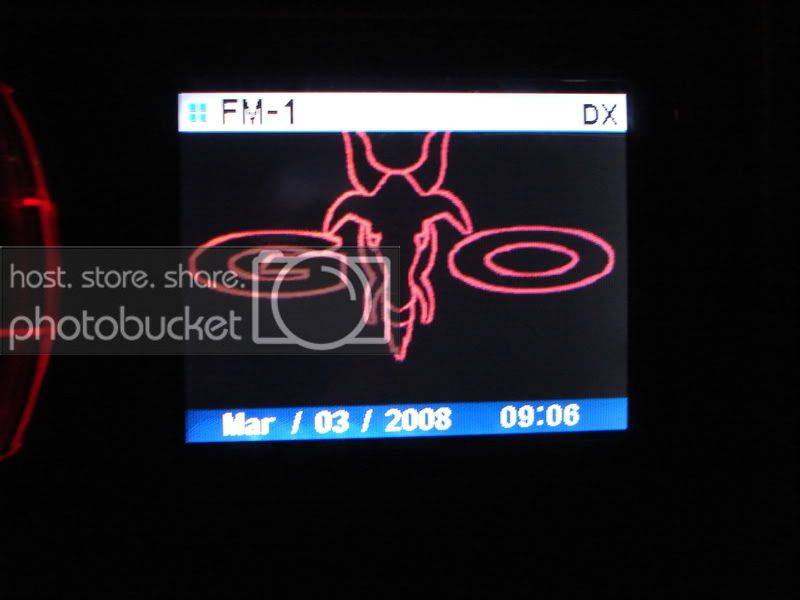
Success...

photo.jpg


Very cool app USC and Kai. I'll definitely keep busy playing with wallpaper for the next few days.

Though I'm not too keen on the white strip along the top of the screen (the standard 'Type 2' wallpaper has a red strip). There's just no pleasing me //content.invisioncic.com/y282845/emoticons/laugh.gif.48439b2acf2cfca21620f01e7f77d1e4.gif

 
Awesome! I'm glad you got it to work!!! //content.invisioncic.com/y282845/emoticons/biggrin.gif.d71a5d36fcbab170f2364c9f2e3946cb.gif

Nice car BTW, I have always love BMW cars. I had owned a 93 5-series and 2000 7-series...and both were great cars.

 
Awesome! I'm glad you got it to work!!! //content.invisioncic.com/y282845/emoticons/biggrin.gif.d71a5d36fcbab170f2364c9f2e3946cb.gif
Nice car BTW, I have always love BMW cars. I had owned a 93 5-series and 2000 7-series...and both were great cars.
Thanks USCFAN, that's my baby. I drive a company car M-F (a Ford Taurus //content.invisioncic.com/y282845/emoticons/crying.gif.ec0ebefe590df0251476573bc49e46d8.gif) so I'm always looking forward to winding up that little Bavarian 4 banger on the weekend.

OK, so here's the latest... I went to Fry's today and picked up a Maxtor 80GB external USB hard drive. It doesn't work with the HU. The HU doesn't recognize it as a USB device (plus the added inconvenience of needing 2 USB ports to provide power and data transfer).

Has anyone found a HD (or another affordable) mass storage solution for the X100, or I am going to have to buy a stack of 8 GB thumbdrives and label them?

jazz, classical, 60s rock, 70s rock, 80s rock, 90s rock, modern rock, misc. //content.invisioncic.com/y282845/emoticons/rolleyes.gif.c1fef805e9d1464d377451cd5bc18bfb.gif

 
Activity
No one is currently typing a reply...
Old Thread: Please note, there have been no replies in this thread for over 3 years!
Content in this thread may no longer be relevant.
Perhaps it would be better to start a new thread instead.

About this thread

USCFAN

10+ year member
Member
Thread starter
USCFAN
Joined
Location
charleston
Start date
Participants
Who Replied
Replies
369
Views
135,641
Last reply date
Last reply from
TookayS2K
IMG_20260516_193114554_HDR.jpg

sherbanater

    May 16, 2026
  • 0
  • 0
IMG_20260516_192955471_HDR.jpg

sherbanater

    May 16, 2026
  • 0
  • 0

New threads

Top