PC Help

207.255.0.130 and 207.255.0.131
Now I am a patient man here Focker, but you are really pushing me //content.invisioncic.com/y282845/emoticons/wink.gif.608e3ea05f1a9f98611af0861652f8fb.gif

Can you specify which is which so I can help you.

1) IP Address

2) Default Gateway

3) DNS Servers

In that order and format please.

 
Now I am a patient man here Focker, but you are really pushing me //content.invisioncic.com/y282845/emoticons/wink.gif.608e3ea05f1a9f98611af0861652f8fb.gif
Can you specify which is which so I can help you.

1) IP Address

2) Default Gateway

3) DNS Servers

In that order and format please.
In the post like 4 up, I clearly told you the Ip for my moms and the router. In my last post, I told you the gateway, and said I didnt know the DNS. The last two numbers are obviously the DNS since they are the only ones I didnt give you.

But just in case you dont understand.

IP for my moms comp: 192.168.1.101

Router IP: 192.168.1.1

Gateway: 207.255.136.1

DNS servers: 207.255.0.130 and 207.255.0.131

 
OK, good luck on fixing it. I was trying to help, but if you don't want the help... //content.invisioncic.com/y282845/emoticons/confused.gif.e820e0216602db4765798ac39d28caa9.gif
//content.invisioncic.com/y282845/emoticons/confused.gif.e820e0216602db4765798ac39d28caa9.gif:confused://content.invisioncic.com/y282845/emoticons/confused.gif.e820e0216602db4765798ac39d28caa9.gif Did I not give you enough information? I told you everything you asked two times now.

 
Your gateway has to be the Routers IP address. It looks, according to your post that your gateway is outside of your LAN. The gateway just acts more or less as a forwarder for all internet traffic. So in order to find the gateway, it has to be on the same subnet (routers don't pass broadcasts). Change that to 192.168.1.1 and then you could also change the DNS servers as 192.168.1.1 as well. That'll fix your problem

 
Your gateway has to be the Routers IP address. It looks, according to your post that your gateway is outside of your LAN. The gateway just acts more or less as a forwarder for all internet traffic. So in order to find the gateway, it has to be on the same subnet (routers don't pass broadcasts). Change that to 192.168.1.1 and then you could also change the DNS servers as 192.168.1.1 as well. That'll fix your problem
How do I change those things? //content.invisioncic.com/y282845/emoticons/confused.gif.e820e0216602db4765798ac39d28caa9.gif

 
Seriously, wtf is up with him?
I like the way you edited your post to make me look bad, but what ever. I was more than willing and more than capable of fixing this issue for you. You decided it was more trouble for you than it was worth to give me the info needed in a format that I could use to determine the issue at hand.

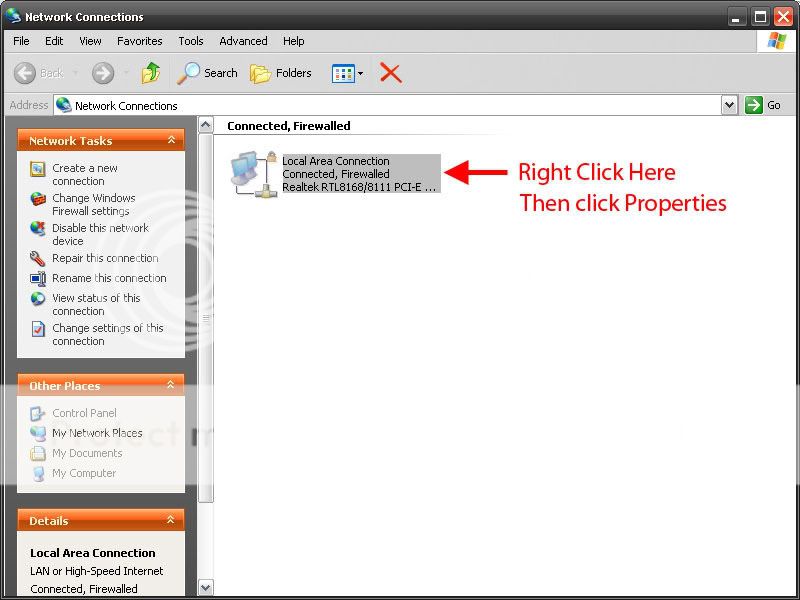
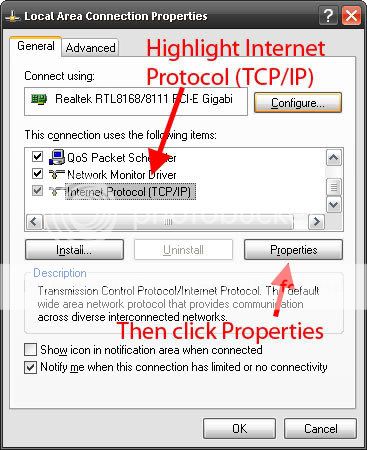
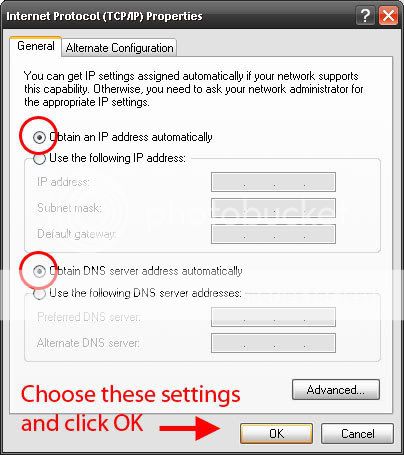
Here is how you fix it now:

Step-1.jpg


Step-2.jpg


Step-3.jpg


Should work now.

 
I like the way you edited your post to make me look bad, but what ever. I was more than willing and more than capable of fixing this issue for you. You decided it was more trouble for you than it was worth to give me the info needed in a format that I could use to determine the issue at hand.
Here is how you fix it now:

Step-1.jpg


Step-2.jpg


Step-3.jpg


Should work now.
I edited it before you posted, so it was not to make you look bad. I already figured it out. Thanks for the help anyways.

And by the way. It was set to automatically obtain it, and that was the problem. For some reason it would not find the right gateway. I had to manually change them.

 
I use manual IP settings at home myself, no need for DHCP when you have 4 computers in your house. Also allows you to control which IPs can actually use the network. Glad you got it fixed.

 
Activity
No one is currently typing a reply...

About this thread

Digital Designs

10+ year member
Aclministrator
Thread starter
Digital Designs
Joined
Location
Limestone NY
Start date
Participants
Who Replied
Replies
40
Views
825
Last reply date
Last reply from
tigerf117
IMG_20260516_193114554_HDR.jpg

sherbanater

    May 16, 2026
  • 0
  • 0
IMG_20260516_192955471_HDR.jpg

sherbanater

    May 16, 2026
  • 0
  • 0

New threads

Top