2000 BMW Z3M
Has two front kicker speakers, door tweeters, two small rear speakers and a small subwoofer
The head unit is the Continental TR7412UB-OR
I have no idea what speakers are installed.
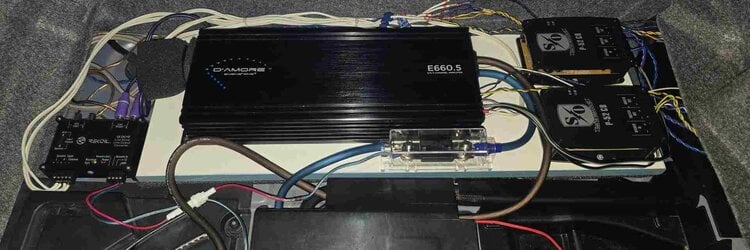
D'Amore Engineering E660.5 car audio amplifier
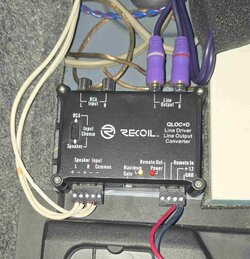
Recoil LOCD Active 2-Channel Line Output Converter
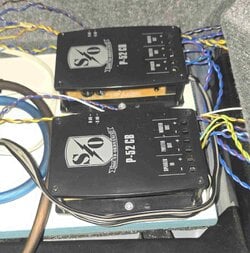
Two Sound Ordnance P-52CB passive crossovers
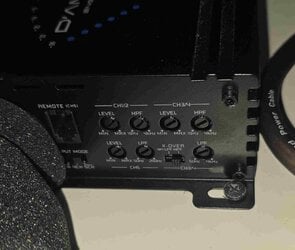
It sounds okay but not sure the E660.5 is setup correctly. Is it purely trial and error? There are settings for the following:
Ch1/2 Level and HPF
Ch3/4 Level and HPF and LPF plus X-Over LPF or HPF
Ch 5 Level and LPF
To optimize the sound system in your 2000 BMW Z3M, you'll want to ensure that your D'Amore Engineering E660.5 amplifier is set up correctly. Here's a breakdown of the settings and some tips to help you adjust them:
### Amplifier Settings
1. **Ch1/2 Level and HPF (High-Pass Filter)**
- **Level**: This controls the output level for channels 1 and 2, which typically power your front speakers. Start by setting this to a moderate level and adjust based on your listening preference.
- **HPF**: Set the HPF to filter out low frequencies that your front speakers can't reproduce effectively. A good starting point is around 80-100 Hz. Adjust higher if you find the sound is too muddy.
2. **Ch3/4 Level and HPF/LPF (Low-Pass Filter)**
- **Level**: Similar to Ch1/2, adjust this to balance the volume of the rear speakers with the front speakers.
- **HPF**: If your rear speakers are full-range, set this to a lower frequency (around 60-80 Hz). If they are smaller and can't handle low frequencies, consider a higher HPF.
- **LPF**: Use this for rear speakers if they are not full-range or if you want to limit their bass output. Set it around 80-100 Hz if you want to prevent distortion.
3. **Ch5 Level and LPF**
- **Level**: This controls the output for the subwoofer. Start at a lower level and increase until you achieve a balanced sound relative to the rest of the system.
- **LPF**: Set the LPF for the subwoofer to around 80-120 Hz. This allows the subwoofer to handle the bass frequencies while keeping higher frequencies out.
### General Tips
- **Trial and Error**: Yes, some of this will involve trial and error. Make small adjustments and listen to a variety of music genres to find the best settings for your taste.
- **Use Reference Tracks**: Play tracks that you are familiar with to help you assess changes in sound quality.
- **Check Phase**: Make sure the subwoofer is wired correctly (positive to positive, negative to negative) to ensure it is in phase with the rest of the system.
- **Balance and Fader**: Use your head unit's balance and fader settings to adjust the soundstage to your liking.
- **Listen for Distortion**: If you hear distortion at higher volumes, you may need to decrease the level on the amplifier or adjust the crossover settings.
By adjusting these settings thoughtfully, you should be able to improve the overall sound quality of your system. Enjoy your listening experience!