need help removing virus**

Thanks for the link I'm gonna give it a try..even though im not too familiar with registry stuff and dll's. Is there a program out there that I can just run to fix it? Search and destroy isn't finding it, neither is adaware pro or avg free edition.
also, any advice on the ntrootkit, it seems to be a bigger issue because its really lagging my system and I dont want any backdoors being opened up on my network or anything.

Thanks guys.
lol not are fixes are at the push of a button. If you want to do it right, just follow the instructions step by step. Knowing what the shit does doesn't have anything to do with following instructions.

 
lol not are fixes are at the push of a button. If you want to do it right, just follow the instructions step by step. Knowing what the shit does doesn't have anything to do with following instructions.
Yea true dat but I'd like to know what I'm messing with first before I mess something else up lol. If I erase the wrong file I'll have a whole other problem. But I think I almost got it I'm back on the intrawebz and no random pop ups ...for now

//content.invisioncic.com/y282845/emoticons/thankyou.gif.5451126d09e870f796f50c3a4dd5acd7.gif

 
There is a hidden virus you need to dig out as well or it will keep spawning;

It can be located in C:\WINDOWS\system32

or C:\WINDOWS\system

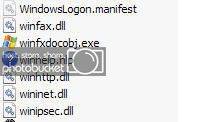
it is similiar to the winhlp.hlp VALID file...which is a system file, and it looks like the following blue circle with a white question mark:

winhpIcon.jpg


IF you see a yellow question mark with the file name winhelp.exe you need to right click and choos rename-- change it to something stupid... like: poohbear

DO NOT LEFT CLICK ON IT!!!!!!

Do NOT try and delete it yet.... re-start your computer and go back into the C: windows/System (32) folder where you found it and NOW delete the file you re-named poohbear.

 
Well hypnawtikpimp tried his best to help me out and I ended up getting rid of most

of the crap but its just never-ending. I'm gonna have to just reformat I guess.

Whats the best way to go about this? Run:format c:/ ???

 
Once you get all your shit straightened out, hit up Kaspersky anti-virus. Best stuff on the market IMHO.

I had to format before....................because I like ****. (Lies to all you who say you don't watch any, if you don't your ghey.........ghey I say!)

System runs flawless and picks up everything and gets rid of it. Awesome stuff. Yes you have to pay, but is worth it to keep my computer safe.

 
Well hypnawtikpimp tried his best to help me out and I ended up getting rid of most of the crap but its just never-ending. I'm gonna have to just reformat I guess.

Whats the best way to go about this? Run:format c:/ ???
I gave you step by step instructions ... why are you formatting //content.invisioncic.com/y282845/emoticons/confused.gif.e820e0216602db4765798ac39d28caa9.gif

 
Activity
No one is currently typing a reply...

About this thread

ddevil0013

10+ year member
Member
Thread starter
ddevil0013
Joined
Location
phx,az
Start date
Participants
Who Replied
Replies
57
Views
1,037
Last reply date
Last reply from
HyPnAwTiKpImP
20260423_214720.jpg

BP1Fanatic

    May 14, 2026
  • 0
  • 0
20260419_124349.jpg

BP1Fanatic

    May 14, 2026
  • 0
  • 0

New threads

Top