I love computers

tommyk90
5,000+ posts

THE WHOLE THING!!!
So today my lovely external harddrive decided to stop working.

Fantastic, I know.

And, of course, it's out of warranty range so not only did I lose all the stuff I had on there, but now I have to buy another external harddrive. Lovely.

I talked with some company about data recovery, and he quoted me $1700 on a successful recovery. I laughed hysterically.

Sorry, but no amount of **** or free music is worth $1700. Thanks chief.

Anyways, I was wondering if there was any backwoods solutions to fixing this or am I just completely screwed?

Luckily I have 95% of my music on the laptop and my mp3 player, so that can be replaced, but I did lose all my **** and some programs. //content.invisioncic.com/y282845/emoticons/frown.gif.a3531fa0534503350665a1e957861287.gif

Probably nothing that can't be replaced, but it's just frustrating to lose all that stuff.

Maybe I'll buy 2 drives, leave one attached and just fill up the other one with the same stuff and stash it away somewhere.

/rant.

On a side note, I need some recommendations for external harddrive brands. The one that crapped out on me was a maxtor, so other brands would be appreciated. //content.invisioncic.com/y282845/emoticons/biggrin.gif.d71a5d36fcbab170f2364c9f2e3946cb.gif

 
sorry bout that but Western Digitals are like the best HD's btw my friend owns a computer repair shop as well maybe i can hit him up and see howmuch for you? if interested..
I would be interested, but it would have to be pretty darn inexpensive.

Most of the shit I could replace.

The main stuff I lost was my ****. //content.invisioncic.com/y282845/emoticons/laugh.gif.48439b2acf2cfca21620f01e7f77d1e4.gif

 
You can try BartPE You'll have to find a cracked version of it but it can work magic lol.

Also are you sure the drive itself is bad? A lot of the times the the drive itself isn't bad just the case its in. If you can get the drive out you might be able to hook it up internally or put it in another case and get the data off.

 
You can try BartPE You'll have to find a cracked version of it but it can work magic lol.
Also are you sure the drive itself is bad? A lot of the times the the drive itself isn't bad just the case its in. If you can get the drive out you might be able to hook it up internally or put it in another case and get the data off.
I asked the data recovery guy about that and he made it seem like that would be impossible.

If it helps at all, the harddrive lights up and gets recognized by the computer, but it throws a "code 10" error and won't let me actually access the files or anything.

From my brief research online, code 10 almost always refers to a drive failure.

Whats this BartPE you refer to?

 
I asked the data recovery guy about that and he made it seem like that would be impossible.
If it helps at all, the harddrive lights up and gets recognized by the computer, but it throws a "code 10" error and won't let me actually access the files or anything.

From my brief research online, code 10 almost always refers to a drive failure.

Whats this BartPE you refer to?
It is a data recovery tool. you boot off of it and let it reconstruct the drive and 9 times out of 10 you can get the data back.

Of course he told you it was impossible he wanted your money lol. I use to work at a repair shop that specialized in data recovery, that shit is not cheap at all. It's only worth it if it corresponds with your job or something. Had a few lawyers and doctors come in and do it.

 
It is a data recovery tool. you boot off of it and let it reconstruct the drive and 9 times out of 10 you can get the data back.
Of course he told you it was impossible he wanted your money lol. I use to work at a repair shop that specialized in data recovery, that shit is not cheap at all. It's only worth it if it corresponds with your job or something. Had a few lawyers and doctors come in and do it.
I think the problem might lie in the drive itself. Usually when you would access files on it, it would make a noise.

Even with it just sitting there it would make a slight hum. Now it's nothing. //content.invisioncic.com/y282845/emoticons/frown.gif.a3531fa0534503350665a1e957861287.gif

Is it a possibility to take the case apart and see whats up?

Also, are external harddrive usually pretty reliable? I don't want to buy another one only to have it crap out in 2 years again. There's some nice 250 gig western digitals on sale for $89.

 
I think the problem might lie in the drive itself. Usually when you would access files on it, it would make a noise.
Even with it just sitting there it would make a slight hum. Now it's nothing. //content.invisioncic.com/y282845/emoticons/frown.gif.a3531fa0534503350665a1e957861287.gif

Is it a possibility to take the case apart and see whats up?

Also, are external harddrive usually pretty reliable? I don't want to buy another one only to have it crap out in 2 years again. There's some nice 250 gig western digitals on sale for $89.
Western digital and seagate are 2 of the best. And yes you should be able to get the case apart and get to the drive. You may have to tear the case up but fuck it the things broken anyway lol.

edit: Did it ever click? humming isn't necessarily a bad thing, clicking is tho.

 
Western digital and seagate are 2 of the best. And yes you should be able to get the case apart and get to the drive. You may have to tear the case up but fuck it the things broken anyway lol.
edit: Did it ever click? humming isn't necessarily a bad thing, clicking is tho.
Apparently seagate makes maxtor.

I went to maxtors site to check the warranty and it directed me to seagate's website. //content.invisioncic.com/y282845/emoticons/laugh.gif.48439b2acf2cfca21620f01e7f77d1e4.gif

True enough. I just thought there might be a way to save it before I destroyed it. //content.invisioncic.com/y282845/emoticons/biggrin.gif.d71a5d36fcbab170f2364c9f2e3946cb.gif

Never clicked, just made the normal harddrive noises. It's as if the thing just died.

 
Apparently seagate makes maxtor.
I went to maxtors site to check the warranty and it directed me to seagate's website. //content.invisioncic.com/y282845/emoticons/laugh.gif.48439b2acf2cfca21620f01e7f77d1e4.gif

True enough. I just thought there might be a way to save it before I destroyed it. //content.invisioncic.com/y282845/emoticons/biggrin.gif.d71a5d36fcbab170f2364c9f2e3946cb.gif
Yeah seagate bought maxtor not to long ago. Maybe they won't **** balls anymore. I've seen more dead maxtor and Hitachi drives then any others.

 
So today my lovely external harddrive decided to stop working.
Fantastic, I know.

And, of course, it's out of warranty range so not only did I lose all the stuff I had on there, but now I have to buy another external harddrive. Lovely.

I talked with some company about data recovery, and he quoted me $1700 on a successful recovery. I laughed hysterically.

Sorry, but no amount of **** or free music is worth $1700. Thanks chief.

Anyways, I was wondering if there was any backwoods solutions to fixing this or am I just completely screwed?

Luckily I have 95% of my music on the laptop and my mp3 player, so that can be replaced, but I did lose all my **** and some programs. //content.invisioncic.com/y282845/emoticons/frown.gif.a3531fa0534503350665a1e957861287.gif

Probably nothing that can't be replaced, but it's just frustrating to lose all that stuff.

Maybe I'll buy 2 drives, leave one attached and just fill up the other one with the same stuff and stash it away somewhere.

/rant.

On a side note, I need some recommendations for external harddrive brands. The one that crapped out on me was a maxtor, so other brands would be appreciated. //content.invisioncic.com/y282845/emoticons/biggrin.gif.d71a5d36fcbab170f2364c9f2e3946cb.gif
EDIT::

ALWAYS DE-STATIC YOURSELF BEFORE WORKING ON YOUR COMPUTER/ELECTRONICS!

Simply touch a piece of unpainted metal.

Also, some people buy magnetic bands that attach to cases or other metal pieces that keep them grounded so they don't produce static shock. If you can, work on a surface that isn't carpet. Anything. Tile, wood, other pieces of metal. If you stop touching your computer, before you touch it again, make sure to touch a piece of unpainted metal. (Any unpainted metal will do, even the inside of your case.)

I also, for extra protection, wear rubber soled shoes. I'm not sure if this works. But, just to be safe, why not?

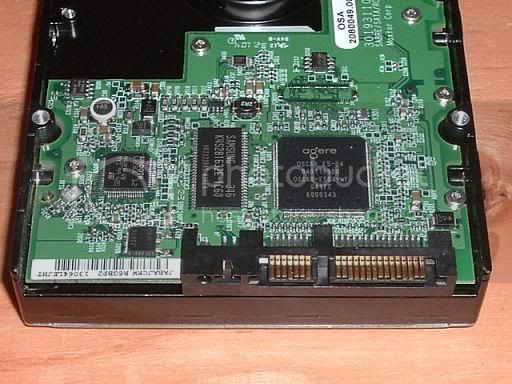
This part is easy, bro. All external drives are are either IDE or SATA harddrives with IDE/SATA to USB converters.

Find some screws on your external case (or just take a screwdriver to it).

Once you take off the case, you should see a little circuit board connected to a harddrive. Disconnect the HD. If it's SATA, it should look something like this:

MaxtorULTRA16300GB7200SATA-Liquid3D.jpg


If it's IDE it should look something like this:

adding-a-hard-drive-7.jpg


Notice the connectors on the right of the harddrive are different. One will have something sticking out where you slide something over it (SATA) the other will have inserts to put pins in (IDE).

It's time to open the case to your PC...

Now, if your PC has SATA ports, it should have a cluster like this on your motherboard:

p6ngm_sata.jpg


Most Motherboards have two IDE slots. One for your CD/DVD Drives (most of them to this day are IDE), and one for Harddrives (Up to two IDE harddrives can be controlled by the motherboard at one time. In order to hook up more than 2, you need to buy a PCI card that allows you to input more IDE devices... but that's probably irrelevant). But some new ones only have 1 IDE slot. If your PC only has 1 IDE slot, and your external is IDE based. Unplug the IDE ribbon from your CD Drive, and plug it into your, now internal, hard drive. Also, plug in the Molex plug from your CD/DVD drive to your harddrive.

Molex connectors look like this:

tutorial-4pin_molex_power_conn.jpg


If your harddrive is SATA, you need a SATA cable. You can buy one at Radioshack or any other electronics store for like... I'd say $5 bucks? You simply plug that into your harddrive, then into your motherboard, and, like the IDE, find a Molex plug (your ocmputer should have a few hanging around being unused, it doesn't matter which one you use) and plug it in.

Now, if your HD is IDE, and your motherboard doesn't have an IDE slot, you can do one of two things. say 'fck it' and throw it away... or buy another external case. (Or, you can buy an IDE to USB or IDE to SATA converter).

The same if your HD is SATA and your PC doesn't have SATA.

Or, you can completely throw the top "walk-through" away and buy a new external drive case and put your HD in it. (Again, make sure you get the right case. If it's SATA, buy SATA, if it's IDE, buy IDE... but you're smart enough to know that.)

 
Activity
No one is currently typing a reply...

About this thread

tommyk90

5,000+ posts
THE WHOLE THING!!!
Thread starter
tommyk90
Joined
Location
Chicago Heights, IL
Start date
Participants
Who Replied
Replies
52
Views
1,159
Last reply date
Last reply from
tommyk90
IMG_20260506_140749.jpg

74eldiablo

    May 22, 2026
  • 0
  • 0
design.jpeg

WNCTracker

    May 22, 2026
  • 0
  • 0

New threads

Top