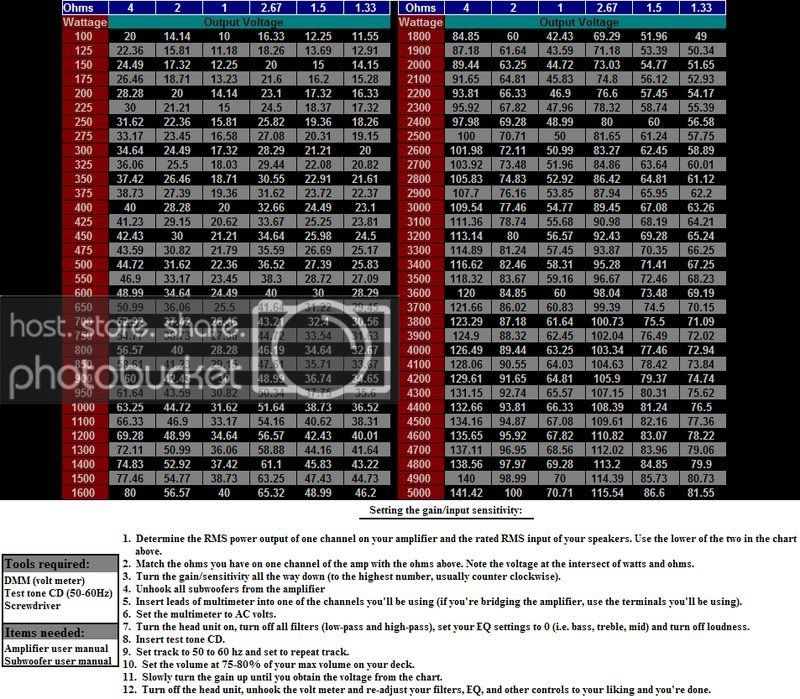
High voltage when tuning with DMM

well, when you have it on ohms, it will beep at anything below 10ohms, or something like that, so don't freak out on the part. if it's a fluke, push the button with the curved lines to silence the beep. it's just a continuity indicator. now, on ac, when it's beeping, that means you have it set to measure the wrong way (to indicate when you are hitting min, or max). there should be buttons to toggle peak/rms/etc. what you want it to do is average rms, and not on min/max settings. if you have your manual for the meter, it will be good to read up on the ac settings and what your little icons mean on the screen. and, if you have it "unloaded", then it will put out higher voltage than when loaded, and if you can get ahold of a clamp-on meter to measure amps with the other meter measuring voltage. the subs are not a dummy load, and impedance rise will actually put the wattage lower at your calculated voltage. for instance, your 2ohm load could be actually playing at 3+ohms, which means you are actually getting closer to 450, rather than almost 700...... if you can't get ahold of a clamp, then i would just set it at 40....
yeah, i currently don't have access to a clamp so you're saying i should set the AC volts to 40?

 
I sure wouldn't say that..i know alot if competitors that all set their gains like this..a handful of those have WR's.. I wouldn't say these guys are "incorrect" ..
Wow you personally know a handfull of world record holders and personally watched them set up thier systems? And they all set thier gains without knowing thier box rise? Man, they are good!

yeah, i currently don't have access to a clamp so you're saying i should set the AC volts to 40?
Ya that is what he is sayin. You'll have box risr, increasing the load your amp will see, so the acv will need to be a bit higher as well

 
the quickest way blow our speakers is to set your gain with a dmm with the speakers hooked up,in every tutorial i have seen all of them had no speakers hooked up
this is very true. I have read a number of amp manuals and they all say to set voltage while the amp is unloaded. And depending on what ohms load you are using you set the gain till you reach said voltage for that specific load and power output.
 
Taken from JL 500/1 Manual

necessary equipment

• Digital AC Voltmeter

• CD with a sine-wave test tone recorded at

0 dB reference level in the frequency range

to be amplified for that set of channels

(50 Hz for subwoofer channels, 1 kHz for

a midrange application). The CleanSweep®

Calibration Disc contains the appropriate

test tones and is available for sale at

JL Audio Mobile - Home Do not use attenuated

test tones (-10 dB, -20 dB, etc.).

the nine-step Procedure

1) Disconnect the speaker(s) from the

amplifier’s speaker output connectors.

2) Turn off all processing (bass/treble, loudness,

EQ, etc.) on the source unit, processors (if

used) and amplifier. Set fader control to center

position and subwoofer level control to 3/4 of

maximum (if used to feed the 500/1v2).

3) Switch the “Input Voltage” switch to “Low”

and turn the “Input Sens.” control all the

way down.

4) Set the source unit volume to 3/4 of full

volume. This will allow for reasonable gain

overlap with moderate clipping at full volume.

5) Using the chart on this page, determine the target

voltage for input sensitivity adjustment according

to the nominal impedance of the speaker system

connected to the amplifier outputs.

6) Verify that you have disconnected the speakers

before proceeding. Play a track with an

appropriate sine wave (within the frequency

range to be amplified by the 500/1v2) at 3/4

source unit volume.

7) Connect the AC voltmeter to the speaker output

connectors of the amplifier. If the channel

pair is operating in stereo, it is only necessary

to measure one channel. If bridged, make sure

you test the voltage at the correct connectors

(L+ and R–).

8) Increase the “Input Sens.” control until the

target voltage is observed with the voltmeter.

9) Once you have adjusted the 500/1v2 to

its maximum low-distortion output level,

reconnect the speaker(s). The “Input Sens.”

control can now be adjusted downward if the

amplifier requires attenuation to achieve the

desired system balance.

! I M P O RTA N T

Do not increase any “Input Sens.” setting

for any amplifier channel or channel

pair in the system beyond the maximum

level established during this procedure.

Doing so will result in audible distortion

and possible speaker damage.

It will be necessary to re-adjust the

“Input Sens.” for the affected channels if any

equalizer boost is activated after setting the

“Input Sens.” with this procedure. This applies

to any EQ boost circuit, including source unit

tone controls or EQ circuits. EQ cuts will not

 
RMSchart.jpg
 
it ***** cuz my stock HU doesn't show specific volume levels, i either turn the knob clockwise or counter clockwise so i have to guess where 3/4 of full volume is.

 
just turn it to where its sounding bad on the speakers and back it down till it sounds good. then pop in your tone cd and do the gain setting procedure at the highest volume that still sounded good on the other speakers.

 
i still won't set like that....... unless it happens to be a load-sensing amp, such as the jl, jbl, and a few others, then yes, i will set it like that to allow the circuitry to properly operate under it's own correction. just for chiz and giggles, i'll go grab a clamp later, and set an un-loaded amp this way, then clamp it and see just what it puts out.

 
i still won't set like that....... unless it happens to be a load-sensing amp, such as the jl, jbl, and a few others, then yes, i will set it like that to allow the circuitry to properly operate under it's own correction. just for chiz and giggles, i'll go grab a clamp later, and set an un-loaded amp this way, then clamp it and see just what it puts out.
PM me the link , not saying you are wrong , hell i don't know that either way is the "right" way, just would like to see the results. I have always set mine by ear actually. //content.invisioncic.com/y282845/emoticons/smile.gif.1ebc41e1811405b213edfc4622c41e27.gif
 
how would sending a speaker unclipped rated power blow it? You're suppose to increase the gain slowly lol

And ya, I usually do it by ear, but use a dmm just to check it. Without knowing your box rise exactly you still have to do it by ear, unless you don't mind missing out on some usable power lol

 
how would sending a speaker unclipped rated power blow it? You're suppose to increase the gain slowly lolAnd ya, I usually do it by ear, but use a dmm just to check it. Without knowing your box rise exactly you still have to do it by ear, unless you don't mind missing out on some usable power lol
dont know about the sub setting but have you tried to setup your high amp with a 1k test tone playing?its not pleasant at all
 
Jesus christ, so much misinformation in one thread...

When setting the gains with a DMM you do it UNLOADED.

And the equation for calculating said voltage is not V = impedance * sqrt(power) it's

V=sqrt(impedance * power)

Power is what you yahoo's call "watts" which sounds retarded because that's the unit of measurement not the term for what your measuring.

 
Activity
No one is currently typing a reply...
Old Thread: Please note, there have been no replies in this thread for over 3 years!
Content in this thread may no longer be relevant.
Perhaps it would be better to start a new thread instead.

About this thread

gbleezy

10+ year member
Junior Member
Thread starter
gbleezy
Joined
Location
Cali
Start date
Participants
Who Replied
Replies
48
Views
4,581
Last reply date
Last reply from
akheathen
IMG_20260516_193114554_HDR.jpg

sherbanater

    May 16, 2026
  • 0
  • 0
IMG_20260516_192955471_HDR.jpg

sherbanater

    May 16, 2026
  • 0
  • 0

New threads

Top