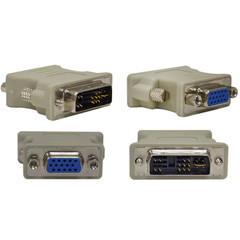
that 'digital slot' is called a DVI port - mainly used for TFT\LCD monitors.
it looks like this;
DVI can be transformed to VGA (standard monitor input\output) with a single connector, but VGA can NOT be converted to DVI without an expensive piece of crap.
this is a DVI adapter;
your first monitor, the one you are using now, should be plugged into the blue port. get that DVI connector and plug it into the white port... woah, look at that. now we got two blue ones! hook your second monitor here.
now go ahead and turn them both on. you should have two displays!
wtf. they are both running the same thing //content.invisioncic.com/y282845/emoticons/frown.gif.a3531fa0534503350665a1e957861287.gif
so - ok. RIGHT CLICK on the desktop, hit properties, then hit the settings tab. under the SCREEN RESOLUTION tick thingie, there should be a tick mark that says "Extend my Windows desktop onto this monitor."
if you dont see it. you SHOULD see two monitors in the middle window (this is good) just click on the other monitor thats not selected, and the button should appear. you can also change the resolution of that monitor, and physically DRAG and drop that monitor ABOVE, LEFT, RIGHT, and BELOW the other monitors picture.
seen here;
now you should have two desktops that you can use for seperate stuff, and you should be able to drag things from one to the other //content.invisioncic.com/y282845/emoticons/smile.gif.1ebc41e1811405b213edfc4622c41e27.gif