
Having issue with my Eclipse EA4100 shutting off at high volumes

Bow94z
10+ year member

Junior Member
14
0
PA
Im running a Alpine Cda-9811 headunit with 4volt pre-amp

running Eclipse SC6500 comp's (75rms) up front and SE6500 coax's (40rms) in the rear powered by a Eclipse EA4100 amp (75x4)

My issue is that my speakers/amp are cutting out when the volume is greater than 16 on my headunit. MAx volume is 35 on headunit. if i turn the headunit off and back on they will continue to work until higher volume. Im assuming the input gain is too high, but im havin trouble finding the sweet spot to keep my amp/speakers from shutting off. from what i read i need to match the preamp voltage of my headunit to the amp. I have my input gain on my front and rear speakers set to the "12 o'clock" position on the amp which im assuming is 4v considering it shows 8 on the low end and .2 which is the loudest which is in the picture below.. Can anyone help me figure this problem out

and what exactly is clipping and how does this help me out tuning.
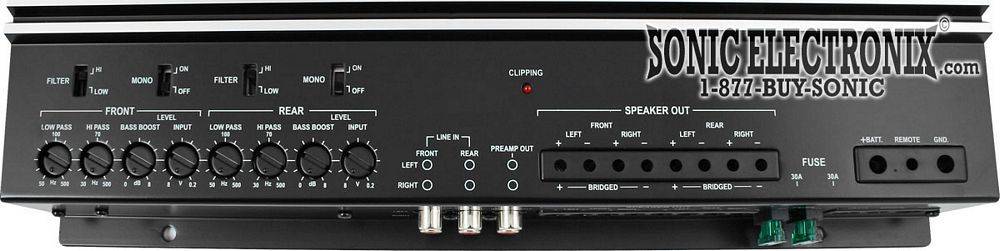
ea4100.jpg


they are not. i can be siting still and as i go higher with volume, the speakers/amp will shut off...but the subs will continue to the song

 
amps going into protect because at high levels its not getting enough power i would think, if thats the case and you got your gain in the 12 o clock position put it lower like around 9 or 8 position //content.invisioncic.com/y282845/emoticons/hide.gif.2d479cfd917eedfe201353b91522ceab.gif

 
i dont understand on this amp why the 8 is the lowest point and 0.2 is the highest point asfar as the input gain:confused:

 
Im running a Alpine Cda-9811 headunit with 4volt pre-amp
running Eclipse SC6500 comp's (75rms) up front and SE6500 coax's (40rms) in the rear powered by a Eclipse EA4100 amp (75x4)

My issue is that my speakers/amp are cutting out when the volume is greater than 16 on my headunit. MAx volume is 35 on headunit. if i turn the headunit off and back on they will continue to work until higher volume. Im assuming the input gain is too high, but im havin trouble finding the sweet spot to keep my amp/speakers from shutting off. from what i read i need to match the preamp voltage of my headunit to the amp. I have my input gain on my front and rear speakers set to the "12 o'clock" position on the amp which im assuming is 4v considering it shows 8 on the low end and .2 which is the loudest which is in the picture below.. Can anyone help me figure this problem out

and what exactly is clipping and how does this help me out tuning.

ea4100.jpg
May or may not be contributing to your problem but you can't use the numbers on those dials to even get an approximate measurement of the right gain setting unless the value you're looking for is specifically marked on the amp or in the manual and you know your head unit is putting out the rated voltage at the pre-outs, which not all of them do. The gain dials usually aren't marked in a linnear manner. Example: On my EA4200 the max is .2. Half way is 4, minimum or all the way counter clockwise is 6.

On my Alpine MRP M500 the max is .2, the min or all the way counter clockwise is 4. I think half way is like 1 or 1.5 volts or so.

 
i dont understand on this amp why the 8 is the lowest point and 0.2 is the highest point asfar as the input gain:confused:
Setting the gain is telling your amp how much of a signal it gets so it will know how hard it has to work to amplify it. The lower the numerical number, the more the signal must be amplified, therefore going clockwise to the lower numbers = increased gain. The higher the number, the less it'll need to be amplified, therefore going counter clockwise to the higher numbers = decreased gain.

I understand clipping but others will be better at explaining it to you. It basically happens when you raise the volume on the head unit past the point where it is capable of producing a clear signal any longer during normal listening, or you set the gain incorrectly so your amplifier reaches maximum power prior to your head unit's maximum clean voltage and then you crank the volume beyond THAT point during frequent listening. If you are already playing with a decent amount of power and then you do this by too much for too long you can cause vital components in the speaker to overheat and eventually kill the driver.

This page has the clearest explanations I have ever found for any of this. http://www.bcae1.com/

 
Activity
No one is currently typing a reply...
Old Thread: Please note, there have been no replies in this thread for over 3 years!
Content in this thread may no longer be relevant.
Perhaps it would be better to start a new thread instead.

About this thread

Bow94z

10+ year member
Junior Member
Thread starter
Bow94z
Joined
Location
PA
Start date
Participants
Who Replied
Replies
9
Views
4,613
Last reply date
Last reply from
ArbleGarble
1778578257023.png

Glen Rodgers

    May 12, 2026
  • 0
  • 0
Screenshot_20260511_212804_Amazon Shopping.jpg

Blackout67

    May 11, 2026
  • 0
  • 0

New threads

Top


