Guinness why front?

remember Horsefarker, you started the CHILDISH post...and you guys call me the kid. Whatever! //content.invisioncic.com/y282845/emoticons/rolleyes.gif.c1fef805e9d1464d377451cd5bc18bfb.gif

 
troll.gif
 
Wtfs all this about? lol..man, Guinness has been cracking me up all day today.

Ay Guinness, I got some 10,000W Peak Pyramid amps, their loaded with "da bling" that say WOW! all over em. $500 shipped? free pyramid capacitor for extra bling? lol

 
How to convert MTS, M2TS, TS files into MP4, H.264 on Mac?

I didn't remember how many times I heard about people talking about their troubles with their videos taken by their AVCHD camcorders, usually these videos are record about their daily life with MTS format that they want to share with their families or friends. They of course know MTS format is not widely recognized by many players or devices, but there seems to be no good way for them to solve this problem smoothly.

However, there is always a way out, you can deal with this problem by simply converting it to some common format supported by many players, softwares or devices. This is what can be done by our MTS to MP4 converter for Mac.

MP4 is a multimedia container format standard specified as a part of MPEG-4 and is most commonly used to store digital audio and digital video streams.It is usually supported by many softwares or devices, such as Apple TV, BlackBerry, Creative Zen, GPhone, iPhone, iPod, PSP, Zune, VLC media player and other players.

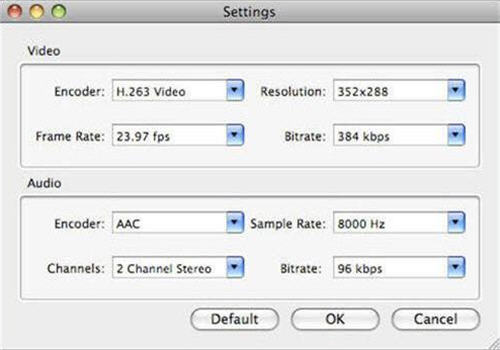
The MTS to MP4 converter for Mac not only helps you to convert MTS to MP4, but also to many other formats, like AVI, MPEG, VOB, 3GP, MOV, WMV, RM, RMVB etc. And more features can be expected in MTS to MP4 converter for Mac: trim the video and audio to what you want, adjust output settings like Encoder, Resolution, Frame Rate and Bitrate. By doing these, you can share your video with your families and friends freely and comfortably.

Tutorial

Step by step to convert MTS to MP4 on Mac

Step 1: Download and install MTS to MP4 Converter for Mac

Free download the software and install it at the specific location, and then have a test. Please don't hesitate to contact our dedicated service team if there is any problem during the process, we are always at your service.

Step 2: Load file

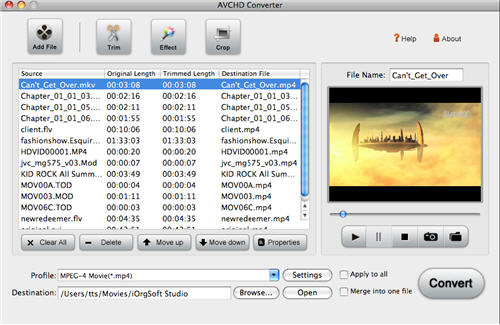
Click Add File at the top of the panel to browse your computer hard disk and to import the files to convert. You can import a bundle of files at one time.

load.jpg


Step 3: Select output format and the directory

On the bottom of the panel, click the drop-down list of Profile beside Settings button to select MP4 as the output format, and then click Browse beside Open button to browse your computer hard disk to specify the location to store the converted file.

Step 4: Video effect

Click Effect on the top of the panel. You can set the video effects as you wish in the pop up Effect window: Brightness, Contrast, Saturation etc. You can also choose the effect such as No Effect, Gray, Emboss, Old Film, depending on your choice. The process can be seen in the preview window on the right.

video-setting.jpg


Step 5: Conversion

After all the settings have been done, click Convert to start converting automatically, the time taking varies depending on the project and the settings you made.

 
How to convert MTS, M2TS, TS files into MP4, H.264 on Mac?
I didn't remember how many times I heard about people talking about their troubles with their videos taken by their AVCHD camcorders, usually these videos are record about their daily life with MTS format that they want to share with their families or friends. They of course know MTS format is not widely recognized by many players or devices, but there seems to be no good way for them to solve this problem smoothly.

However, there is always a way out, you can deal with this problem by simply converting it to some common format supported by many players, softwares or devices. This is what can be done by our MTS to MP4 converter for Mac.

MP4 is a multimedia container format standard specified as a part of MPEG-4 and is most commonly used to store digital audio and digital video streams.It is usually supported by many softwares or devices, such as Apple TV, BlackBerry, Creative Zen, GPhone, iPhone, iPod, PSP, Zune, VLC media player and other players.

The MTS to MP4 converter for Mac not only helps you to convert MTS to MP4, but also to many other formats, like AVI, MPEG, VOB, 3GP, MOV, WMV, RM, RMVB etc. And more features can be expected in MTS to MP4 converter for Mac: trim the video and audio to what you want, adjust output settings like Encoder, Resolution, Frame Rate and Bitrate. By doing these, you can share your video with your families and friends freely and comfortably.

Tutorial

Step by step to convert MTS to MP4 on Mac

Step 1: Download and install MTS to MP4 Converter for Mac

Free download the software and install it at the specific location, and then have a test. Please don't hesitate to contact our dedicated service team if there is any problem during the process, we are always at your service.

Step 2: Load file

Click Add File at the top of the panel to browse your computer hard disk and to import the files to convert. You can import a bundle of files at one time.

load.jpg


Step 3: Select output format and the directory

On the bottom of the panel, click the drop-down list of Profile beside Settings button to select MP4 as the output format, and then click Browse beside Open button to browse your computer hard disk to specify the location to store the converted file.

Step 4: Video effect

Click Effect on the top of the panel. You can set the video effects as you wish in the pop up Effect window: Brightness, Contrast, Saturation etc. You can also choose the effect such as No Effect, Gray, Emboss, Old Film, depending on your choice. The process can be seen in the preview window on the right.

video-setting.jpg


Step 5: Conversion

After all the settings have been done, click Convert to start converting automatically, the time taking varies depending on the project and the settings you made.

WTF //content.invisioncic.com/y282845/emoticons/eek.gif.771b7a90cf45cabdc554ff1121c21c4a.gif//content.invisioncic.com/y282845/emoticons/confused.gif.e820e0216602db4765798ac39d28caa9.gif//content.invisioncic.com/y282845/emoticons/laugh.gif.48439b2acf2cfca21620f01e7f77d1e4.gif

 
Activity
No one is currently typing a reply...
Old Thread: Please note, there have been no replies in this thread for over 3 years!
Content in this thread may no longer be relevant.
Perhaps it would be better to start a new thread instead.

About this thread

Horsemanwill

10+ year member
CarAudio.com Veteran
Thread starter
Horsemanwill
Joined
Location
Junction City, Kansas
Start date
Participants
Who Replied
Replies
61
Views
3,041
Last reply date
Last reply from
Blue Fury
IMG_20260516_193114554_HDR.jpg

sherbanater

    May 16, 2026
  • 0
  • 0
IMG_20260516_192955471_HDR.jpg

sherbanater

    May 16, 2026
  • 0
  • 0

New threads

Top