amp for cadence components

clubcar13
10+ year member

Senior VIP Member
Hello,

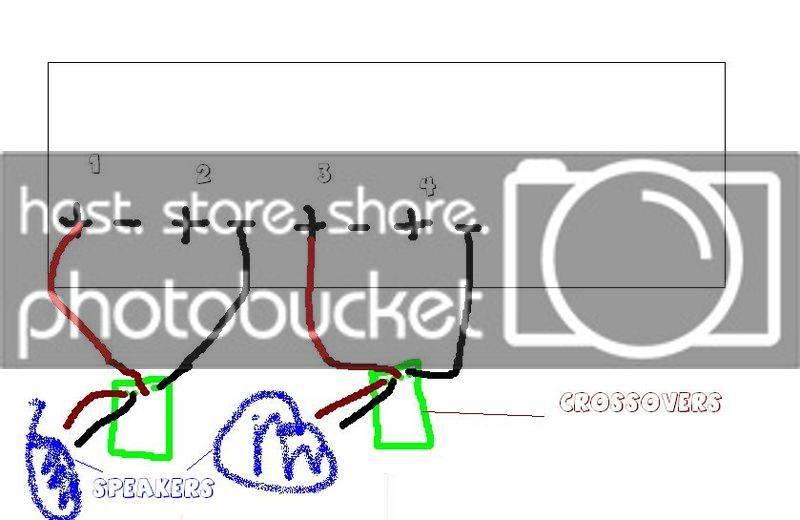
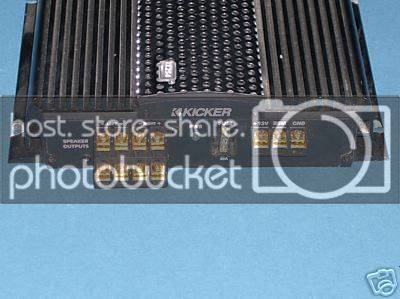
I just got a kicker ix254 from my brother and I was wondering how I should wire this thing up to my two cadence components. It says they take 100 RMS but I guess I wont be able to give it all that power. Which one of these is how I should wire it? Also, since its a 4 channel and I am using only 2 channels, how can I brige it? Also, these speakers are 4 ohm.

24 x 4 @ 4 Ohm

35 x 4 @ 2 Ohm

65 x 2 @ 4 Ohm bridged

30 x 4 @ 4 Ohm dynamic

42 x 4 @ 2 Ohm dynamic

85 x 2 @ 4 Ohm bridged dynamic

Thanks,

Mike

 
run it at 4ohms bridged into 2 channels, you'll only be getting 65w to each side, but it's the best option and they will still sound great.

One sec, let me find the diagram I drew up yesterday on how to bridge //content.invisioncic.com/y282845/emoticons/tongue.gif.6130eb82179565f6db8d26d6001dcd24.gif

Well, i realized my text diagram didn't translate too well do to the forum formatting it.
Here's a random paint I drew up to get the rough point across.

Example.jpg

It will also be in your manual with more specific directions. actually, let me see if I can scan you the page on how to bridge from my ZX350.4 manual (same thing basically)

 
Well my amp is a little different. They are right on top of eachother and one side is for the right side speakers and the other is for the left speakers, so i am a little confused on how to bridge it.

 
Well my amp is a little different. They are right on top of eachother and one side is for the right side speakers and the other is for the left speakers, so i am a little confused on how to bridge it.
when looking at the diagram above consider that channel 1 and 2 are the left channels and channel 3 and 4 are the right channels

 
Here, I scanned the manual page that describes it in depth.

The only difference is I have the ZX while you have the KX, so my terminals are in a straight row while yours is two channels above the other two.


(Click and it grows!)

 
Alright I get it now thanks a bunch. Now can you answer the question about tuning? haha
What was the question about tuning? Did I miss it? Lol.

EDIT : NVM! I see it now!

And yes, your gonna have to set the cross overs. Do you have a sub stage?

 
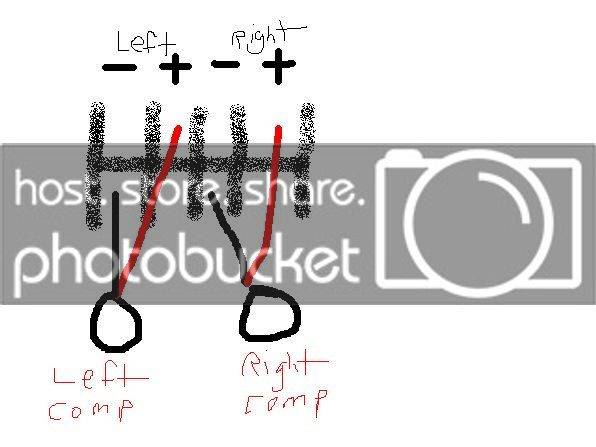
Alright heres what i drew up. Tell me if its right. Also, i forgot it says one more thing on the bottom. Under neath the hookups, it says bridged and it has a minus on the bottom left channel and a plus on the bottom right channel. I should have drawn it but w.e.

untitled-1.jpg


honestly, no lol. I am a littly confused setting the amp. my suggestion would be to hook it up and mess around with the crossover til it sounds right. hopefully someone more knowledgeable will chime in. I set my amp to the high pass filter and I have it at about 150 hz. Im not sure if thats where it should be but it works for me

 
Alright heres what i drew up. Tell me if its right. Also, i forgot it says one more thing on the bottom. Under neath the hookups, it says bridged and it has a minus on the bottom left channel and a plus on the bottom right channel. I should have drawn it but w.e.
untitled-1.jpg
looks right

edit: but maybe from what you are saying the right channel should wired using the other two outputs?

 
Alright heres what i drew up. Tell me if its right. Also, i forgot it says one more thing on the bottom. Under neath the hookups, it says bridged and it has a minus on the bottom left channel and a plus on the bottom right channel. I should have drawn it but w.e.
untitled-1.jpg
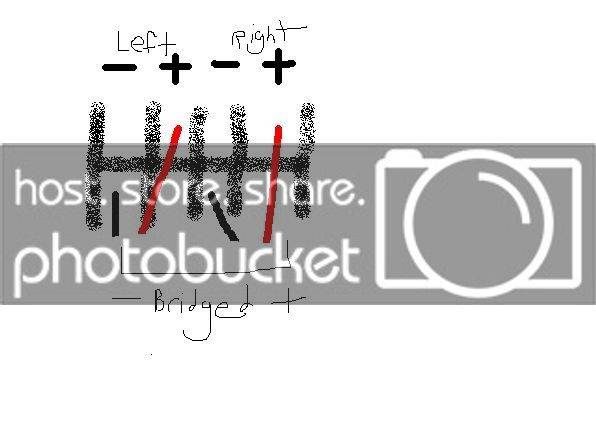
If it says bridged + and - at the bottom, that is where you need to plug it in to bridge it. So from my understanding it needs to be like this unless i misunderstood what you meant where it says bridged:

 
If it says bridged + and - at the bottom, that is where you need to plug it in to bridge it. So from my understanding it needs to be like this unless i misunderstood what you meant where it says bridged:
Yea I think you misunderstood, that would mean plugging it into channels 2 and 4. This is how it looks.

untitled-2.jpg


Activity
No one is currently typing a reply...
Old Thread: Please note, there have been no replies in this thread for over 3 years!
Content in this thread may no longer be relevant.
Perhaps it would be better to start a new thread instead.

About this thread

clubcar13

10+ year member
Senior VIP Member
Thread starter
clubcar13
Joined
Location
Boca Raton, FL
Start date
Participants
Who Replied
Replies
17
Views
1,934
Last reply date
Last reply from
clubcar13
1778578257023.png

Glen Rodgers

    May 12, 2026
  • 0
  • 0
Screenshot_20260511_212804_Amazon Shopping.jpg

Blackout67

    May 11, 2026
  • 0
  • 0

New threads

Top