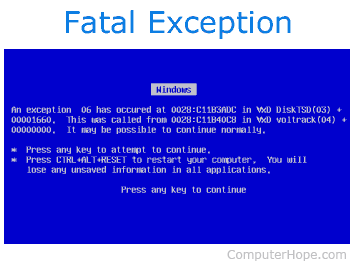
WTF does a blue screen mean?

LoudCrownVic
5,000+ posts

1/1 of Team Team Team
I had my Toshiba laptop NEW! I just bought it from Staples.... I did some homework on it for about a week, now I shut the lid, put it in my bag, and left it in my truck fro three hours. when i put it in my truck, I bumped it pretty good on the seat lever... Which is not even 1/4 the abuse that any of my other machines has taken.

Now, when I try to boot it up, it says I had a power failure or that windows cannot boot. It will attempt to load windows, flash a blue screen, then restart!!!! //content.invisioncic.com/y282845/emoticons/eek.gif.771b7a90cf45cabdc554ff1121c21c4a.gif

I had no virus programs but was only on the school website and my email for a little while. It could not have been ****ed that quicky, could it??? //content.invisioncic.com/y282845/emoticons/crying.gif.ec0ebefe590df0251476573bc49e46d8.gif

 
most likely you knocked the video card out of socket as you are getting a blue screen, which is the default dont have any signal coming in screen, not black like people think

if you got warrenty take it in.

if not take the bottom off you will imidiatly see a card with generally 2 wires that have what can best be called a button connection (like on your coat just a button) and a set of wires in a harness attached to it. lift it up a bit and then just reseat it back in and you should be good to go

 
BSOD ftw!!!!

bsod.gif


You have horrible luck! Hope you get it fixed so you don't fall too far behind. I also have a Toshiba and have had good experience with their customer service

 
most likely you knocked the video card out of socket as you are getting a blue screen, which is the default dont have any signal coming in screen, not black like people think
if you got warrenty take it in.

if not take the bottom off you will imidiatly see a card with generally 2 wires that have what can best be called a button connection (like on your coat just a button) and a set of wires in a harness attached to it. lift it up a bit and then just reseat it back in and you should be good to go
It's a software problem... Def a software problem. I get a BRIEF blue screen. It has error messages written on it. //content.invisioncic.com/y282845/emoticons/mad.gif.c18f003ab0ef8a0d9c27ca78d77a6392.gif But it's so brief that I cannt read it.

BTW i bought my second comp from Best Buy... That one was dead on arrival. So I went to staples.......... And now.... //content.invisioncic.com/y282845/emoticons/crying.gif.ec0ebefe590df0251476573bc49e46d8.gif

 
most likely you knocked the video card out of socket as you are getting a blue screen, which is the default dont have any signal coming in screen, not black like people think
if you got warrenty take it in.

if not take the bottom off you will imidiatly see a card with generally 2 wires that have what can best be called a button connection (like on your coat just a button) and a set of wires in a harness attached to it. lift it up a bit and then just reseat it back in and you should be good to go
I had a flash drive plugged in, and somethims that stops a comp from booting up. But it does nothing whether it is in or out.

 
It's a software problem... Def a software problem. I get a BRIEF blue screen. It has error messages written on it. //content.invisioncic.com/y282845/emoticons/mad.gif.c18f003ab0ef8a0d9c27ca78d77a6392.gif But it's so brief that I cannt read it.
BTW i bought my second comp from Best Buy... That one was dead on arrival. So I went to staples.......... And now.... //content.invisioncic.com/y282845/emoticons/crying.gif.ec0ebefe590df0251476573bc49e46d8.gif
the blue screen you are saying that you have seen is a software issue that is usually OS driver failure and that blue screen is actually telling you its doing a physiccal memory dump (its clearring thr ram out)

if his screen is solid blue then there is no video signal going to the screen, and since he says he knocked it my money is on the video card got unseated

if you have the original xp cd just go ahead and power on the computer and go into BIOS (usually F8) then go into the boot file and select cd as the first boot device, put the cd in and then exit BIOS and your computer will boot from the cd, then run the recovery utility.

PS jsut for your information i do know what im talking about jsut try what i suggest.

but dont do any of this if yo have a warrenty, unless yo have information that you want to recover, as the store wont recover the information for you

 
the blue screen you are saying that you have seen is a software issue that is usually OS driver failure and that blue screen is actually telling you its doing a physiccal memory dump (its clearring thr ram out)
if his screen is solid blue then there is no video signal going to the screen, and since he says he knocked it my money is on the video card got unseated

if you have the original xp cd just go ahead and power on the computer and go into BIOS (usually F8) then go into the boot file and select cd as the first boot device, put the cd in and then exit BIOS and your computer will boot from the cd, then run the recovery utility.

PS jsut for your information i do know what im talking about jsut try what i suggest.

but dont do any of this if yo have a warrenty, unless yo have information that you want to recover, as the store wont recover the information for you
Yes you do know waht you are talking about, i don't doubt that AT ALL!

I do not have the original xp cd Staples must have it.... //content.invisioncic.com/y282845/emoticons/frown.gif.a3531fa0534503350665a1e957861287.gif

 
Activity
No one is currently typing a reply...

About this thread

LoudCrownVic

5,000+ posts
1/1 of Team Team Team
Thread starter
LoudCrownVic
Joined
Location
Scales Bump, IL
Start date
Participants
Who Replied
Replies
28
Views
620
Last reply date
Last reply from
LoudCrownVic
IMG_20260516_193114554_HDR.jpg

sherbanater

    May 16, 2026
  • 0
  • 0
IMG_20260516_192955471_HDR.jpg

sherbanater

    May 16, 2026
  • 0
  • 0

New threads

Top