When will intel and amd be releasing quad core processors to the mainstream?

Well theres a few reasons i want that extra power.
Completely superficial reasons, dont want to have buyers remorse, etc. etc.

I multi task a lot

I dont like waiting around for things to render, or be encrypted, decrypted, etc. etc.

Things like that.

But you're completly right about wants versus necessities.

One of the things i'm going to do to lessen the strain is delegate my current laptop to dutys such as playing music and managing torrents. Freeing up the new one for watching movies, using photoshop, etc. etc.

2 machines are always better than one! Hence why i have a netwrok of machines that in current times is behind the curve. I can remotely acces either and set it on various tasks while remaining free of overload on my forum trolling machine.

FTMFW!

 
2 machines are always better than one! Hence why i have a netwrok of machines that in current times is behind the curve. I can remotely acces either and set it on various tasks while remaining free of overload on my forum trolling machine.

FTMFW!
How do you have that setup? And what would it take for me to be able to access the external harddrives from one machine on the other? Is that stuff difficult? I have 3 laptops, idealy i'd like to have the old one shut all the time and just doing torrents or god knows what. but just crunching numbers.

 
How do you have that setup? And what would it take for me to be able to access the external harddrives from one machine on the other? Is that stuff difficult? I have 3 laptops, idealy i'd like to have the old one shut all the time and just doing torrents or god knows what. but just crunching numbers.
Its easy as pie, especially with WinXP Pro. I just use remote desktop. As far as keeping the other laptop closed, you just have to make sure to set the power settings to do nothing with lid closed. Then set up a basic network and remotely connect using remote desktop connection on WinXp Pro OS. It gives you full fucntion and use of remote machine. You can even migrate local desktops HDDs to remote machine under this connection for easy drag and drop of files between machines. It is easy as pie.

If your daring and think your password and ability to keep your machine updated are superior then you can even access the other machine over internet by forwarding appropriate ports from you router. Allowing this type of connection from internet though REQUIRES you be vigilant and on top of your network security.

 
Its easy as pie, especially with WinXP Pro. I just use remote desktop. As far as keeping the other laptop closed, you just have to make sure to set the power settings to do nothing with lid closed. Then set up a basic network and remotely connect using remote desktop connection on WinXp Pro OS. It gives you full fucntion and use of remote machine. You can even migrate local desktops HDDs to remote machine under this connection for easy drag and drop of files between machines. It is easy as pie.
If your daring and think your password and ability to keep your machine updated are superior then you can even access the other machine over internet by forwarding appropriate ports from you router. Allowing this type of connection from internet though REQUIRES you be vigilant and on top of your network security.
Yeah, i dont want to mess with security.

Can you explain more about the harddrives? Would i be able to view the drives from my other computer on this one?

I added you to aim.

 
Yeah, i dont want to mess with security.
Can you explain more about the harddrives? Would i be able to view the drives from my other computer on this one?

I added you to aim.
the computer you would be on wouldn't have the remote machine HDDs listed in my computer, but when in the remote desktop connection the remote virtual machine would have the local machines hdds listed. Making transfers under the connection easy. Lemmee see if I can get a screen cap to show you. then again simply mapping remote mcahines hdds would have them show up in locals my computer so this isnt need under the connection I mention anyway.
 
the computer you would be on wouldn't have the remote machine HDDs listed in my computer, but when in the remote desktop connection the remote virtual machine would have the local machines hdds listed. Making transfers under the connection easy. Lemmee see if I can get a screen cap to show you. then again simply mapping remote mcahines hdds would have them show up in locals my computer so this isnt need under the connection I mention anyway.
Well the reason i'm saying this is because i'd like to be able to download files with one computer but then use them with another. Like have one computer that i delegate all the torrent tasks to, but play those files on another without having to copy them to another harddrive.

 
Well the reason i'm saying this is because i'd like to be able to download files with one computer but then use them with another. Like have one computer that i delegate all the torrent tasks to, but play those files on another without having to copy them to another harddrive.
Doable. Very easily.
 
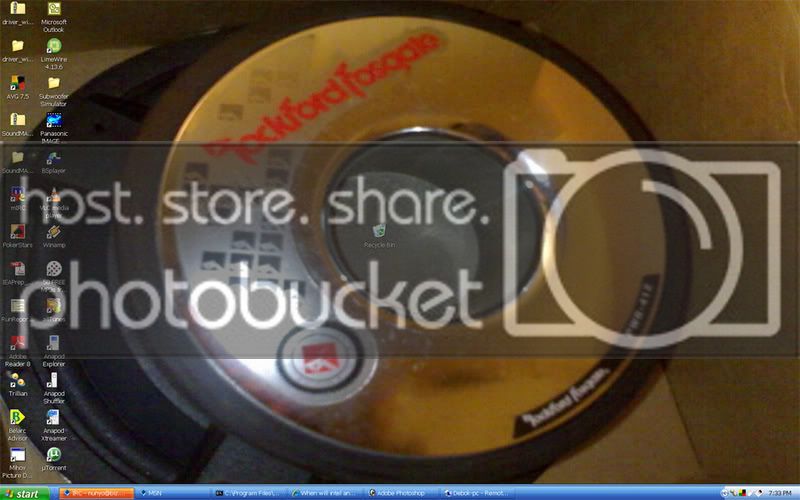
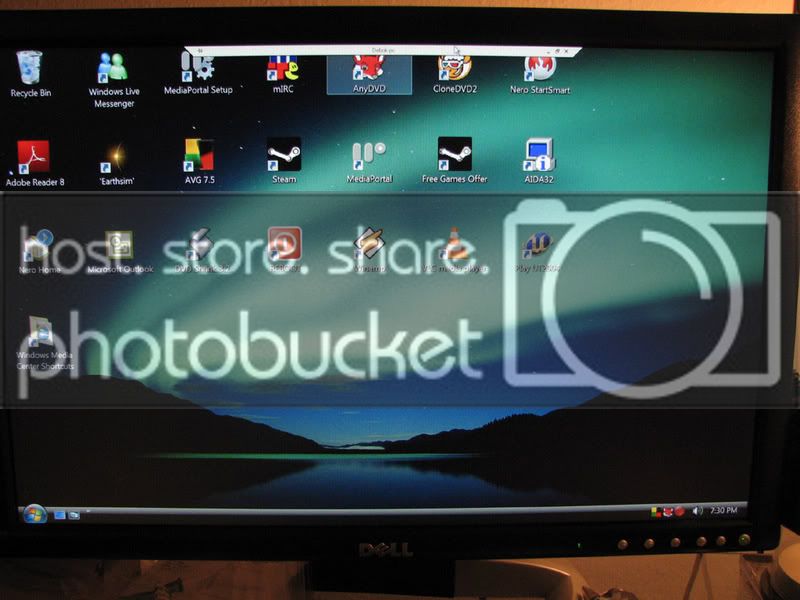
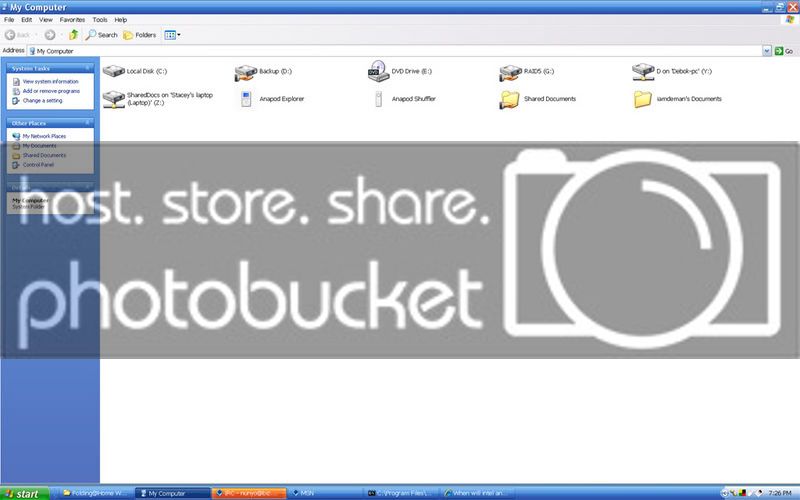
Here is what I see to give you an idea of how it works.

This is the desktop of the machine I am at. the last item on the right in the task bar is the remote desktop connection minimized.

desktop.jpg


When maximized, it is the desktop of my HTPC in the living room.

remotedesktop.jpg


this the the "my Computer" link on the machine I am using. Drives Y and Z aren't on this machine. Y is the storage drive on my HTPC and Z is my wifes laptop. These are virtual drives on this machine since they are mapped through a basic workgroup network. I can read, write, or run from these drives as if they were on this machine.

mappeddrives.jpg


So using my pictoral example you can have the remote torrent machine download files to a storage file or drive and map them as a drive to your local machine and use them however you like. This is how Microsoft IT guys service Windows servers without geting their fat lazy ***** out of their chair in their nice comfy offices.

 
Activity
No one is currently typing a reply...

About this thread

Eugenics

5,000+ posts
Princess
Thread starter
Eugenics
Joined
Location
Arbys
Start date
Participants
Who Replied
Replies
36
Views
497
Last reply date
Last reply from
Eugenics
IMG_20260506_140749.jpg

74eldiablo

    May 22, 2026
  • 0
  • 0
design.jpeg

WNCTracker

    May 22, 2026
  • 0
  • 0

New threads

Top