budahbuddy803
10+ year member
CarAudio.com Veteran
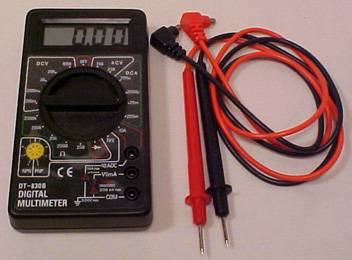
I have never been able to correctly figure out how to use my multimeter for the purpose of setting my gain. With all the reading i have done recently this is what i have come up with, just trying to make sure this is correct.
Turn the knob to 20 DC Volts.
Plug the Red cord into Red
Plug the Black cord into the 10A DC spot.
Is this correct?
Then remove positive speaker wire from amp.
Turn gain all the way down.
Insert Red cord into positive and black cord into negative.
Slowly turn the gain up until desired voltage.
If i want to send my 15" IDQ 600rms @ 2ohm the gain setting tutorial says (600*2)=34.641volts what is the * what does that symbol mean to do?
One last question. My last amp didnt have a subsonic filter. That filters out the lower frequencies right? If thats the case why cant i let my speaker hit all the frequencies and just set the subsonic on as low as it will go? I dont really understand what the subsonic filter is really doing.
Turn the knob to 20 DC Volts.
Plug the Red cord into Red
Plug the Black cord into the 10A DC spot.
Is this correct?
Then remove positive speaker wire from amp.
Turn gain all the way down.
Insert Red cord into positive and black cord into negative.
Slowly turn the gain up until desired voltage.
If i want to send my 15" IDQ 600rms @ 2ohm the gain setting tutorial says (600*2)=34.641volts what is the * what does that symbol mean to do?
One last question. My last amp didnt have a subsonic filter. That filters out the lower frequencies right? If thats the case why cant i let my speaker hit all the frequencies and just set the subsonic on as low as it will go? I dont really understand what the subsonic filter is really doing.