Less is Better?

buy some nice comps that you like for the front and amp them, leave the rear with oem off the HU to see if you like this set up, then disconnect the rear completely or use the fader, see how you like just the fronts, go from there. will just need to read more here and other sites, and then come up with an idea that you think might work, and try it out, lots of people here say they never finish an install because they keep changing their minds about this speaker or sub or amp or whatever comes to mind they want to try.

 
IMO... or rather the way I do it is by putting a good set of comps up front and either a cheaper set of comps or a good set of Coazials for rear fill... I did a front stage only once and I didn't like, spent anothe r$50 for a set of Eclipse Coaxials and was much happier with some rear fill.

Right now I am actualy running TRC.6N's front and rear, I have a little more power going to the rears and I like it. some people disagree with it but I like it and it is my car so.... basicaly I am saying try some stuff adn chose what YOU like...

 
Why wouldn't I have both a componet system up front and some extra sound output coming from the rear? It sounds strange to me not to use all the factory slots.
Why have sound in the rear? Unless you've got a surround sound capable headunit, the only benefit is to the passengers. Your ear lobes block sound from behind, so to add speakers will only help you when you turn your head.

My setup is stock (until I can afford good components) and I still do front only. The rears interfere with the music, and make it not as clear. The rear soundwaves take longer to get to my ears, and I think that causes a delay which I can notice. I feel the music is more clear with front only.

Rears are good if your passengers need the sound, but I'm in car audio for my own ears, not my passengers.

 
Every dollar you spend on amplification for your rear speakers, not to mention the speakers themselves, could be a dollar spend on amplification and better speakers for your front stage. Just like saying 'well, it'd only be a 100$ cheap amp and 100$ cheap speakers'...well, that's 200$ better front speakers that you could have. That's a big step up unless you're already spending 700$+ on front speakers.

Consider that people commonly spend over a thousand dollars on their subwoofer setup - why not spend that kind of money on your fronts too? I mean, your frontstage has to produce a much wider band of sound, and your ears are the most sensitive in the ranges that your frontstage produce.

I still insist that the average cost conscious setup will sound better with a cheap kicker CVR on an old 50$ punch amp, but paired with an awesome well amped set of dynaudio or rainbow front speakers, than the same value setup with a really nice sub setup with some random pioneers up front on 2x50 or 2x100w... people underestimate just how much the fronts matter. Your front speakers should be playing down to 50-60hz with authority. Most people's don't go below 100hz with any authority at all. Of course, to get that kind of response you can't just buy speakers and throw them in...many people are slack on the installation side of things. To get your fronts producing high volumes under 100hz you need to deaden, seal, and reinforce your doors pretty heftily.

 
Being in such a small car as a Mercury Cougar 99' I almost hear my back speakers better the way my seat is positioned. This is with my stock system and while my DEH-6000ub was installed. Trust my, my passengers are my last concern lol I'm looking for something to fit ME. There's no way I'm going to spend more money on my rears then my front at this point but I'm up in the air about my entire approach on the topic. I have spearate threads regarding other aspects that I'm trying to factor "size,quality,brand" just need to make sure its what i need.

 
A good set of fronts will be incredibly loud; it doesn't matter how much closer your rears are to you than the fronts...unless you really do like to hear your music coming from behind you. Personally, I hate that sound.

 
How to convert MTS, M2TS, TS, TP to FCP files?

I have read a good many articles about the difficulties people have had editing video footage in the AVCHD (mts) format that is used by camcorder like Sony HDR-SR7. The main issue I noticed was the probability of editing footage of AVCHD in Final Cut Pro, which is probably the pain many Mac user may suffer.

Before further exploring this problem, we should first get a knowledge of what it is. Just like Final Cut Express, Final Cut Pro is also a professional non-linear editing software developed by Apple Inc, the software logs and captures video onto a hard disk (internal or external), where it can be processed and edited. As we know, Apple Inc upgrade their products regularly, so does it with Final Cut Pro, of course different versions may have different functions, according to the statistics, release by Apple, only Final Cut Pro 6.0.1 or above add capability to transfer the AVCHD footage, besides AVCHD can only work with Intel-based system.

Then how can we edit the footage in MTS format? Actually, there are other formats supported by Final Cut Pro, namely, DV, HDV, MOV, MPEG-4 that we can turn to. That is, convert AVCHD (mts) to one of the mentioned formats for editing.

This is what MTS to Final Cut Pro converter for Mac does, by using the powerful and professional software, you can not only convert MTS to Final Cut Pro supported file format, besides, you are also allowed to customize your file like Encode, Resolution, Frame Rate and Bitrate as you like.

Tutorial

Step by step to convert MTS to Final Cut Pro on Mac

Step 1: Download and install MTS to Final Cut Pro Converter for Mac

The safe and easy way to download and install the software is to do it via our official website http://www.iOrgSoft.com. Then you can run a test. Please don't hesitate to contact us if there is any problem, we are ready to be at your service.

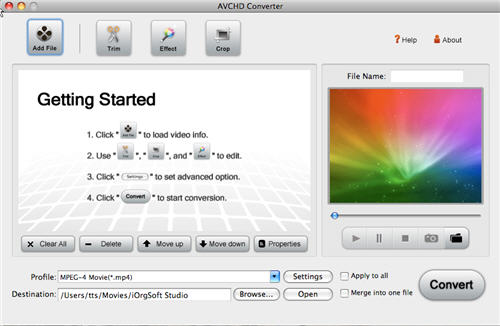
mts-to-fcp.jpg


Step 2: Load file

Click Add File at the top of the panel to browse your computer hard disk to import the files to convert. As batch conversion is supported, you can import a bundle of files at one time.

Step 3: Select output format and directory

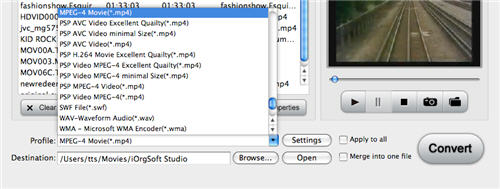
Click the drop-down list of Profile beside Setting tab on the top of the panel to select the output format, it can be either, DV, HDV, MOV, or MPEG-4 depending on your project.

And then click Browse beside Open button to specify a location to store the converted file.

select-format.jpg


Step 4: Video setting

Click Settings on the top of the panel to pop up a Settings window, where you can tweak Encoder, Resolution, Frame rate, Bitrate of the original file.

Step 5: Conversion

After all the required settings have been done, click Convert to start converting automatically. The time taking varies according to the file size and setting you made.

 
Spend everything you have in your amp and speaker budget on the front stage right now. Get good components, deaden the doors, and throw the most power you can afford at them. Better to go 2-3 times RMS ratings then back off on the gain til they sound clean than to try to match RMS ratings exactly. Then take the time and put more money aside for rear speakers but while you do drive it that way and see how you like it.

What I think happens is most people don't invest in anywhere near high enough quality speakers and anywhere near enough power to fill the car with sound on just one set of speakers. This is because they buy into the BS that you shouldn't feed speakers too much over RMS rating. So they think the only way to go now is to add another set of mediocre, underpowered drivers in the rear in addition to the mediocre, underpowered drivers in the front just to get things loud enough.

 
Activity
No one is currently typing a reply...
Old Thread: Please note, there have been no replies in this thread for over 3 years!
Content in this thread may no longer be relevant.
Perhaps it would be better to start a new thread instead.

About this thread

Sweet'n Low

10+ year member
Harshaw
Thread starter
Sweet'n Low
Joined
Location
Springfield-Dayton, OH
Start date
Participants
Who Replied
Replies
24
Views
2,532
Last reply date
Last reply from
eharri3
IMG_20260516_193114554_HDR.jpg

sherbanater

    May 16, 2026
  • 0
  • 0
IMG_20260516_192955471_HDR.jpg

sherbanater

    May 16, 2026
  • 0
  • 0

New threads

Top