
So I managed to get all 6 positions in the car measured.
This is the result screen:
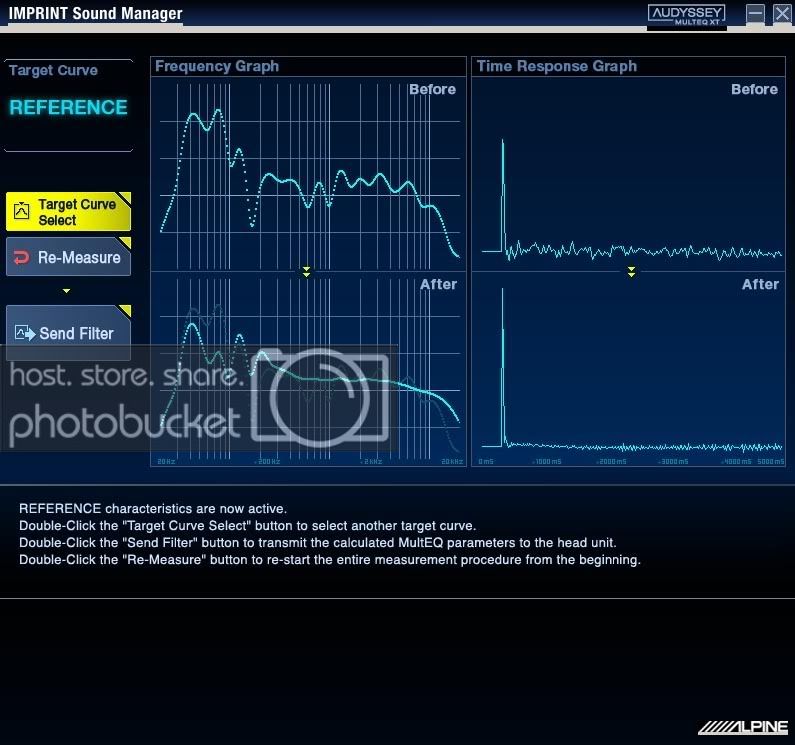
- It flattens the mid-high sections while fixing dips and peaks in the sub 200hz part.
- The subwoofer blends really well and cannot be localized. I can't really figure out the crossover point by ear anymore.
- Sound stage is pushed up high and front.
- Rear-fill speakers do not pull the image back.
Now this is not quite idiot-proof still. Before you start you have to make sure your gains are set properly and to your taste. Although I can set rear-fill speakers gain higher I chose to set them at around 1/4 before the measurement starts. Setting them higher will not pull the imaging back but will rather give more of the wide "rear-fill" effect that makes it a bit harder to localize the front stage. You won't hear vocals coming from the rear and overpowering the front but it still adds up something and it depends on your taste.
Sub gain has to be a bit low. Alpine probably figured that out after printing the manual and added a separate note stating that sub gain has to be at 1/2.
After you're done you will finally see the bass/treble options on the headunit. You can still change sub-level and balance/fade.
The software is made to be used by anyone. It's very simple but unfortunately lacks some important features:
- Once you do the setup, your results are actually stored on the pc (even if alpine say they're not) in a zip file in the alpine directory. But when you want to take new measurements it won't recall your old measurement but will start a new one. Considering it's a lengthy process and needs to be done in quiet environment there should have been a way for you to "continue" measuring next time.
- I don't know how the software does the calculations internally but there should be a way for you to choose what location you want to re-measure. The wizard-style means you can only choose to re-measure your last location or continue to the next one.
- Location order is rather strange too: front-mid, rear-mid, front-left, rear-right, front-right, rear-left. You have to use a tripod and you most likely will use different heights from front to rear so more fiddling with the tripod.
- When you're in the middle of a measurement and say a car drives by and makes some noise you know the noise even for a few seconds will be added to the measurement average so you decide to stop and repeat. Well, there is no stop button. You'll have to wait for it to finish first and re-measure again.
Anyway, most important is that the result is really worth it. Takes away the harshness from bright tweeters and sound is more enjoyable and smooth without anything over-powering anything else. You will want to listen to all your favorite music collection again so hear what you've been missing before. //content.invisioncic.com/y282845/emoticons/smile.gif.1ebc41e1811405b213edfc4622c41e27.gif
This is the result screen:
- It flattens the mid-high sections while fixing dips and peaks in the sub 200hz part.
- The subwoofer blends really well and cannot be localized. I can't really figure out the crossover point by ear anymore.
- Sound stage is pushed up high and front.
- Rear-fill speakers do not pull the image back.
Now this is not quite idiot-proof still. Before you start you have to make sure your gains are set properly and to your taste. Although I can set rear-fill speakers gain higher I chose to set them at around 1/4 before the measurement starts. Setting them higher will not pull the imaging back but will rather give more of the wide "rear-fill" effect that makes it a bit harder to localize the front stage. You won't hear vocals coming from the rear and overpowering the front but it still adds up something and it depends on your taste.
Sub gain has to be a bit low. Alpine probably figured that out after printing the manual and added a separate note stating that sub gain has to be at 1/2.
After you're done you will finally see the bass/treble options on the headunit. You can still change sub-level and balance/fade.
The software is made to be used by anyone. It's very simple but unfortunately lacks some important features:
- Once you do the setup, your results are actually stored on the pc (even if alpine say they're not) in a zip file in the alpine directory. But when you want to take new measurements it won't recall your old measurement but will start a new one. Considering it's a lengthy process and needs to be done in quiet environment there should have been a way for you to "continue" measuring next time.
- I don't know how the software does the calculations internally but there should be a way for you to choose what location you want to re-measure. The wizard-style means you can only choose to re-measure your last location or continue to the next one.
- Location order is rather strange too: front-mid, rear-mid, front-left, rear-right, front-right, rear-left. You have to use a tripod and you most likely will use different heights from front to rear so more fiddling with the tripod.
- When you're in the middle of a measurement and say a car drives by and makes some noise you know the noise even for a few seconds will be added to the measurement average so you decide to stop and repeat. Well, there is no stop button. You'll have to wait for it to finish first and re-measure again.
Anyway, most important is that the result is really worth it. Takes away the harshness from bright tweeters and sound is more enjoyable and smooth without anything over-powering anything else. You will want to listen to all your favorite music collection again so hear what you've been missing before. //content.invisioncic.com/y282845/emoticons/smile.gif.1ebc41e1811405b213edfc4622c41e27.gif





