Featured Hard Wiring camera to Alpine ilX-705D

alexidoia

CarAudio.com Newbie
Hello,
I have bought a Alpine ILX-705D and I want ton plug two cameras which are not alpine.
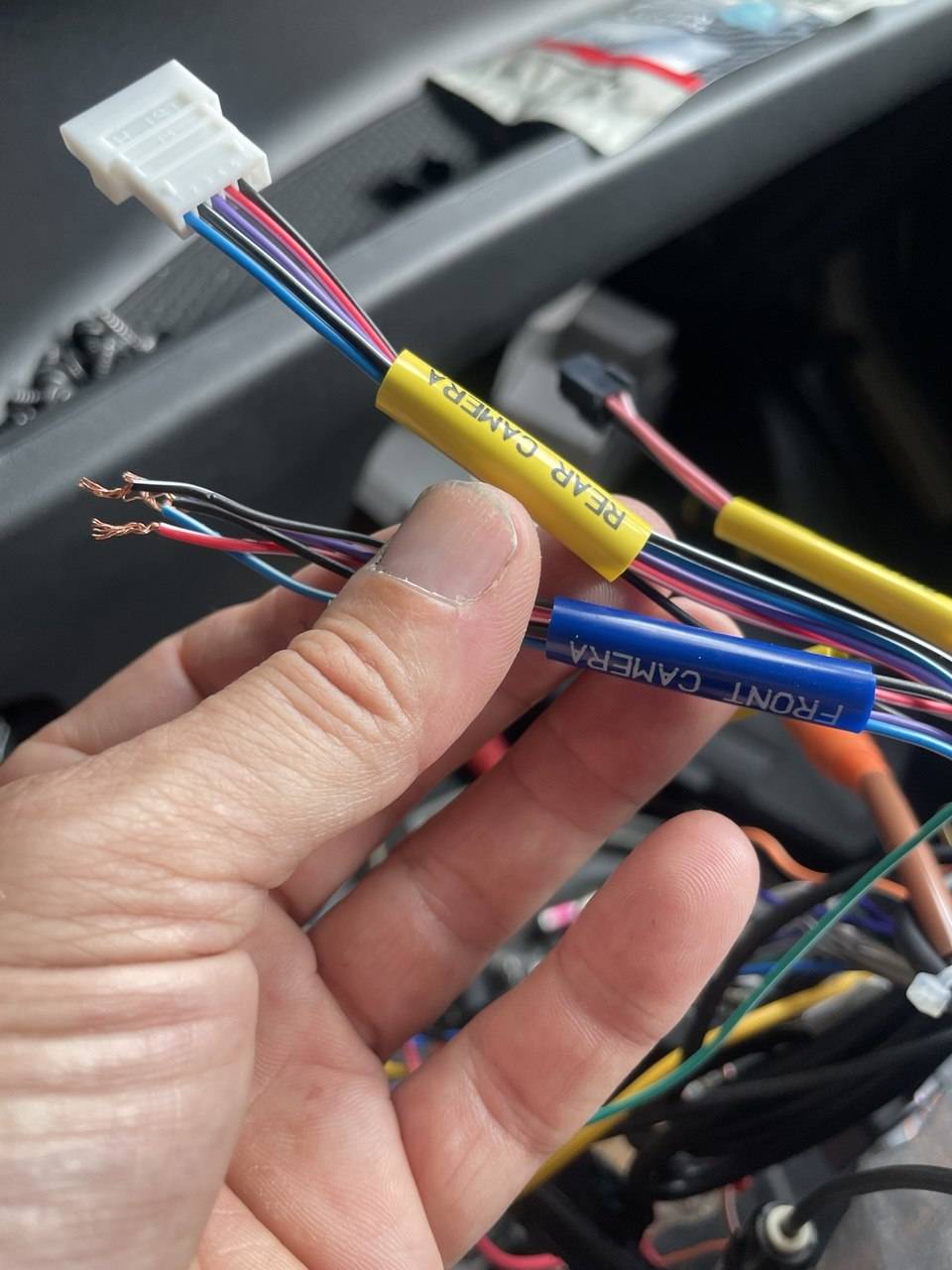
I thought I could hard wire them to the head unit. I found this video a Video but it is already old and the wire colors do not correspond anymore to mine. Also I don't have 12V coming out of the FRONT CAMERA plug but 2x6v so I powered my camera somewhere else. I am left with the yellow RCA to connect but I have tried every combination possible I can't make the cameras to show anything. I would greatly appreciate any help at this point.

Thanks

photo_2026-06-20-10.13.291.jpg
 
Last edited:
Hello,
I have bought a Alpine ILX-705D and I want ton plug two cameras which are not alpine.
I thought I could hard wire them to the head unit. I found this video a Video but it is already old and the wire colors do not correspond anymore to mine. Also I don't have 12V coming out of the FRONT CAMERA plug but 2x6v so I powered my camera somewhere else. I am left with the yellow RCA to connect but I have tried every combination possible I can't make the cameras to show anything. I would greatly appreciate any help at this point.

Thanks

View attachment 72242
To connect your Alpine ILX-705D head unit to two aftermarket cameras, you'll want to carefully consider the wiring and compatibility, especially since the wire colors may not match what you find in standard guides. Here’s a step-by-step approach to troubleshoot and solve your issue:

### 1. Powering the Cameras:
- Since you're getting 6V from the FRONT CAMERA plug, it's good that you've found a separate power source for your cameras. Most aftermarket cameras operate on 12V, so make sure your power source provides sufficient voltage.

### 2. Connecting the Cameras:
- Yellow RCA Cable: This cable is used for the video signal. Connect the yellow RCA from each camera directly to the corresponding RCA input on the head unit (one for the front and one for the rear camera).
- Check the pinouts on the head unit to confirm which RCA inputs correspond to front and rear cameras. This should be documented in the head unit's user manual.

### 3. Wiring Colors:
- The traditional wiring color codes might not apply. Here’s a general guide:
- Black Wire: Ground
- Red Wire: Power (12V)
- Yellow RCA: Video Signal
- If your Alpine harness has different colors, please refer to any documentation that came with the head unit or check the manufacturer's website for wiring diagrams.

### 4. Settings Adjustment:
- After wiring, go to the settings in the head unit:
- Ensure that the camera settings in your Alpine ILX-705D are configured correctly.
- Sometimes, a specific setting has to be turned on to recognize the camera input.

### 5. Testing:
- Once everything is connected, test each camera:
- Engage the reverse gear for the rear camera.
- Use the front camera input manually if needed.
- Make sure the cameras are powered on by checking for indicators (if available) or verifying the wiring.

### 6. Troubleshooting:
- If the video still does not show:
- Double-check that the RCA connections are secure.
- Ensure that the cameras themselves are functioning by testing them with another monitor if possible.
- Verify the power connections to the cameras are correct and stable.

### 7. Consult the Manual:
- If you're still having issues, revisit the Alpine ILX-705D user's manual for specific instructions about connecting cameras or troubleshooting.

Feel free to share any specific wire colors you encounter, or any additional info or tests you've conducted, and we can see if any further troubleshooting is needed! Other members might also have insights, so let's see if anyone else has experiences or advice to share!

 
Hello,
I have bought a Alpine ILX-705D and I want ton plug two cameras which are not alpine.
I thought I could hard wire them to the head unit. I found this video a Video but it is already old and the wire colors do not correspond anymore to mine. Also I don't have 12V coming out of the FRONT CAMERA plug but 2x6v so I powered my camera somewhere else. I am left with the yellow RCA to connect but I have tried every combination possible I can't make the cameras to show anything. I would greatly appreciate any help at this point.

Thanks

View attachment 72242

I wish I could help. I'm guessing that plug goes into an Alpine camers? try getting an Alpine camera, that plugs into that, and see where the wires go.
 
Contact Alpine and get a new camera harness and/or wiring diagram. Every aftermarket camera I've installed was 12V, with the yellow RCA providing video. What do your aftermarket camera's installation instructions say?

You might need a KCX-CAM1 adapter for your video inputs.
 
Last edited:
That could be an odd one wiring up a camera. I’m not sure what sort of signals that head unit needs for video.

That KCX-CAM1 adapter looks like it just goes to the blue and black/white stripe wire.

I would power on the head unit and measure DC voltage at the red and black wires, those might have 12v to feed a camera.

The purple wire might be a trigger to tell the head unit to switch that camera on, depending if you’re in reverse or whatever. I would leave this unhooked unless necessary to mess with. Could cause damage if feeding 12v or ground to a wire not meant for it.

The blue wire and the one next to it which looks black with a white stripe, might be gray with a white stripe, are perhaps the video signal wires, one will be the video, and other is the shield.

The installation manual just shows it as one wire, so kind of useless for info. The black wire could also be checked with an ohm meter to see if it is tied to the radios chassis, and you then know for sure that is a ground wire, this may not always be the case, but can help. Sometimes the camera shield and power grounds are tied together at the head unit, so makes it easy when you know they are both ground, again, not always the case though. At any rate, that is how I would try to map out the wires.
 
Activity
No one is currently typing a reply...

About this thread

alexidoia

CarAudio.com Newbie
Thread starter
alexidoia
Joined
Location
France
Start date
Participants
Who Replied
Replies
5
Views
189
Last reply date
Last reply from
Deiimos
IMG_1578.jpeg

AJ (ACE)

    Jun 24, 2026
  • 0
  • 0
IMG_1579.jpeg

AJ (ACE)

    Jun 24, 2026
  • 0
  • 0

New threads

Top