Correct way to format USB for Eclipse

dvrmstrng
5,000+ posts

...
i have a cd7200MKII and im using a USB thumb drive...

currently my file setup looks like this

F: > Documents, Bootex, Eclipse > then folders with my files in them

for some reason when i go to go through the files in the Head Unit there are numbers all over the place etc, the files arent organized anything like they are on the thumb drive..

is there a right or wrong way to set it up?

 
I have no experience with any USB enabled head units, but I suggest doing :

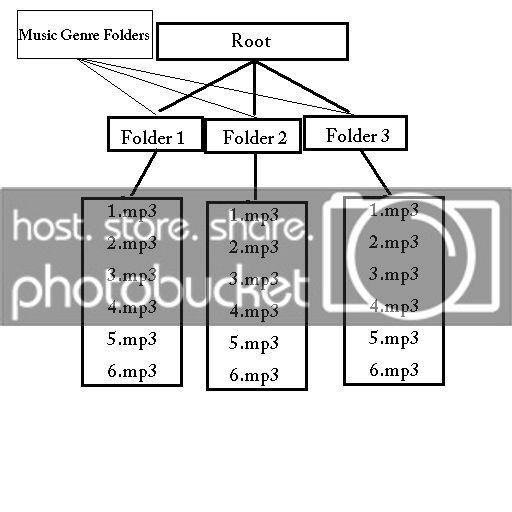
Music.jpg


Music Genre Folders (I.E. Rap, Rock, Country, Jazz, ect. ect.) Placing your Mp3's in their respective genre folders. If you have your MP3's in folders where a single folder is just for a single artist, you can put your folders in there, instead of just copying the MP3s. This way, the character length for the complete file name (I.E. E:\My Music\Rock\Hinder\Get Stoned.mp3) will not exceed the maximum character length that the head unit is limited to. Just a suggestion, as I have never played with a USB enabled head unit, so I could be wrong, and that won't work. You must limit the number of files to 3,000 also, so if you have other documents on the drive, that may be one of the problems?

 
I have not checked Eclipse, but at least three other HU-manufacturers products, and you might find what you are looking for in your manual, but what I've seen so far, and can remember is that you have to use any of FAT 8/16/32 formats. Some HUs even put a maximum number of folders and songs in folders etc, etc. I hope you will get it sorted out, it is so frustrating when "simple" things doesn'w work as you would have expected.

I did not like my crappy reply, so I went to the Eclipse web pages and found the following:

About playable USB memory standards

Supported File System: FAT 12/16/32

Playable Audio Format: MP3/WMA

Max.Current: 500mA

Compatibility: USB1.1/2.0

Correspondence: USB mass storage class

Playable MP3 file standardsSupported standards:

MPEG-1

MPEG-2

MPEG-2.5

Audio Layer III

Supported sampling frequencies:

MPEG-1:32, 44.1 (kHz)

MPEG-2:16, 22.05, 24 (kHz)

MPEG-2.5:8, 11.025, 12 (kHz)

Supported bit rate:

MPEG-1: 32, 40, 48, 56, 64, 80, 96, 112, 128, 160, 192, 224, 256, 288, 320 (kbps)

MPEG-2: 8, 16, 24, 32, 40, 48, 56, 64, 80, 96, 112, 128, 160 (kbps)

MPEG-2.5: 8, 16, 24, 32, 40, 48, 56, 64, 80, 96, 112, 128, 160 (kbps)

*1 Supports VBR. (8~320 kbps)

*2 Does not support free format.

Supported channel modes:

monaural, stereo, joint, dual

Playable WMA file standardsSupported standards:

WMA Ver. 7

WMA Ver. 8

WMA Ver. 9

Supported sampling frequencies:

8, 11.025, 12, 22.05, 32, 44.1 (kHz)

Supported bit rate:

8, 16, 24, 32, 40, 48, 64, 80, 96, 128, 160, 192 (kbps)

*1 Supports VBR (40~95 kbps)

*2 Does not play DRM.

Supported channel modes:

monaural, stereo

Format of USB memoryThe USB memory format must be ISO9660 Level 1 or Level 2.

Standards are as follows:

Maximum directory layers:

8 layers

Maximum characters for folder names/file names:

128 (including “.” and 3 letter file extension)

Allowable characters for folder names/file names:

A~Z, 0~9, _ (underscore)

Number of files possible on a single USB memory:

3000

Total number of folders possible on a single USB memory:

999

Maximum folders this main unit can recognize:

1000*

*1 A root directory is counted as one folder.

There is an image that I cannot copy, you will find an example how to set up your stick here:

http://www.eclipse-web.com/download/manual/cd7200mkII_e/audio/contents/1636.html

 
I have not checked Eclipse, but at least three other HU-manufacturers products, and you might find what you are looking for in your manual, but what I've seen so far, and can remember is that you have to use any of FAT 8/16/32 formats. Some HUs even put a maximum number of folders and songs in folders etc, etc. I hope you will get it sorted out, it is so frustrating when "simple" things doesn'w work as you would have expected.
For the eclipse deck, you can have no more than 7 sub folders, and no more than 3,000, and yes, you do have to have it formatted to Fat 12/16/32, which would be the main problem, if it is formatted to NTFS. But it would most likely NOT read it at all?

 
Activity
No one is currently typing a reply...
Old Thread: Please note, there have been no replies in this thread for over 3 years!
Content in this thread may no longer be relevant.
Perhaps it would be better to start a new thread instead.

About this thread

dvrmstrng

5,000+ posts
...
Thread starter
dvrmstrng
Joined
Location
DE
Start date
Participants
Who Replied
Replies
5
Views
2,001
Last reply date
Last reply from
95BlackGA
IMG_20260516_193114554_HDR.jpg

sherbanater

    May 16, 2026
  • 0
  • 0
IMG_20260516_192955471_HDR.jpg

sherbanater

    May 16, 2026
  • 0
  • 0

New threads

Top