Capitalized on Lenovo Deal

Since most external drives are 5400 rpm anyway you wont save time backing up from your laptop to an external either
7.2k notebook drive and external enclosure..

And if you're ripping DVDs you'll probably end up with a large amount of data to back up or tranfer to another drive eventually.

 
7.2k notebook drive and external enclosure..
And if you're ripping DVDs you'll probably end up with a large amount of data to back up or tranfer to another drive eventually.
just stating most externals are 5400rpm since they dont require dual usb ports or an external power source.

if your gonna buy a 7200rpm external may as well just swap it out of the case with the 5400rpm internal anyway cause you will only be as fast as the fastest drive in the system so may as well use the fastest drive in the laptop

i just rip the movie to the partition and folder they will be played on, but when i download a large file in .rar format and then have to uncompress it thats when the extra speed is noticable

shaving off 4 seconds on a 4gb file a few times a day, losing valuable battery life, increasing heat and noise and paying more for the same storage space just doesn't make sense for a basic laptop. however, if your using the laptop as a 24/7 desktop replacement then it makes more sense

 
just stating most externals are 5400rpm since they dont require dual usb ports or an external power source.
if your gonna buy a 7200rpm external may as well just swap it out of the case with the 5400rpm internal anyway cause you will only be as fast as the fastest drive in the system so may as well use the fastest drive in the laptop

i just rip the movie to the partition and folder they will be played on, but when i download a large file in .rar format and then have to uncompress it thats when the extra speed is noticable

shaving off 4 seconds on a 4gb file a few times a day, losing valuable battery life, increasing heat and noise and paying more for the same storage space just doesn't make sense for a basic laptop. however, if your using the laptop as a 24/7 desktop replacement then it makes more sense

Indeed. 7.2K external and internal is the way to go.

Thats what i was doing all day.. pulling the 5.4K out of my 1210 and replacing it with this:

http://www.storagereview.com/HTS722020K9A00.sr?page=0%2C0

Then i put the 5.4K into my old laptop and took the 7.2K drive from it and put it into an external enclosure.

7.2K internal and external //content.invisioncic.com/y282845/emoticons/wink.gif.608e3ea05f1a9f98611af0861652f8fb.gif

I'm not too worried about battery life because i never come close to draining the battery in normal use..

 
Indeed. 7.2K external and internal is the way to go.
Thats what i was doing all day.. pulling the 5.4K out of my 1210 and replacing it with this:

http://www.storagereview.com/HTS722020K9A00.sr?page=0%2C0

Then i put the 5.4K into my old laptop and took the 7.2K drive from it and put it into an external enclosure.

7.2K internal and external //content.invisioncic.com/y282845/emoticons/wink.gif.608e3ea05f1a9f98611af0861652f8fb.gif

I'm not too worried about battery life because i never come close to draining the battery in normal use..
I didn't expect it to be a huge debate! I think I'm going to get this Iomega Media HD though, but that would be the only transferring I'd do. Not only am I used to USB 1.1 speeds (i don't have 2.0) but i'm used to slowness. I have the money to buy one, but I wanted to see if I even need one before i spent the money.

If i need one, I'll get one. Simple as that!

 
//content.invisioncic.com/y282845/emoticons/fyi.gif.9f1f679348da7204ce960cfc74bca8e0.gif 5.4K drives cause the cancer and give u teh AIDS //content.invisioncic.com/y282845/emoticons/fyi.gif.9f1f679348da7204ce960cfc74bca8e0.gif
 
I looked at it, but it didn't seem like much of a difference. I still would have got the same stuff, but it was more expensive by about 150. My parents are buying it, so, well theirs your answer.
Thanks for the vista tips too!

edit:

the advance hard drive thing. When I turn the computer off, do I lose the memory? It says If the power goes out then I'll lose stuff. But will it still happen if i tell it to turn off?
Write Caching
Caching reads from the hard disk and caching writes to the hard disk are similar in some ways, but very different in others. They are the same in their overall objective: to decouple the fast PC from the slow mechanics of the hard disk. The key difference is that a write involves a change to the hard disk, while a read does not.

With no write caching, every write to the hard disk involves a performance hit while the system waits for the hard disk to access the correct location on the hard disk and write the data. As mentioned in the general discussion of the cache circuitry and operation, this takes at least 10 milliseconds on most drives, which is a long time in the computer world and really slows down performance as the system waits for the hard disk. This mode of operation is called write-through caching. (The contents of the area written actually are put into the cache in case it needs to be read again later, but the write to the disk always occurs at the same time.)

When write caching is enabled, when the system sends a write to the hard disk, the logic circuit records the write in its much faster cache, and then immediately sends back an acknowledgement to the operating system saying, in essence, "all done!" The rest of the system can then proceed on its merry way without having to sit around waiting for the actuator to position and the disk to spin, and so on. This is called write-back caching, because the data is stored in the cache and only "written back" to the platters later on.

Write-back functionality of course improves performance. There's a catch however. The drive sends back saying "all done" when it really isn't done--the data isn't on the disk at all, it's only in the cache. The hard disk's logic circuits begin to write the data to the disk, but of course this takes some time. The hard disk is using a variant of that old "the check is in the mail" trick you might hear when you call someone to remind them of that loan they were supposed to pay back three weeks ago. :^)

Now, this isn't really a problem most of the time, as long as the power stays on. Since cache memory is volatile, if the power goes out, its contents are lost. If there were any pending writes in the cache that were not written to the disk yet, they are gone forever. Worse, the rest of the system has no way to know this, because when it is told by the hard disk "all done", it can't really know what that means. So not only is some data lost, the system doesn't even know which data, or even that it happened. The end result can be file consistency problems, operating system corruption, and so on. (Of course, this problem doesn't affect cached reads at all. They can be discarded at any time.)

Due to this risk, in some situations write caching is not used at all. This is especially true for applications where high data integrity is critical. Due to the improvement in performance that write caching offers, however, it is increasingly being used despite the risk, and the risk is being mitigated through the use of additional technology. The most common technique is simply ensuring that the power does not go off! In high-end server environments, with their uninterruptible power supplies and even redundant power supplies, having unfilled cached writes is much less of a concern. For added peace of mind, better drives that employ write caching have a "write flush" feature that tells the drive to immediately write to disk any pending writes in its cache. This is a command that would commonly be sent before the UPS batteries ran out if a power interruption was detected by the system, or just before the system was to be shut down for any other reason.

Because laptops have a battery, you'll never lose power, so it's not an issue. It has nothing to do with you turning your computer on or off (though it will turn on and off faster because of write caching). Believe me, if your hard drive supports write-caching, it is well worth enabling it on a laptop and you incur no risks as long as you keep your battery in your laptop.

 
Example :


//content.invisioncic.com/y282845/emoticons/frown.gif.a3531fa0534503350665a1e957861287.gif

and i think with the new 7.2 drives battery life difference is negligble...

besides if you want max battery life why didn't you get a 9 cell batt?
Ouch ...
My flash drive is faster than that //content.invisioncic.com/y282845/emoticons/tongue.gif.6130eb82179565f6db8d26d6001dcd24.gif

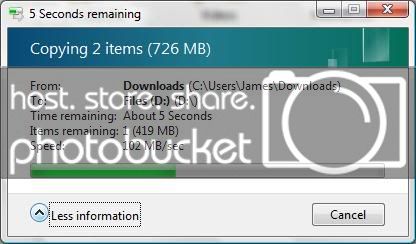
This is my 500 GB Seagate 7200.11 w/ 32 MB cache:

102MBps.jpg


Mind you, that's just copying a pair of fairly large files vs. many small ones, but still ...

 
Activity
No one is currently typing a reply...

Similar threads

About this thread

konechiwa

10+ year member
Jeepers
Thread starter
konechiwa
Joined
Location
Seattle, WA
Start date
Participants
Who Replied
Replies
41
Views
856
Last reply date
Last reply from
Jmac
IMG_20260506_140749.jpg

74eldiablo

    May 22, 2026
  • 0
  • 0
design.jpeg

WNCTracker

    May 22, 2026
  • 0
  • 0

New threads

Top