Amp Gain

bgowdy
5,000+ posts

Heroes are remembered, but legends never die
Trying to set a amp gain. Been reading for like 5 hours. all the threads say some thing different than

ive read. im tryna set a PA BB2400.1 to a HDC3 18. I always keep my bass on my HU on 0(wont go any lower) i dont know were my LOWS setting should be and my subwoofer out put on negative-10 daily and turn it to negative-5 when i compete.I dont use loud feature on the HU. I have my gain remote all the way down(right now to set gain on amp) just tryna see were i should set gain on amp & i guess figure out were my lows setting(on HU) should be?

 
there's a ton of different info on gain setting procedures on the net, many of them misleading or incorrect, so i understand your frustration. in my opinion, jl audio's tutorial is a good one. it should be sufficient for most users, without the use of expensive test equipment, like an o-scope. you will need a dmm, however. they should be relatively inexpensive to get.

http://mobile.jlaudio.com/tutorials/Input_Sensitivity/gainSetting.pdf

in a nutshell, raise hu volume to 3/4, slowly increase gain on amp until calculated voltage is met. do this with all amps in your system. now level match all your amp's gain, by turning down whatever is too loud. for example, if the subwoofer is overpowering your front speakers, reduce the gain on that amp. do not raise gain on any of them. the settings made with the dmm is your maximum unclipped signal out of the amp.

personally, i prefer to have each speaker connected during testing. also, jl's site lists desired voltage for their amps only. not to worry, though, a simple formula will allow you to determine the voltage on your amp. v = square root of (power x resistance). so in your case, your amp is rated at 2400w rms at 1 ohm. i'm going to assume your audioque sub is the dual 2 ohm version. with the coils wired in parallel to 1ohm, that's 2400 x 1, take the square root of that, and you get roughly 49v. that's where you want it set at. keep in mind, when setting gain on multi channel amps, use power output of each channel, not the total power of the amp.

hope this helps, and hope i haven't confused you any further.

 
as for your hu settings, before setting the gains on the amp, keep the subwoofer output level to zero (that's all the way to max - don't worry, the sub level control is used to actually decrease gain, not increase it, as you might see from the negative numbers). in your system, i would set up gain on all amps, then use the hu's sub output level control to decrease the gain to blend the output of your mid/high speakers with your subwoofer.

 
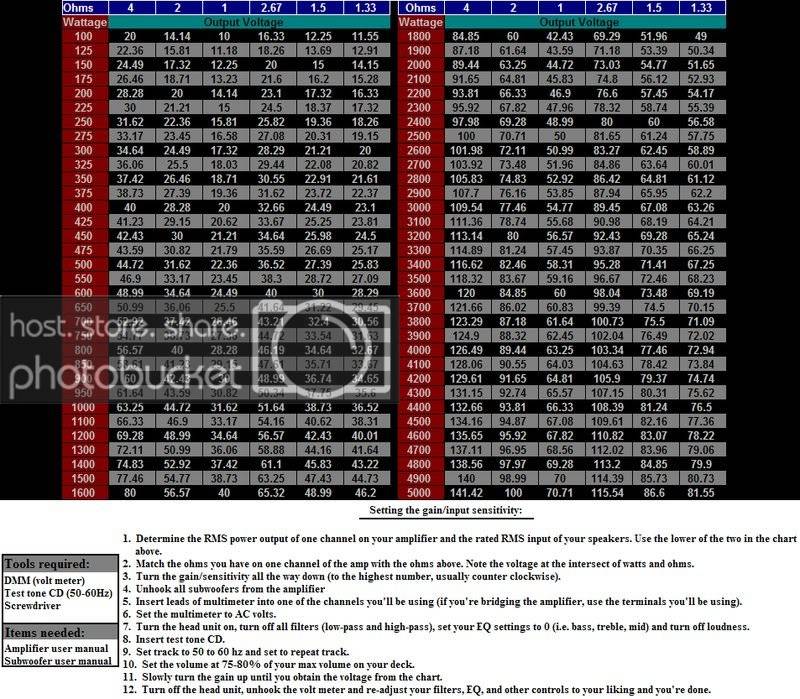
RMSchart.jpg
 
That chart doesn't work for several reasons. First, some amps will change their output depending if there's a load present. It's why you can O-scope an amp, hook up your drivers, and still clip them. Secondly, unregulated power supplies will make more power if the vehicle's voltage increases.

That chart should only be used if you're using a very tightly regulated amp and you're 100% sure it does rated power and not more.

If you're using an unregulated amp, sine waves at 50hz & 1khz & a good ear should be enough to properly set the gains. It's much easier to hear clipping when using sine waves than it is music.

 
There are those of us who go by numbers, and those of us who go by ear. If you aren't able to tell the difference between normal signal and clipped or distorted signal by ear then go by the numbers.

 
Activity
No one is currently typing a reply...
Old Thread: Please note, there have been no replies in this thread for over 3 years!
Content in this thread may no longer be relevant.
Perhaps it would be better to start a new thread instead.

About this thread

bgowdy

5,000+ posts
Heroes are remembered, but legends never die
Thread starter
bgowdy
Joined
Location
Campbellsville, Ky
Start date
Participants
Who Replied
Replies
9
Views
1,029
Last reply date
Last reply from
dipitydoo
IMG_20260516_193114554_HDR.jpg

sherbanater

    May 16, 2026
  • 0
  • 0
IMG_20260516_192955471_HDR.jpg

sherbanater

    May 16, 2026
  • 0
  • 0

New threads

Top