Rockford 2CH Amplifier wiring to single sub

AL210

Member
57
0
PA
I just purchased a refurbished Rockford Fosgate P500-2 2 channel amplifier. This amplifier is 2 ohms per channel 250watts or 4 ohms bridged 500 watts.

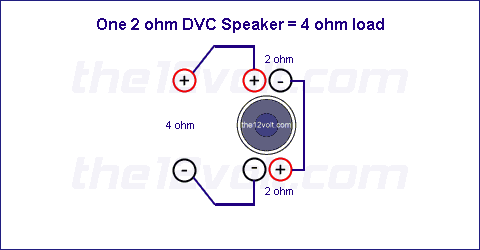
I have it wired bridged to an Alpine SWS-10D2 sub wired in series for the 4 ohm load. I have 4 gauge wire to my amp but get a protect light when hitting hard.

My question is should I be better off running the amp in 2 channel mode to each voice coil in the sub separately? The voice coils are only rated at 300RMS and I'm thinking because I have them in series they are getting up to 500rms from my amp bridged. If they were separately wired to each channel then I would have 250 watts to each voice coil max and be under their 300watt rating. Right or am I way of base?

thanks for your response.

 
do not run it in 2 ch mode. left and right signal out of the amp is going to be 2 different signals aka stereo. running how you have it is the proper way. if it is a 10d2 and not a 1022 model number then they actualliy call for 500 rms

 
bridge the amp to run 4 ohm and you will get 500watts

1_2ohm_dvc_4ohm.gif


The sub's power rating is total, not per coil. How did you set the gain on the amp? Maybe you just need to turn it down a bit.
I set the gain on the amp @ 50 percent or half way. I have my subwoofer out from my head unit at +3 output with 100hz crossover. This seems to be good bass for mixing with my front speaker.

 
Half way on the gain means absolutely nothing. Gain settings are relative to the output signal from the head unit and if your head unit is producing more voltage than is needed for the gain setting you have, you will have clipping, which means heating up and throwing the amp into protect.

You need to use a scope, a DD-1 or a DMM in order to properly set the gains. If you use a DMM and you don't know where the head unit clips, set the volume of the head unit at no more than 50%.

With the subwoofer disconnected, play a flat (0db) 40hz tone through the head unit with all tone controls flat and with the amp gain turned all the way down. Put the probes of the meter on the speaker outputs of the subwoofer amp and set the meter to AC voltage. Turn the gain up until you see 44 volts on the meter. That will be as close to accurate as you can get with a meter and without knowing when your HU clips.

If you post what your head unit is, someone else may know what volume level that model clips at and that will help to get your gain set properly.

If you can't or won't do the above, no one can help you with this problem, because it's impossible to shoot trouble on an amplifier that isn't hooked up correctly.

As for running the amp in two channel mode... if your sub out signal is mono (which is the norm), then you can run it in stereo mode with one channel to each coil but, that's useless because the amplifier is going to produce the same amount of power at 2 ohms in stereo as it does with 4 ohms bridged. Neither arrangement will net you more or less power to the coils and neither will save you from going into protect if you're asking the amp to produce more than it can via improper gain settings.

Oh and, one simple way to find out if the gains are set too high (but not 100% accurate) is to play a clean music source like a cd and monitor the maximum volume you can use on the head unit. If your head unit's volume control tracks from 0-60, for instance, and the max setting you can use is at or less than half (30), you have the gains set too high. On any quality aftermarket head unit, you should be able to raise the volume level to ~90% (54 for a 0-60 volume control) before you start to clip or hear distortion. But again, that isn't an accurate way to check, it's just a simple test.

Also... go check ALL of your power connections to the amp, from battery to ground. Make sure the ground for the amp is tight, that the metal under it is clean (no paint, rust, etc.) and that it is an adequate location. i.e. a thick area of the actual body of the car and not a seat or seatbelt bolt. If you've always had this problem, the ground may need to be relocated.

 
measure the voltage on your battery when the amp goes into protect,

my guess is that you are dropping below 12v or whatever the protect is set at and tripping it off.

This could be fixed with bigger wire, but at 500 rms I would try the big 3 first. 4 gauge should be enough depending on how long your wires are

How big is your ground wire? could you show us a picture of your ground connection?

another possibility is that you have your gain set way too high and you are expecting too much from that amplifier

 
Voltage to the amp is a likely issue indeed. Your battery could be a culprit also. Get a voltage meter and see what the amp is seeing when the bass hits.

 
I have a good Fluke DMM I use for work. I measured the voltage at my battery at 14.3 with dips down to 14.1 when the amp hits hard like a kick drum beat. I then measured the terminals right on the amp and got the same readings. I turned things up a bit to where the amp goes into protect on a big kick drum beat and measured 14.1 volts when it goes into protect. //content.invisioncic.com/y282845/emoticons/uhoh.gif.c07307dd22ee7e63e22fc8e9c614d1fd.gif

My ground wire is 4 awg and is approx 2 feet long. I do have it connected to the bolt that mounts my back seat to the floor. I really made sure I cleaned all the connections up with sand paper so their we're no paint or anything but I'm feeling from the answers that this could be it.//content.invisioncic.com/y282845/emoticons/uhoh.gif.c07307dd22ee7e63e22fc8e9c614d1fd.gif

I do have access to a scope from work for setting up the gains. Didn't know that these gain settings would be that critical.//content.invisioncic.com/y282845/emoticons/redface.gif.62fdbfe1a101588a808c4cff71bcb942.gif

 
Activity
No one is currently typing a reply...
Old Thread: Please note, there have been no replies in this thread for over 3 years!
Content in this thread may no longer be relevant.
Perhaps it would be better to start a new thread instead.

About this thread

AL210

Member
Thread starter
AL210
Joined
Location
PA
Start date
Participants
Who Replied
Replies
11
Views
1,101
Last reply date
Last reply from
maylar
IMG_20260516_193114554_HDR.jpg

sherbanater

    May 16, 2026
  • 0
  • 0
IMG_20260516_192955471_HDR.jpg

sherbanater

    May 16, 2026
  • 0
  • 0

New threads

Top