
How to split Blu-ray by chapters?
For its excellent high definition video quality, Blu-ray is becoming more and more popular. You must have purchased plenty of Blu-ray movies, District 9, The Reader, The Pursuit of Happiness, Revolutionary Road, Brave Heart, The Lord of the Rings, Roman Holiday, The Wizard Of Oz, …the latest ones or the classic ones may all in your collection. While the Blu-ray rippers in the market are not as many as common DVD rippers, so I’m sure some of you have met setbacks while trying to split Blu-ray movies to do other use. Do not feel frustrating from now on, since this thread will present you how to split Blu-ray by chapters step by step, just get what you need from it.
Step 1: Download, install and launch Pavtube Blu-Ray Ripper
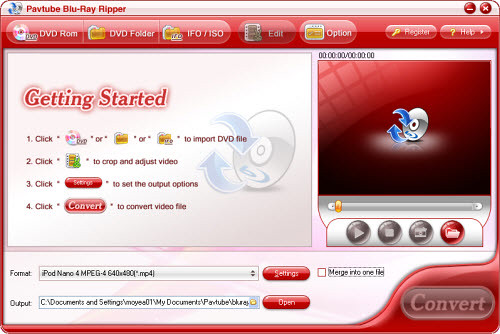
Its main interface is as follow, there are three ways to add Blu-ray movie, namely via “DVD Rom”, “DVD Folder”, and “IFO/ISO”:
Step 2: Select output format and set destination folder
After importing Blu-ray movie, now you can click the drop-down list of “Format” to select the output format according to your end use. For example, import to iPod, iPhone, PSP, BlackBerry for playback you can select MP4; insert to PowerPoint for presentation you can select WMV and MPG; input to Windows Movie Maker for editing you can select WMV; upload onto YouTube you can select FLV, AVI, 3GP, etc. Meanwhile, you are allowed to set the save path of the converted files, just click the folder icon in the opposite side of “Output” to specify it. Moreover, if you want the different chapters to be joined into one file, you can tick “Merge into one file” to achieve it.
Step 3: Check split chapters of Blu-ray
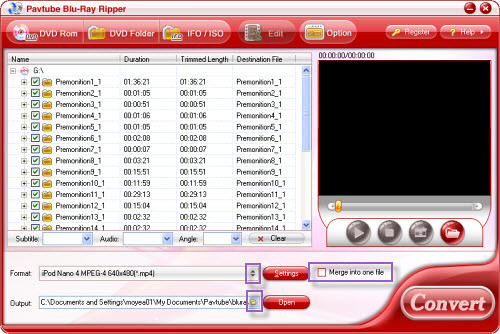
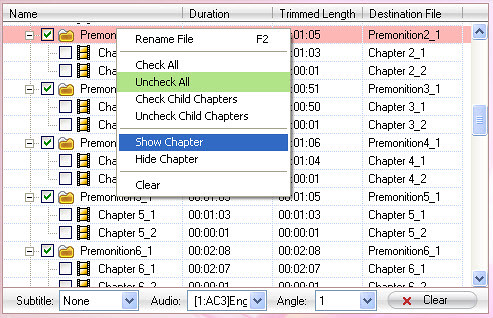
Pavtube Blu-Ray Ripper check and hide all the chapters by default, in order to make it easy to select chapters which you want to split, you can put your cursor on the title of any file, and right-click on it, then the following interface will show up, afterwards, check “Uncheck All” and “Show Chapters”, and then tick the check box before the chapters which you need rip.
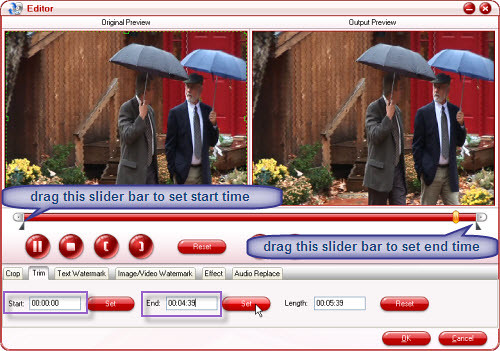
Furthermore, if you want to split your Blu-ray movie to a more accurate duration, you can press button “Edit”, and then click tag “Trim” to do selection. There are two ways to realize it: insert your specified start time and end time into the text box after “Start” and “End” respectively, and then press “Set” button to apply; drag the slider bars in the timeline to set start time and end time.
Step 4: Convert
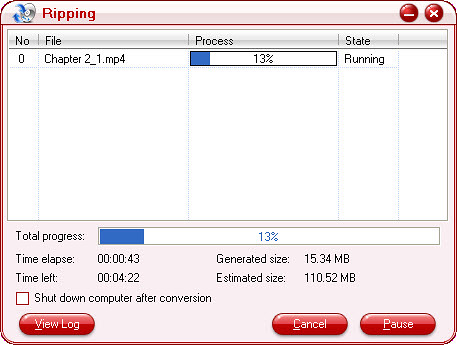
As soon as all the above settings are completed, finally, you can click “Convert” to start Blu-ray splitting. Do remember hit button “Start” in the following pop-up window, after that, ripping work will go ahead, at the same time, the “Start” button will change to “Pause”. It is easy to find that this interface provide you with ripping info as much as possible, including splitting process, time elapse, time left, generated size, estimated size, so that you can manage your time and disk space properly.
After the ripping is done, you can click “Open” button to get the resulted files with ease, also, it’s your business to do whatever you like with the split Blu-ray files, wish you can get what you want from my post. Good luck!
For its excellent high definition video quality, Blu-ray is becoming more and more popular. You must have purchased plenty of Blu-ray movies, District 9, The Reader, The Pursuit of Happiness, Revolutionary Road, Brave Heart, The Lord of the Rings, Roman Holiday, The Wizard Of Oz, …the latest ones or the classic ones may all in your collection. While the Blu-ray rippers in the market are not as many as common DVD rippers, so I’m sure some of you have met setbacks while trying to split Blu-ray movies to do other use. Do not feel frustrating from now on, since this thread will present you how to split Blu-ray by chapters step by step, just get what you need from it.
Step 1: Download, install and launch Pavtube Blu-Ray Ripper
Its main interface is as follow, there are three ways to add Blu-ray movie, namely via “DVD Rom”, “DVD Folder”, and “IFO/ISO”:
Step 2: Select output format and set destination folder
After importing Blu-ray movie, now you can click the drop-down list of “Format” to select the output format according to your end use. For example, import to iPod, iPhone, PSP, BlackBerry for playback you can select MP4; insert to PowerPoint for presentation you can select WMV and MPG; input to Windows Movie Maker for editing you can select WMV; upload onto YouTube you can select FLV, AVI, 3GP, etc. Meanwhile, you are allowed to set the save path of the converted files, just click the folder icon in the opposite side of “Output” to specify it. Moreover, if you want the different chapters to be joined into one file, you can tick “Merge into one file” to achieve it.
Step 3: Check split chapters of Blu-ray
Pavtube Blu-Ray Ripper check and hide all the chapters by default, in order to make it easy to select chapters which you want to split, you can put your cursor on the title of any file, and right-click on it, then the following interface will show up, afterwards, check “Uncheck All” and “Show Chapters”, and then tick the check box before the chapters which you need rip.
Furthermore, if you want to split your Blu-ray movie to a more accurate duration, you can press button “Edit”, and then click tag “Trim” to do selection. There are two ways to realize it: insert your specified start time and end time into the text box after “Start” and “End” respectively, and then press “Set” button to apply; drag the slider bars in the timeline to set start time and end time.
Step 4: Convert
As soon as all the above settings are completed, finally, you can click “Convert” to start Blu-ray splitting. Do remember hit button “Start” in the following pop-up window, after that, ripping work will go ahead, at the same time, the “Start” button will change to “Pause”. It is easy to find that this interface provide you with ripping info as much as possible, including splitting process, time elapse, time left, generated size, estimated size, so that you can manage your time and disk space properly.
After the ripping is done, you can click “Open” button to get the resulted files with ease, also, it’s your business to do whatever you like with the split Blu-ray files, wish you can get what you want from my post. Good luck!




