
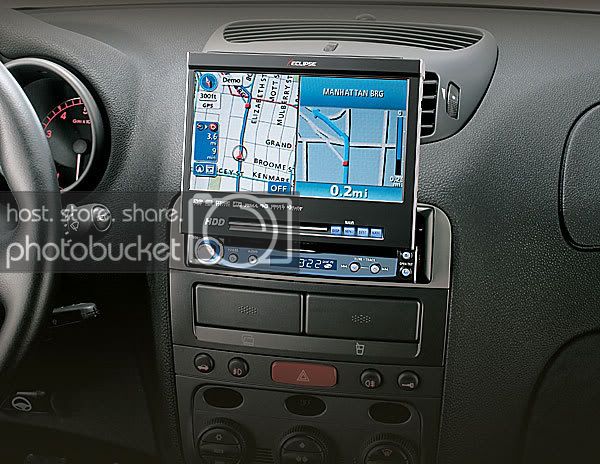
Hey Guys, my Eclipse headunit is for sale. Its been in the Cobra for about 4 weeks. It is perfect and has the full warranty, and includes I-Pod/Sirius Adapter.
$2000 OBO (Need it gone so make me one!)
Call or text me @ 405-863-4650, or PM me. Thanks, -J
General Features
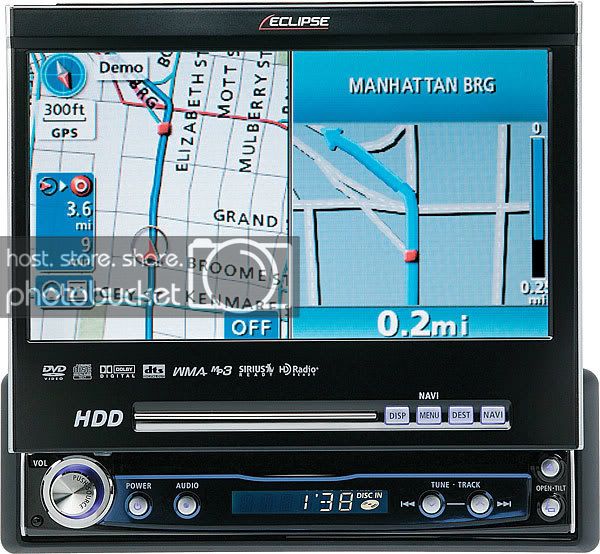
7" Widescreen TFT Display: The Eclipse AVN7000 is equipped with a motorized 7" widescreen TFT display with touch control. The LCD panel has 112,320 pixels (400 x 234) and an anti-glare coating.
Monitor Angle/Slide Adjustment: You can adjust the monitor's angle and slide position for better visibility. The display slides forward and backward, allowing you to choose one of 2 slide positions. You can also choose one of 7 tilt angles.
20 GB Hard Disk Drive: This unit features a built-in 20 GB hard disk drive (HDD) dedicated to navigation.
Memory Stick Slot: The AVN7000 contains a slot for Memory Stick Duos for music playback, database updates, and ESN (Eclipse Security Network).
Digital Signal Processor: The unit's DSP offers the following sound adjustments for total audio control:
7-Band EQ: You can adjust the following EQ bands and store up to five custom EQ presets (EQ 1 - EQ 5):
Band 1:
Frequency: 63, 80, or 100 Hz
Gain: adjustable from -10 dB to +10 dB in 1 dB increments
Q Factor: Q1 (wide), Q2 (medium), or Q3 (narrow)
Band 2:
Frequency: 125, 160, or 200 Hz
Gain: adjustable from -10 dB to +10 dB in 1 dB increments
Q Factor: Q1 (wide), Q2 (medium), or Q3 (narrow)
Band 3:
Frequency: 250, 315, 400, or 500 Hz
Gain: adjustable from -10 dB to +10 dB in 1 dB increments
Q Factor: Q1 (wide), Q2 (medium), or Q3 (narrow)
Band 4:
Frequency: 630 Hz, 800 Hz, 1 kHz, or 1.25 kHz
Gain: adjustable from -10 dB to +10 dB in 1 dB increments
Q Factor: Q1 (wide), Q2 (medium), or Q3 (narrow)
Band 5:
Frequency: 1.6, 2, 2.5, or 3.15 kHz
Gain: adjustable from -10 dB to +10 dB in 1 dB increments
Q Factor: Q1 (wide), Q2 (medium), or Q3 (narrow)
Band 6:
Frequency: 4, 5, 6.3, or 8 kHz
Gain: adjustable from -10 dB to +10 dB in 1 dB increments
Q Factor: Q1 (wide), Q2 (medium), or Q3 (narrow)
Band 7:
Frequency: 10, 12.5, or 16 kHz
Gain: adjustable from -10 dB to +10 dB in 1 dB increments
Q Factor: Q1 (wide), Q2 (medium), or Q3 (narrow)
Listening Position: The digitally time-aligned listening position settings approximates the ideal position of being equidistant from the speakers. You can select one of four listening positions: front left, front right, all front, or all rear. You can also set the balance and fade volume controls using the touch controls.
Speaker Settings: You can adjust the following speaker settings:
Car Type: compact, sedan, wagon, mini van, SUV, or small
Tweeter: dash, door, or none
Rear Speaker: door or others
Woofer: you can adjust the following woofer settings:
Woofer Output: stereo or mono
Phase Control: normal or reverse
Woofer Level: adjustable from -6 dB to +6 dB in 1dB increments
Low-pass Frequency: 63, 80, 100, 125, 160, or 200 Hz
Slope: 6 dB/octave, 12 dB/octave, or pass
A/V Inputs/Outputs: The AVN7000 is equipped with one audio/video input with composite video and stereo RCA audio jacks for connecting a VCR or game console. Video from the A/V input can only be viewed when the vehicle is stopped and the parking brake engaged. The unit also has an audio/video output for connecting an external monitor.
Decoder/AV Matrix Unit Control: The AVN7000 can control the DCU105 5.1-channel decoder/AV Matrix unit.
Screen Modes: During DVD playback or while watching TV with an optional tuner, you can choose one of the following screen modes:
Normal: displays a 4:3 picture with black bars on either side
Wide 1: a 4:3 image is stretched horizontally to fill the screen
Wide 2: only the left and right edges of a 4:3 picture are stretched to fill the screen
Wide 3: a 4:3 image is expanded in both horizontally and vertically
ESN Security: This unit is equipped with the Eclipse Security Network. You can register a Memory Stick Duo as a "key" device and a 4-digit security PIN code must be entered to unlock the unit once it has been removed, then reconnected to power. Without the Memory Stick Duo and 4-digit PIN code, the unit's audio and navigation functions are rendered inoperable.
Rear View Camera Ready: The AVN7000 has a dedicated rear port for plugging in the optional BEC104 (item #099BEC104) Rear View Camera. The BEC104 is designed to assist you with rear parking or eliminate the dangerous blind spot immediately behind your vehicle.
Memory Stick Playback Features
Compatibility: The AVN7000 can only play music data recorded in ATRAC 3 on MagicGate Memory Stick Duos. MagicGate Memory Stick Duos and standard Memory Stick Duos can also be used for database updates and ESN. Memory Stick Duos with a capacity of up to 128MB are supported. Memory Stick PRO is not supported. Note: This unit cannot play music data recorded using ATRAC3 Plus.
Playback Controls: Music files are not divided into playlists or groups. Tracks are selected by skipping to the next or previous track. Other playback controls include: Fast Forward/Rewind, Track Repeat, and Track Random Play.
Navigation Features
HDD Navigation: The AVN7000 features a built-in 20 GB hard disc drive (HDD), offering a faster operational speed than traditional DVD-ROM navigation. The unit has a built-in map database of the United States and Canada (except for Hawaii and Alaska), divided into 9 areas for easier searching.. The navigation system uses maps and vocal instructions to guide you as you are driving.
GPS: The unit uses the Global Positioning System (GPS) to pinpoint your present location by using latitudinal and longitudinal data received from three or more satellites. A GPS antenna is included with the unit, and should be mounted in a position (inside or outside) with a clear view of the sky.
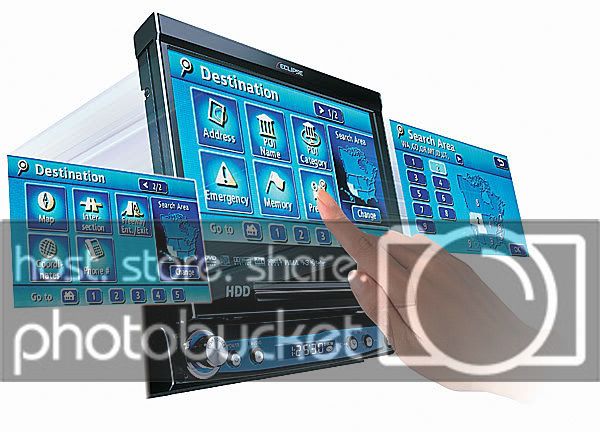
Search Methods: The navigation system gives you several methods for searching for a destination:
Address: By simply inputting the street name and street number, you can display a map showing the destination.
Points of Interest (POI): The map database contains millions of points of interest (parks, schools, hospitals, restaurants, banks, etc.) that can be entered as a destination. You can also display the icons of specific types of POIs on the maps as you travel to show you the nearest gas station, restaurant, ATM, grocery store, or hotel.
Emergency Search: In the event of an emergency, a search can be initiated for the nearest police station or hospital to your present position.
Memory Points: A map can be retrieved using your home or a point registered in the memory. Up to 106 of your favorite places can be registered on the map.
Previous: This mode allows you to choose a previous destination.
Map: You can choose a destination simply by selecting it on the map.
Intersection: By entering the name of the 2 intersecting streets, you can display a map of the intersection.
Freeway Exit/Entrance: A search can be initiated using the name of a freeway or an exit or entrance.
Coordinates: A map can be displayed by directly entering the latitude and longitude coordinates.
Telephone Number: If you know the phone number at your desired destination, a map of the vicinity near your destination can be retrieved (if it is a registered POI in the database).
Route Calculation: Once a destination is selected, the AVN7000 will instantly offer three recommended routes to choose from: Quick 1, Quick 2, and Short. You can also insert up to 5 locations as stopping points along the route to a destination, and the unit will include those point when calculating the route.
Route Preferences: You can activate or deactivate the following preferences: Allow freeway, Allow toll road, Allow time restricted road, Allow season restriction road, and Allow ferry.
Displays: During route guidance, the following displays are shown onscreen:
Toll Road Distance: all toll road distances to the destination are displayed
Freeway Distance: all freeway distances to the destination are displayed
Used Road Overview: icons for ferry crossings and restricted roads on the way to the destination are active if these are included in the route
Distance: the distance to the destination is displayed
Remaining Distance: the distance remaining on the indicated route is displayed
Required Time: the required time to the destination is displayed
Rerouting: If you accidentally or on purpose leave the recommended route, a new alternate route will instantly be recalculated and displayed. Typical rerouting takes only about 5 seconds.
Zooming: You can change the on-screen map scale to give you more or less detail. Using the touch controls, you can zoom in to a map scale of 150 feet, or zoom out to a map scale of 250 miles. Using the split screen function, you can combine maps of different scales on the screen at the same time.
External Device Controls
iPod Interface Ready: You can enjoy music from your Apple iPod when it's connected to the head unit via the optional Eclipse iPC-106 Interface Adapter for iPod (item number 099IPC106). The adapter is compatible only with iPods with a dock connector. While connected, the unit will charge the iPod's battery.
Sirius Satellite Radio Ready
HD Radio Ready
CD Changer Ready
$2000 OBO (Need it gone so make me one!)
Call or text me @ 405-863-4650, or PM me. Thanks, -J
General Features
7" Widescreen TFT Display: The Eclipse AVN7000 is equipped with a motorized 7" widescreen TFT display with touch control. The LCD panel has 112,320 pixels (400 x 234) and an anti-glare coating.
Monitor Angle/Slide Adjustment: You can adjust the monitor's angle and slide position for better visibility. The display slides forward and backward, allowing you to choose one of 2 slide positions. You can also choose one of 7 tilt angles.
20 GB Hard Disk Drive: This unit features a built-in 20 GB hard disk drive (HDD) dedicated to navigation.
Memory Stick Slot: The AVN7000 contains a slot for Memory Stick Duos for music playback, database updates, and ESN (Eclipse Security Network).
Digital Signal Processor: The unit's DSP offers the following sound adjustments for total audio control:
7-Band EQ: You can adjust the following EQ bands and store up to five custom EQ presets (EQ 1 - EQ 5):
Band 1:
Frequency: 63, 80, or 100 Hz
Gain: adjustable from -10 dB to +10 dB in 1 dB increments
Q Factor: Q1 (wide), Q2 (medium), or Q3 (narrow)
Band 2:
Frequency: 125, 160, or 200 Hz
Gain: adjustable from -10 dB to +10 dB in 1 dB increments
Q Factor: Q1 (wide), Q2 (medium), or Q3 (narrow)
Band 3:
Frequency: 250, 315, 400, or 500 Hz
Gain: adjustable from -10 dB to +10 dB in 1 dB increments
Q Factor: Q1 (wide), Q2 (medium), or Q3 (narrow)
Band 4:
Frequency: 630 Hz, 800 Hz, 1 kHz, or 1.25 kHz
Gain: adjustable from -10 dB to +10 dB in 1 dB increments
Q Factor: Q1 (wide), Q2 (medium), or Q3 (narrow)
Band 5:
Frequency: 1.6, 2, 2.5, or 3.15 kHz
Gain: adjustable from -10 dB to +10 dB in 1 dB increments
Q Factor: Q1 (wide), Q2 (medium), or Q3 (narrow)
Band 6:
Frequency: 4, 5, 6.3, or 8 kHz
Gain: adjustable from -10 dB to +10 dB in 1 dB increments
Q Factor: Q1 (wide), Q2 (medium), or Q3 (narrow)
Band 7:
Frequency: 10, 12.5, or 16 kHz
Gain: adjustable from -10 dB to +10 dB in 1 dB increments
Q Factor: Q1 (wide), Q2 (medium), or Q3 (narrow)
Listening Position: The digitally time-aligned listening position settings approximates the ideal position of being equidistant from the speakers. You can select one of four listening positions: front left, front right, all front, or all rear. You can also set the balance and fade volume controls using the touch controls.
Speaker Settings: You can adjust the following speaker settings:
Car Type: compact, sedan, wagon, mini van, SUV, or small
Tweeter: dash, door, or none
Rear Speaker: door or others
Woofer: you can adjust the following woofer settings:
Woofer Output: stereo or mono
Phase Control: normal or reverse
Woofer Level: adjustable from -6 dB to +6 dB in 1dB increments
Low-pass Frequency: 63, 80, 100, 125, 160, or 200 Hz
Slope: 6 dB/octave, 12 dB/octave, or pass
A/V Inputs/Outputs: The AVN7000 is equipped with one audio/video input with composite video and stereo RCA audio jacks for connecting a VCR or game console. Video from the A/V input can only be viewed when the vehicle is stopped and the parking brake engaged. The unit also has an audio/video output for connecting an external monitor.
Decoder/AV Matrix Unit Control: The AVN7000 can control the DCU105 5.1-channel decoder/AV Matrix unit.
Screen Modes: During DVD playback or while watching TV with an optional tuner, you can choose one of the following screen modes:
Normal: displays a 4:3 picture with black bars on either side
Wide 1: a 4:3 image is stretched horizontally to fill the screen
Wide 2: only the left and right edges of a 4:3 picture are stretched to fill the screen
Wide 3: a 4:3 image is expanded in both horizontally and vertically
ESN Security: This unit is equipped with the Eclipse Security Network. You can register a Memory Stick Duo as a "key" device and a 4-digit security PIN code must be entered to unlock the unit once it has been removed, then reconnected to power. Without the Memory Stick Duo and 4-digit PIN code, the unit's audio and navigation functions are rendered inoperable.
Rear View Camera Ready: The AVN7000 has a dedicated rear port for plugging in the optional BEC104 (item #099BEC104) Rear View Camera. The BEC104 is designed to assist you with rear parking or eliminate the dangerous blind spot immediately behind your vehicle.
Memory Stick Playback Features
Compatibility: The AVN7000 can only play music data recorded in ATRAC 3 on MagicGate Memory Stick Duos. MagicGate Memory Stick Duos and standard Memory Stick Duos can also be used for database updates and ESN. Memory Stick Duos with a capacity of up to 128MB are supported. Memory Stick PRO is not supported. Note: This unit cannot play music data recorded using ATRAC3 Plus.
Playback Controls: Music files are not divided into playlists or groups. Tracks are selected by skipping to the next or previous track. Other playback controls include: Fast Forward/Rewind, Track Repeat, and Track Random Play.
Navigation Features
HDD Navigation: The AVN7000 features a built-in 20 GB hard disc drive (HDD), offering a faster operational speed than traditional DVD-ROM navigation. The unit has a built-in map database of the United States and Canada (except for Hawaii and Alaska), divided into 9 areas for easier searching.. The navigation system uses maps and vocal instructions to guide you as you are driving.
GPS: The unit uses the Global Positioning System (GPS) to pinpoint your present location by using latitudinal and longitudinal data received from three or more satellites. A GPS antenna is included with the unit, and should be mounted in a position (inside or outside) with a clear view of the sky.
Search Methods: The navigation system gives you several methods for searching for a destination:
Address: By simply inputting the street name and street number, you can display a map showing the destination.
Points of Interest (POI): The map database contains millions of points of interest (parks, schools, hospitals, restaurants, banks, etc.) that can be entered as a destination. You can also display the icons of specific types of POIs on the maps as you travel to show you the nearest gas station, restaurant, ATM, grocery store, or hotel.
Emergency Search: In the event of an emergency, a search can be initiated for the nearest police station or hospital to your present position.
Memory Points: A map can be retrieved using your home or a point registered in the memory. Up to 106 of your favorite places can be registered on the map.
Previous: This mode allows you to choose a previous destination.
Map: You can choose a destination simply by selecting it on the map.
Intersection: By entering the name of the 2 intersecting streets, you can display a map of the intersection.
Freeway Exit/Entrance: A search can be initiated using the name of a freeway or an exit or entrance.
Coordinates: A map can be displayed by directly entering the latitude and longitude coordinates.
Telephone Number: If you know the phone number at your desired destination, a map of the vicinity near your destination can be retrieved (if it is a registered POI in the database).
Route Calculation: Once a destination is selected, the AVN7000 will instantly offer three recommended routes to choose from: Quick 1, Quick 2, and Short. You can also insert up to 5 locations as stopping points along the route to a destination, and the unit will include those point when calculating the route.
Route Preferences: You can activate or deactivate the following preferences: Allow freeway, Allow toll road, Allow time restricted road, Allow season restriction road, and Allow ferry.
Displays: During route guidance, the following displays are shown onscreen:
Toll Road Distance: all toll road distances to the destination are displayed
Freeway Distance: all freeway distances to the destination are displayed
Used Road Overview: icons for ferry crossings and restricted roads on the way to the destination are active if these are included in the route
Distance: the distance to the destination is displayed
Remaining Distance: the distance remaining on the indicated route is displayed
Required Time: the required time to the destination is displayed
Rerouting: If you accidentally or on purpose leave the recommended route, a new alternate route will instantly be recalculated and displayed. Typical rerouting takes only about 5 seconds.
Zooming: You can change the on-screen map scale to give you more or less detail. Using the touch controls, you can zoom in to a map scale of 150 feet, or zoom out to a map scale of 250 miles. Using the split screen function, you can combine maps of different scales on the screen at the same time.
External Device Controls
iPod Interface Ready: You can enjoy music from your Apple iPod when it's connected to the head unit via the optional Eclipse iPC-106 Interface Adapter for iPod (item number 099IPC106). The adapter is compatible only with iPods with a dock connector. While connected, the unit will charge the iPod's battery.
Sirius Satellite Radio Ready
HD Radio Ready
CD Changer Ready




 //content.invisioncic.com/y282845/emoticons/smile.gif.1ebc41e1811405b213edfc4622c41e27.gif but if he wants 2000 for his hes more than happy to try right



