Bypassing the "parking brake" requirement?

Chromatic

Senior VIP Member
Hey guys..

I have the Pioneer AVH-P4100DVD.. which of course plays video/dvd's etc.. But, is dependent on the parking brake being up in order to even utilize these functions. Now I don't care a thing about watching movies while driving of course.. but passengers do.. and it's just nice to have these things disabled for obvious reasons.

I've seen some ways to bypass it online.. By buying relays, etc..

But is there an easier.. essentially FREE way?

The parking brake just activates based on a ground contact,.. Some people say you can just ground the Pbrake wire and it works.. others say you have to make it switch on/off in order for it to work.

Just wanted your thoughts on any ways to do this that I could just wire up without going and buying anything. (Basically I really don't want to pull the head unit out again after the time I had getting it in.. so wiring something by the parking brake, or tapping in to other wires would be great. )

I know Relays are like $5 at radioshack.. just was curious if it was something that could be done in the just grounding something out, etc.

Thanks

 
Some brands you can just tie it to ground and it's always on, some will want a pulse then ground so you may need to get a 90 cent switch. You'll need to read the manual and see what it says to do to get it to play movies. This should give you a hint.

 
You're going to have to pull the head unit out either way if you want to bypass it. Like others have said; just ground out that wire. That won't cost you more than the ten cents for the cost of a 14-16 gauge ring terminal.

 
My pioneer HU needed a double pulse. So rather than doing something with relays, where i wouldn't have know what i was doing, i bought a parking brake bypass on ebay for 20 bux. works great!

double pulse meaning, brake on, brake off, brake on.

 
Something is making me think that those pioneers need to see a break in ground to register the parking break actually being engaged.

I do like to run a toggle switch on my vehicles just in case you get pulled over. Flip it off and "no officer I wasnt watching movies that function doesnt even work."

 
Ok.. I'm going to run a toggle.. It already had a toggle on it that was broken.. and I fixed it. So I'll just remount that for now. Then if a time comes where I'm suddenly watching movies in the car or whatever.. I can pull it out and do a relay.

Thanks guys

Now only if you could tell me how to get this trim piece to be flush (or get the radio to be flush with the trim) -- I'd be done.

The headunit was in the car when I bought it.. it WAS flush when I pulled it out last Friday.. now screwing into both sets of holes (one is factory , one the prev. installer drilled) it doesn't line up where the trim is flush.. There are gaps .. particularly on the sides.

I'm baffled and out of ideas at this point.

Here are some pictures if that helps -- maybe you can give me some ideas on how to flush the headunit/trim up right.

(Also maybe tell me a 1 2 3 step for when trim goes in.. at what point.. then what to do with headunit to get it matched up and so on).. I had the headunit screwed in and put the trim piece in/on at that point from the outside (angling one end in behind the lip, and then angling the other end to be behind the lip).

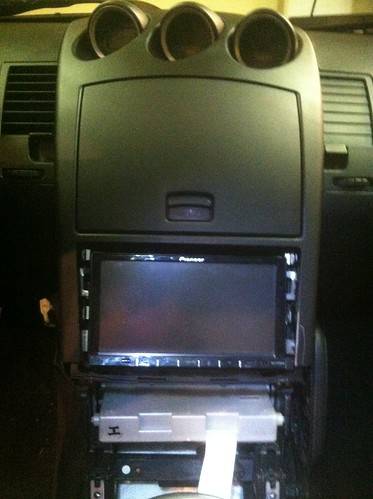
Pics of MY actual car/head unit:

This is how it sits RIGHT now.. with the trim not on it.. :


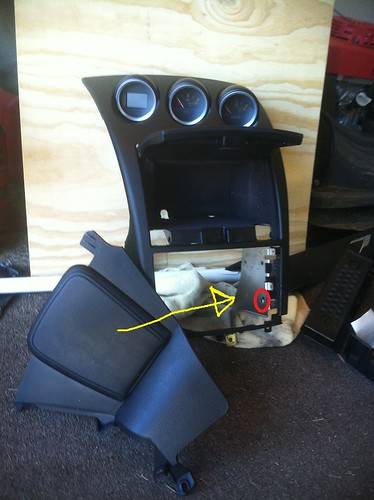
This is the bracket the headunit attaches to from the sides: (Yellow arrow = bracket) (Red circle = mounting holes)


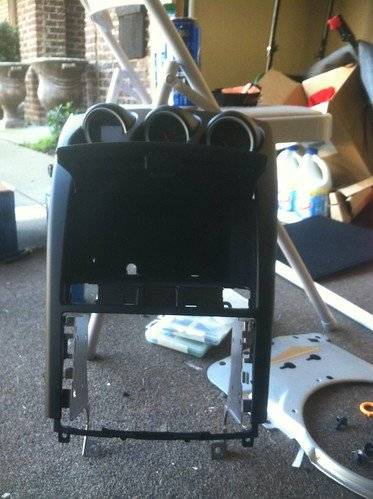
Another angle of that bracket:


So far no one has been able to give me any actual advice on getting the trim and headunit flush.. Which I thought would some 101 stuff..

Reaaallly hope I don't have to bring this to a shop to get them to essentially put a piece of plastic around the radio after I've done 40 hours of back breaking , much more difficult work on this install. Come on.. help me keep my dignity //content.invisioncic.com/y282845/emoticons/smile.gif.1ebc41e1811405b213edfc4622c41e27.gif

 
I'm posting this in my threads I'm keeping up with here,.. Due to buying a new Headunit from BestBuy tomorrow. (Read to see why)

**If you don't want to read this post.. I would like some help picking out a headunit from Bestbuy (I'm doing 18months interest free.. all I can do this month) -- The "must haves" are Double Din - Touch Screen - Built In Bluetooth - 4V Pre-outs (not 2v) - and 3 RCA Pre-outs (OR, 2 RCA Pre-outs and A "Sub-out") --- Go to the bottom of the post and you will see a link I made that takes you right to the headunits at bestbuy to scan through and help me pick one. Budget around $300-$550. Thanks **

Well good news (Car is finished completely), and really.. really bad news (Head Unit stopped working!).

I figured out how to flush the head unit.. I just grabbed the dremel for the billionth time and opened up the holes and was able to flush it.

I buttoned everything back up.. turned the key! -- And,..nothing from the headunit.. no lights, no screen... then it starts this constant beeping.

Beep beep.... beep beep...... beep beep... and it never stops.

I was like this is bad..

I took it ALL apart again,.. checked all the wiring.. (Good)

I pulled all wires off headunit,.. and checked fuse -- Even put a new one in. (Good)

At this point I was like.. I don't think this is going to work again. But I continued.. over the next 2-3 hours I pulled every Fuse from the vehicle and independently checked them. Yes, really. (All good).

I went online.. nothing much about just 2 beeps, pause.. 2 beeps pause.. 2 beeps.. forever.. and no lights, no screen display .. on a Pioneer headunit.. or my specific headunit the Pioneer AVH-P4100DVD . I found a FEW help threads on the issue.. and every single one of them the person ended up taking it out for service and the unit was DEAD.

I read the entire manual on my model online.. No mention of "beeps" .. Did mention a reset button. So I pressed and held it.. nothing. I did that another 20 times in different ways.

So I was like ok.. I'll pull the battery cables and let it sit for an hour. (Did nothing).

I was out of ideas.. Everything I could think of.. I did. And I figured there would be a million topics about this online,.. but I couldn't find them.

SO.. I'm assuming I need a new headunit.

So the only UPSIDE to this is this headunit doesn't have Bluetooth in it.. and it's like $200 just for the adapter to enable it.. so,.. the new headunit WILL have bluetooth , to make it not just a carbon copy of what I have. I'd like GPS, but they are $200+ more dollars generally.

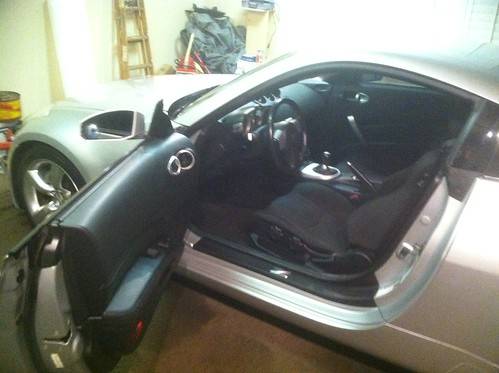
The good news? I finished the car. Everything is in.. nothing broken.. it's back like she was. Again.. camera is taking grainy pics.. but here she is:


Now.. here's the deal. My intuition tells me the HU is just not going to work again.

So,.. I really can't order one online at the moment,.. and it's really ****** to have done 40+ hours of work with this and now it doesn't work cause of the HU.

SO.. I do have a good best buy account.. with 18 months interest free.. I always pay single purchases off in less than 6 months from there.

So while I don't think you guys can give me a magical "fix" for this headunit (If you've heard/read or seen this issue with a Pioneer headunit and KNOW an absolute way to fix it, please tell.)

But otherwise -- I'm now in the market to get another headunit and fast.. like tomorrow fast.

I'm limited to Bestbuy. Surprisingly they have a decent selection.

I DID notice some of the ones I preferred had 2V pre-outs instead of 4V preouts.. And some of these with 2V pre-outs were top of the line $750+ headunits.

So here's the criteria. Must have 4V preouts (must have 3 sets.. or, 2 sets, and a sub woofer set of "preouts, aka: RCA's) (As I'm running fronts, rears, and the sub off three pair of RCA's.)

To make this have an "upside".. it must have built in Blue tooth. I've wanted that , and never had it in any vehicle in my life. So might as well.

So (must haves), Double Din - Touch Screen - Blue Tooth Built In - and 4V Preouts (3 sets of RCA's, or 2 sets and a Sub out).

Can/will you guys can help recommend the best one in a $300-$550 pricerange (ish).. from bestbuy. I'll even give you the direct link to browse to make it quick for you:

In-Dash with DVD : Best Buy | Double DIN Double DIN - Best Buy

Help me pick out a good headunit.. I'm probably going to grab it tomorrow afternoon.

Thanks..

 
Activity
No one is currently typing a reply...
Old Thread: Please note, there have been no replies in this thread for over 3 years!
Content in this thread may no longer be relevant.
Perhaps it would be better to start a new thread instead.

About this thread

Chromatic

Senior VIP Member
Thread starter
Chromatic
Joined
Location
B'ham, AL
Start date
Participants
Who Replied
Replies
15
Views
15,085
Last reply date
Last reply from
RChillin
IMG_20260516_193114554_HDR.jpg

sherbanater

    May 16, 2026
  • 0
  • 0
IMG_20260516_192955471_HDR.jpg

sherbanater

    May 16, 2026
  • 0
  • 0

New threads

Top