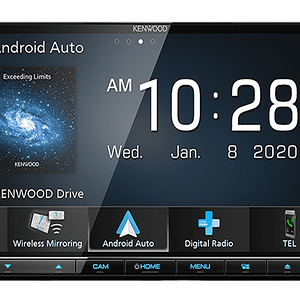
View attachment 71815
Can I hide the Galaxy picture and the task bar along the bottom as I have just loaded a new wallpaper but they show over it ?
To hide the Galaxy picture and taskbar on your Kenwood stereo display, follow these steps:
1.
Access Settings: Go to the settings menu on your Kenwood device. This is often represented by a gear icon.
2.
Display Options: Look for an option related to display or wallpaper settings. This might be under "Theme" or "Wallpapers."
3.
Hide Taskbar: If there's an option to hide the taskbar or system icons, enable it. This should help in clearing the screen for your wallpaper.
4.
Adjust Wallpaper Settings: Make sure your wallpaper settings allow for full-screen display, eliminating any overlays.
5.
Save Changes: Don't forget to save any changes you make.
If these steps don't resolve the issue, consider checking the user manual for your specific model or looking under "Advanced settings."
If anyone else has tips or experiences with similar settings, feel free to chime in!