
uTorrent speeds...

95BlackGA
5,000+ posts

CarAudio.com Veteran
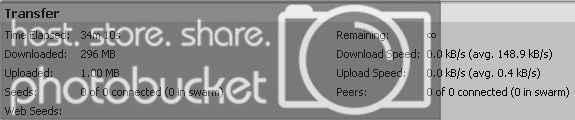
I'm having some problems with uTorrent speeds. Sometimes they are fast, sometimes they are extremely slow. Anyone else experience this? I have all proper ports forwarded, though both my modem, and my router. When speeds are slow, it takes forever to load web pages, but when speeds are fast, it loads web pages pretty fast. I'm on an ADSL connection

Speedtest.net
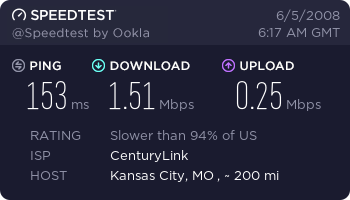


uTorrent Fast
Utorrent1.jpg


uTorrent Slow

Utorrent2.jpg


get on a private tracker;)
image44rj4.jpg


btw any update on the laptop?
Yeah, I got the shipping box today, but I was too late getting to the post office because my girlfriend wanted me to driver her to work. It should be shipped out first thing tomorrow, unless I have to get cash, then it may not be 'til Friday. Most likely it WILL be tomorrow, but I don't want to guarantee that just yet.

I'll trade you ISPs and connections. //content.invisioncic.com/y282845/emoticons/biggrin.gif.d71a5d36fcbab170f2364c9f2e3946cb.gif

 
ok, np man, hopefully my explanation helped answer your question

basically you can only get the speed that others give and on public sites most of the times the speed sucks

 
ok, np man, hopefully my explanation helped answer your question
basically you can only get the speed that others give and on public sites most of the times the speed sucks
Well, at first I get up 179Kbps, but after about 5 minutes, it's down between the 20-35Kbps. I'm not complaining too much, as I just leave uTorrent running while I sleep.

 
Sometimes if you let it run too long your ISP (if you have an ISP that watches you) will temporarily cut your speed a little...mine does...I stop for a few hours and go back to 400 Kpbs //content.invisioncic.com/y282845/emoticons/smile.gif.1ebc41e1811405b213edfc4622c41e27.gif

Also like scooby said the swarm speed is where you're getting the download speed from....it's that's really low then so is your download speed. Also, just because the tracker/torrent says theres a ton of people seeding, it does not mean they're necessarily seeding to you, or that they're even there (RIAA type companies and other people can spoof this number to make it look like a really good torrent.)

 
look on the bottom of utorrent, does it say "disk overload"

it would be next to the "dht"

that happens to me sometimes and my speed will drop from 500+ to about 20

if so thats the problem, restart the program

 
look on the bottom of utorrent, does it say "disk overload"
it would be next to the "dht"

that happens to me sometimes and my speed will drop from 500+ to about 20

if so thats the problem, restart the program
I turned off DHT because private trackers don't allow it, and that's all I use - besides randomly for a movie on PBT I cant find anywhere else.

 
look on the bottom of utorrent, does it say "disk overload"
it would be next to the "dht"

that happens to me sometimes and my speed will drop from 500+ to about 20

if so thats the problem, restart the program
I think you just have to let your hard drive catch up, by waiting. Thats why the speed slows down and will go back up when the HDD is ready to write the speed youre downloading at. Atleast in my experience I didn't have to close the program.

 
on uTorrent, when you start a download right click on it in the list of the status and locate Bandwith allocation, in the sub menu set the Upload limit to 25kb(will be the lowest), then right click on it again and go back to set upload limit, the limit will show lower limits than 25 and just set it to 15k or 10k.

with that you should get a faster speed with less upload.

with that your web browser should run at a faster speed.

too much upload will rip your download rate in general on a dsl connection.

 
on some private trackers......you have to keep your upload-download ratio the same or close like 1:1 and so on.....turning down your upload limits will be ok on public trackers and will give you more download speed but you may not be able to do that else where

 
i only get the overload when i am downloading 5+ items plus trying to transfer large amounts of data from drive to drive at the same time, but it may explain why it slows down on him

the private trackers i use require DHT to be turned off

 
Activity
No one is currently typing a reply...

About this thread

95BlackGA

5,000+ posts
CarAudio.com Veteran
Thread starter
95BlackGA
Joined
Location
Missouri
Start date
Participants
Who Replied
Replies
13
Views
342
Last reply date
Last reply from
Scoobydoo
IMG_20260516_193114554_HDR.jpg

sherbanater

    May 16, 2026
  • 0
  • 0
IMG_20260516_192955471_HDR.jpg

sherbanater

    May 16, 2026
  • 0
  • 0

New threads

Top

