
computer people...

regal8r
5,000+ posts

I <3 my CRX
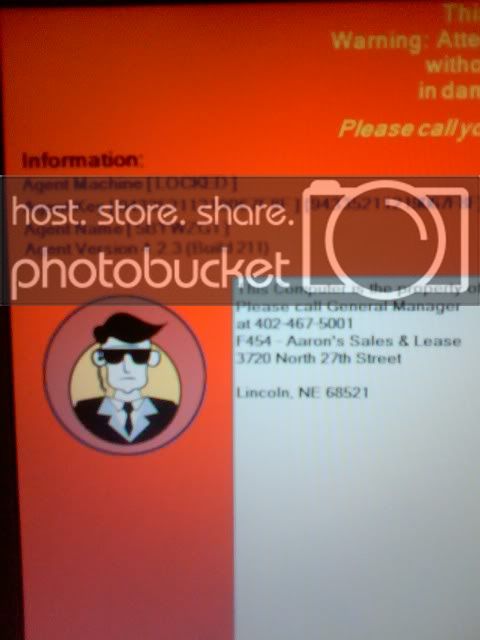
wtf is this and how do i disable/bypass it? i tried booting up in safe mode and that didnt work.

edit: besides formatting hard drive and reinstalling windows lol
pic122508_1.jpg


so you have it leased and that comes up? and it says its locked? why not just go back to aaron's and get a diff one? does it lock you out of the system or just cause you a bit of annoyance?

 
so you have it leased and that comes up? and it says its locked? why not just go back to aaron's and get a diff one? does it lock you out of the system or just cause you a bit of annoyance?
the whole reason i even got this computer was just to hold me over until income tax time, that way i can buy a brand new laptop. i havent paid the bill this month for the rented laptop, which is why they locked it im sure. im just wanting to squeeze out a few more days of use out of it before i take it back.

 
it boots up, and this screen comes up before the windows login screen
okay so its not bios, and if its connected to the internet, its one of two things, was on a date/time to lock it, or they remotely did it.

either way, its nothing big, is there anything saying which program it is, or a company logo?

 
okay so its not bios, and if its connected to the internet, its one of two things, was on a date/time to lock it, or they remotely did it.
either way, its nothing big, is there anything saying which program it is, or a company logo?
no program name or anything, just the logo thats in the pic i posted. ive done a google search of remote computer locking software, but havent found a match. i also typed in what it says at the top and this is what i got http://www.google.com/search?hl=en&amp;safe=off&amp;rls=com.microsoft%3A*%3AIE-SearchBox&amp;rlz=1I7ADBF_en&amp;q=this+computer+has+been+deactivated.+warning%3A+attempting+to+bypass+or+reactivate+this+machine+without+the+proper+password+may+result+in+damage+to+your+system+and+loss+of+data ..still doesnt tell me anything about the program or how to temporarily get around it...

 
okay so its not bios, and if its connected to the internet, its one of two things, was on a date/time to lock it, or they remotely did it.
either way, its nothing big, is there anything saying which program it is, or a company logo?
i just tried pressing alt+tab and theres 2 icons, one for windows login screen and one for this one. i tried switcing to the login screen but it just stayed on the lock screen...

 
i just tried pressing alt+tab and theres 2 icons, one for windows login screen and one for this one. i tried switcing to the login screen but it just stayed on the lock screen...
run a linux live cd, you could probably remove the program itself if you were so inclined.

 
Activity
No one is currently typing a reply...

About this thread

regal8r

5,000+ posts
I <3 my CRX
Thread starter
regal8r
Joined
Location
Lincoln, NE
Start date
Participants
Who Replied
Replies
32
Views
565
Last reply date
Last reply from
MikeofTulsa
IMG_20260516_193114554_HDR.jpg

sherbanater

    May 16, 2026
  • 0
  • 0
IMG_20260516_192955471_HDR.jpg

sherbanater

    May 16, 2026
  • 0
  • 0

New threads

Top


