Any PC builders in here?? Building my first and am looking for some guidance

bad advice?

CPU- you can buy a unlocked I7 for $220... is the extra speed worth the $40? 4 thread vs 8 thread

Memory - Win7 is a memory hog. Granted it is WAY better than other OS's, it still likes it memory. and if Memory is so **** cheap, why not start with 16 gigs?

GPU- never said this was a bad choice. I more of a Nvidia fan myself as the drivers as more stable, and I don't care for the catalyst software.

PSU- never said anything about it, but I would go with a modular one if possible

Warranty- most parts have a 1 to 5 year warranty. you get this regardless. But, better save the receipts, and be ready to jump through some hoops when talking to each company tech support. i said dells warranty because it is normally 1 to 3 year next day delivery, and normally you can get stuff relatively easily with their tech support.

Harddrive- nothing wrong with SSD, but when your trying to build a budget comp, that isn't used primarily for gaming, whats the point of dropping cash on a HD that's speed will barely be noticeable, and have limited space. If anything, wait a few months and pick up a 250 gig when the prices drop.

last time I checked, Dell uses Intel mobo.

Nvidia and AMD GPUs

normally rebranded Kingston memory

rebranded PSU

i don't know about HP, or other companies stuff, as i don't use it, so i wont say anything about it.

user didn't say if he had any other computer components i.e, Monitor, keyboard, mouse, OS, and so on. with just parts alone he is over $1k.. when you can buy a complete system with monitor and all for $600 to $700....

as for bad advice.. if you want to pull out your E-**** and compare certs and paychecks.. bring it on.

not being a ****, or saying i know more than anyone here. im just saying that with what he has picked out, he might as well spend the few extra $$ and get more out of the system.

 
i build more AMD rigs any more. cpu is comparable performance for way less money, then you can dump more money into the GPU. especially now that systems are starting to utilize open-compute and GPGPU. there is no reason to not build a complete AMD rig and reap the bennefits all around.

 
Well. As a person who rocks the 3570k OC'd at 4.5GHz stable, SeaSonic 620watt PSU, and that ASRock Extreme4 motherboard, I think you've created a great computer!
As I mentioned earlier, I HAVE a 3570k on an Extreme4, and I've never had a single issue with hibernation or sleep...

For your purposes, the processor is a tad overkill, but if you're fine with the price, I say go for it. The REAL potential of that processor is when its OC'd. You don't need crazy coolers that BlurriedVision recommended, I am OC'd at 4.5GHz with a $30 Cooler Master Hyper 212+. As for the graphics card, you don't need to bother with extra cooling. The HD7850/70 series are an amazing card for the price. Sapphire is a great company, and the ONLY possible way you could overheat that card is by putting it next to a heater. Those cards overclock like CRAZY. my 7850 stock wasn't able to max out Crysis 3, but with a decent OC, I was able to. Great card

You don't neccessarily overclock your CPU if you don't need to, but it is good to know that you've got 4 cores running each at 4.5Ghz, and that nothing will get in your way. Its a bitchin feeling hahaha

If the case I sport was still in production, I would've recommended it to you, as it has superior cooling for a lower price if you buy it at Walmart. But alas, thats not the case. Don't fret, the 410 is still a great case.

Your builds great. Follow through with it. If you have a microcenter that you can drive to, you can get a MAJOR deal on the 3570k and ASRock Extreme4. I got both of those for $270, vs the $330 (or the $370 when I built my computer) it costs originally. Try to get as many parts from your local Microcenter as possible, as they have the BEST deals than any other retail store OR online. They are better than newegg, tigerdirect, eBay, ANYTHING.

PLUS, IF you do have a issue with that Extreme4, Microcenter has a "returns, no questions asked" policy. Return it if it doesn't work.

In my experience, the Extreme4 was the best motherboard I've ever worked with bar NONE!

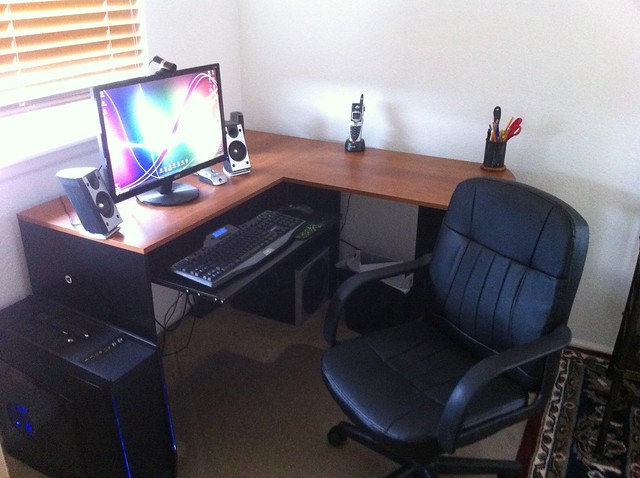
Here's my build FYI (and to show it off a lil lol:D)

7946262754_0aa7f52bb8_z.jpg
nice sub

 
bad advice?
CPU- you can buy a unlocked I7 for $220... is the extra speed worth the $40? 4 thread vs 8 thread

Memory - Win7 is a memory hog. Granted it is WAY better than other OS's, it still likes it memory. and if Memory is so **** cheap, why not start with 16 gigs?

GPU- never said this was a bad choice. I more of a Nvidia fan myself as the drivers as more stable, and I don't care for the catalyst software.

PSU- never said anything about it, but I would go with a modular one if possible

Warranty- most parts have a 1 to 5 year warranty. you get this regardless. But, better save the receipts, and be ready to jump through some hoops when talking to each company tech support. i said dells warranty because it is normally 1 to 3 year next day delivery, and normally you can get stuff relatively easily with their tech support.

Harddrive- nothing wrong with SSD, but when your trying to build a budget comp, that isn't used primarily for gaming, whats the point of dropping cash on a HD that's speed will barely be noticeable, and have limited space. If anything, wait a few months and pick up a 250 gig when the prices drop.

last time I checked, Dell uses Intel mobo.

Nvidia and AMD GPUs

normally rebranded Kingston memory

rebranded PSU

i don't know about HP, or other companies stuff, as i don't use it, so i wont say anything about it.

user didn't say if he had any other computer components i.e, Monitor, keyboard, mouse, OS, and so on. with just parts alone he is over $1k.. when you can buy a complete system with monitor and all for $600 to $700....

as for bad advice.. if you want to pull out your E-**** and compare certs and paychecks.. bring it on.

not being a ****, or saying i know more than anyone here. im just saying that with what he has picked out, he might as well spend the few extra $$ and get more out of the system.
The whole ATI vs NVIDIA driver issue has been null and void for awhile now. ATI makes just as stable of drivers as NVIDIA now.

Sounds like youve never used an SSD before. I can boot into OS from a cold boot with a SSD in 4 seconds. With a SATA HD its 15+ seconds on exact same hardware and software configurations. Not to mention increased performance when searching through files, music, etc.

For $700 your not getting an i5 and 16Gbs of RAM. My company purchases Dells and we get steep discounts because we have over 200 workstations. We look at $1000+ just for an i5, 4-8Gbs of RAM, and a ATI 7570HD GPU. That doesnt count monitors either.

There was no eThugging going on. Im just saying your position doesnt mean you know what your talking about. We can compare certs. You have more than I do. However, I am also a Network Engineer. What do you do?

 
I do net administration. about 5k users nation wide, 80 mixed servers. Im also a server team NCO in the Guard... but whatever..

Its funny how the Catalyst PCIE instructions cause a lot of BSOD... im not saying they aren't stable, but they seem to cause problems that we don't see with NVidia.

i don't doubt you can get a comp to cold boot that quickly, but i also know its not a desktop. it will be a tablet type, or an ultra light laptop with no optical drive, or extra's.

my M6500 laptop boots in 9-ish secs, and yes it has a SSD drive.

anyways....OP glw the comp.

 
I do net administration. about 5k users nation wide, 80 mixed servers. Im also a server team NCO in the Guard... but whatever..
Its funny how the Catalyst PCIE instructions cause a lot of BSOD... im not saying they aren't stable, but they seem to cause problems that we don't see with NVidia.

i don't doubt you can get a comp to cold boot that quickly, but i also know its not a desktop. it will be a tablet type, or an ultra light laptop with no optical drive, or extra's.

my M6500 laptop boots in 9-ish secs, and yes it has a SSD drive.

anyways....OP glw the comp.
Samsung Ultra Book 7 series with 4Gbs of RAM, i5, Win 8, and 128Gb SSD boots that quickly. Thats also running KES10 with the netagent for network AV management.

 
seriously over 95% of reviews on amazon, newegg has no problem with the Radeon drivers and vice versa for the Nvidia drivers. Experience in IT is one thing, but keeping up to date with product information and prices is another. An i7 is totally irrelavant to the OP's Uses. Heck he can even meet his needs with an I3 and he'll still be set for a couple of years.

As for the windows 7 memory hog thing, Even if i run 5 games, 8 software programs and hundreds of internet tabs, i dont even get near 50% ram usage and i have only 8 gigs. So far all your suggestions is met with severe diminishing returns for the OP hellz.

With my desktop the time it takes to boot up completely from pushing the power button is 25 seconds with a moderate speed SSD. It takes close to 2 minutes with a seagate barracuda 7200 rpm drive. Installation of large games/software takes less than 2 minutes with SSD and more than 5 minutes with the mechanical drive.

 
^^^^ This

Lets stop bickering. Your build is just fine. Buy whatever you can from Microcenter and Walmart and be happy //content.invisioncic.com/y282845/emoticons/smile.gif.1ebc41e1811405b213edfc4622c41e27.gif

 
Lets stop bickering. Your build is just fine. Buy whatever you can from Microcenter and Walmart and be happy //content.invisioncic.com/y282845/emoticons/smile.gif.1ebc41e1811405b213edfc4622c41e27.gif
/nod fully agree!

With my desktop the time it takes to boot up completely from pushing the power button is 25 seconds with a moderate speed SSD. It takes close to 2 minutes with a seagate barracuda 7200 rpm drive.
wow.. 25 secs? that's blazing fast for a SSD.. your l33t!

im currently running a SG 7200 RPM HD in this comp... and I boot up a lot faster than your SSD, and this comp hasn't been imaged in 5 years.....

 
With Windows 7 and a SSD, I boot into Windows in 11 seconds

Windows 8 i estimate to be 3-4 seconds

Buying an SSD was probably one of the best investments I've ever made for ANY computer...

So much infact, I'm gonna put an SSD on my HTPC (home theater PC) my dads Netbook, AND my next laptop

 
Activity
No one is currently typing a reply...

About this thread

hzsogood

5,000+ posts
**The Clean South**
Thread starter
hzsogood
Joined
Location
TX/MN
Start date
Participants
Who Replied
Replies
26
Views
511
Last reply date
Last reply from
ramos
IMG_20260516_193114554_HDR.jpg

sherbanater

    May 16, 2026
  • 0
  • 0
IMG_20260516_192955471_HDR.jpg

sherbanater

    May 16, 2026
  • 0
  • 0

New threads

Top