Sold 15" Fi BL (Fully Loaded) D2, Custom Enclosure, Priced to go/trades welcome

NJTStang11
10+ year member

CarAudio.com Elite
Rating: 100%
2 0 0
Well the 15 is simply a bit too much on the car right now.

I need some space in the trunk and I need to lighten the power as my electrical is beginning to hurt (and Im too poor to upgrade atm).

Fi 15" BL Subwoofer

Fully Loaded

Handles 1700-1800rms Daily

Dual 2ohm

9.5/10 Cosmetically

10/10 Mechanically

4 Cubic Feet Enclosure

Sub Up/Port Back

Tuned to 34hz

$275 obo for Sub/Box

$225 for Sub

$75 for Box

Prices are OBO

Best case scenario would be local trade, but can work out shipping trades.

Looking for the following

Single 10"-12" Subwoofer that can handle 1200rms Daily (SX, DC lvl 4, mach5, ia dr, etc)

Pair of 10's/12's that can handle 1200rms Daily. (DC lvl 3s/cvx's/se's/bm's/ia li's/etc)

I'd ultimately like an enclosure with it, but isn't necessary for sale/trade.

Can take cash to even up trade or give minor cash (as i said im poor).

I'll get pics up tomorrow. If anyone needs them right away I can send some from phone.

 
How to convert mts to avi with avchd video converter?

If you have a nice AVCHD camcorder such as Sony HDR-SR12E, you would be so frustrated to find that there are just few devices would support mts video. Usually, you can only play your mts video directly from a camcorder on a HDTV with a HDMI, or play on a Blu-ray Disc player.

AVCHD video converter can give you a hand, it is a professional and easy-to-use software, which can convert mts to some common video formats, take avi for example, it can convert mts to avi smoothly and efficiently. By converting mts to avi, you are relieved from the worries of enjoying your videos anywhere and anytime.

Features:

MTS to AVI converter can convert MTS, TS, M2TS and a variety of other HD Video files.

Support HD camcorders such as Panasonic AVCHD camcorders, Sony AVCHD camcorders, Hitachi, Cannon AVCHD camcorders and JVC

Manage all video/audio files:

Video: mts, m2ts, ts, tp, mov, mpeg, mp4, dv, avi, mpg, wmv, flv, asf, 3gp

Audio: aac, ac3, aiff, amr, flac, m4a, mka, mp2, mp3, ra, wma, wav

Support various portable devices and video players:

iPhone, iPod, BlackBerry, Creative Zen, PSP, iRiver, Apple TV, 3G phone, Gphone

Cut off unwanted frame from clips.

MTS to AVI converter provides Trim function to help you cut unwanted frame from clps. You can set the Start Time and End Time of the clip you want to get or just drag the slide to the desired position to achieve it.

Merge several files into one fileMTS to AVI converter allows you to combine and join multiple files together. Just select the files you want to join and check the Merge into one file check box you can finish it easily.

Preview file effect

With MTS to AVI Converter, you can preview the original video in the preview window

Tutorial

Step by step to convert MTS to AVI

Step 1: Install and run MTS to AVI converter

Free download the software and install it on the specified path on your personal computer, and then run a test. As it is just a test version, there will be a watermark on your converted file. Please don't hesitate to contact us if there is any problem, we are ready for help.

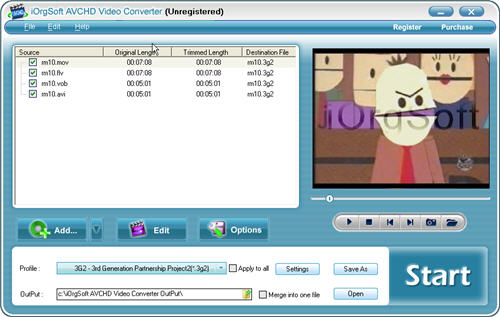
Step 2: Load mts file

Click Add File button on the middle of the panel to import mts files stored on the specific location. You can load many files at will at one time.

load.jpg


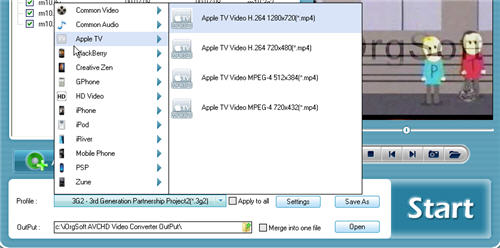
Step 3: Select output format and the directory

From the drop-down menu of Profile button choose your output avi format that you want to convert to, and then click the upward and green arrow of Output to specify the location to store the converted file.

select-format.jpg


Step 4: Video Setting

The Setting tab allows you to set Resolution, Frame rate, Encoder, Bitrate of the source file. After setting, click OK to finish.

Step 5: Video Editing

Click Edit button to pop up a Video Edit window, there are three options available in this window, that is, Crop, Effect and Trim, you can edit the file by clicking them separately, for example, Effect tab allows you to adjust the Brightness, Contrast and Saturation of the source file.

Step 6: Conversion

Click Start to convert the file automatically, the time takes depending on the size of the file and the setting you made.

 
Activity
No one is currently typing a reply...
Old Thread: Please note, there have been no replies in this thread for over 3 years!
Content in this thread may no longer be relevant.
Perhaps it would be better to start a new thread instead.

About this thread

NJTStang11

10+ year member
CarAudio.com Elite
Thread starter
NJTStang11
Joined
Location
Chicago, IL
Start date
Participants
Who Replied
Replies
25
Views
1,494
Last reply date
Last reply from
dafobbishon3
IMG_20260516_193114554_HDR.jpg

sherbanater

    May 16, 2026
  • 0
  • 0
IMG_20260516_192955471_HDR.jpg

sherbanater

    May 16, 2026
  • 0
  • 0

New threads

Top