
Some PSP video conversion tools are free and now I share what I have used
The Sony PlayStation Portable (Sony PSP) has become a very popular handheld game platform. It is designed for gaming and viewing movies. All the major film studios including
Disney, Warner Brothers, Paramount and Sony Pictures have published movies specifically for the Sony PSP.
The large handheld display combined with very good audio quality makes the Sony PSP an excellent choice when viewing movies on the go.
The Sony PSP can play many different audio file formats, including the most popular two—MP3 and WMA. Video files for your Sony PSP need to be in a MPEG-4 format. Sony uses a
slightly altered version of the MPEG-4 format which includes its own header information.
It is easy to transfer home movies or videos from your camcorder or even to show that you've recorded on your Media Center PC to your Sony PSP. Some programs like Pavtube Video
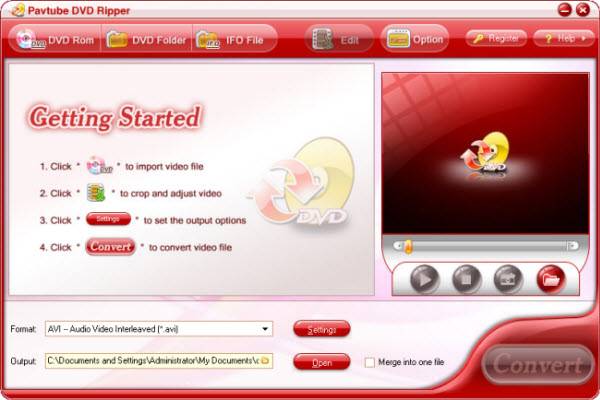
Converter can convert and transfer video files from your PC to the Sony PSP, and the Pavtube DVD Ripper can perfectly help you rip the DVD to PSP.
There are some guides may help you quickly!!
http://www.pavtube.com/video_to_psp/guide/
http://www.engadget.com/2004/12/21/how-to-get-videos-and-dvds-onto-your-sony-playstation-portable/
More tools:
Convert video file to PSP: free tools and share tools!
Free:
PSP Video 9: http://www.pspvideo9.com/
Apex Free PSP Video Converter:
http://www.softpedia.com/get/Multimedia/Video/Encoders-Converter-DIVX-Related/Apex-Free-PSP-Video-Converter.shtml
PSP Video Express 1.0
http://psp-video-express.pq-dvd-psp-software.qarchive.org/
For DVD:
DVD Decrypter:http://www.afterdawn.com/software/video_software/dvd_rippers/dvd_decrypter.cfm
Free DVD Ripper: http://www.freewarezoom.com/archives/free-dvd-ripper
Pavtube DVD ripper: http://www.pavtube.com/dvd_ripper/, which is very easy for beginners,and support to convert directly to PSP.
Hanbrake: http://handbrake.fr/?article=download; it is easy to convert to iPod.
DVDshrink http://www.dvdshrink.org/
DVDFab HD Decrypter http://www.dvdfab.com/free.htm ; some functions are free.
Tips:
File Naming Convention
When storing video on the card a strange file naming convention is used. All video files and thumbnails need to be stored in a folder called: /MP_ROOT/100MNV01.
Each video in this folder is represented by a data file and a thumbnail file called: M4V00001.MP4 and M4V00001.THM. The 00001 component of the file name is incremented for multiple videos.
The thumbnails are simple 160x120 JPEG images stored with the .THM extension. Note that the title of the video is stored in the header of the file.
The Sony PlayStation Portable (Sony PSP) has become a very popular handheld game platform. It is designed for gaming and viewing movies. All the major film studios including
Disney, Warner Brothers, Paramount and Sony Pictures have published movies specifically for the Sony PSP.
The large handheld display combined with very good audio quality makes the Sony PSP an excellent choice when viewing movies on the go.
The Sony PSP can play many different audio file formats, including the most popular two—MP3 and WMA. Video files for your Sony PSP need to be in a MPEG-4 format. Sony uses a
slightly altered version of the MPEG-4 format which includes its own header information.
It is easy to transfer home movies or videos from your camcorder or even to show that you've recorded on your Media Center PC to your Sony PSP. Some programs like Pavtube Video
Converter can convert and transfer video files from your PC to the Sony PSP, and the Pavtube DVD Ripper can perfectly help you rip the DVD to PSP.
There are some guides may help you quickly!!
http://www.pavtube.com/video_to_psp/guide/
http://www.engadget.com/2004/12/21/how-to-get-videos-and-dvds-onto-your-sony-playstation-portable/
More tools:
Convert video file to PSP: free tools and share tools!
Free:
PSP Video 9: http://www.pspvideo9.com/
Apex Free PSP Video Converter:
http://www.softpedia.com/get/Multimedia/Video/Encoders-Converter-DIVX-Related/Apex-Free-PSP-Video-Converter.shtml
PSP Video Express 1.0
http://psp-video-express.pq-dvd-psp-software.qarchive.org/
For DVD:
DVD Decrypter:http://www.afterdawn.com/software/video_software/dvd_rippers/dvd_decrypter.cfm
Free DVD Ripper: http://www.freewarezoom.com/archives/free-dvd-ripper
Pavtube DVD ripper: http://www.pavtube.com/dvd_ripper/, which is very easy for beginners,and support to convert directly to PSP.
Hanbrake: http://handbrake.fr/?article=download; it is easy to convert to iPod.
DVDshrink http://www.dvdshrink.org/
DVDFab HD Decrypter http://www.dvdfab.com/free.htm ; some functions are free.
Tips:
File Naming Convention
When storing video on the card a strange file naming convention is used. All video files and thumbnails need to be stored in a folder called: /MP_ROOT/100MNV01.
Each video in this folder is represented by a data file and a thumbnail file called: M4V00001.MP4 and M4V00001.THM. The 00001 component of the file name is incremented for multiple videos.
The thumbnails are simple 160x120 JPEG images stored with the .THM extension. Note that the title of the video is stored in the header of the file.






