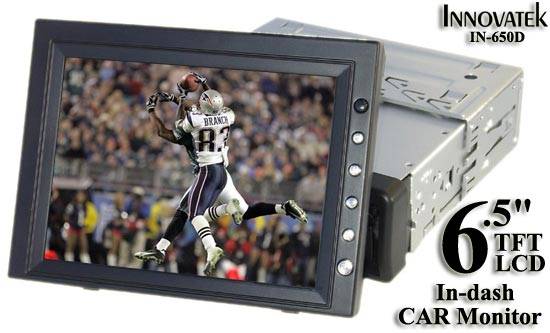
Can't get picture on my Innovatek 6.5" Indash

Just purchased an Innovatek 6.5 indash trying to install it in my friends Pathfinder.

It has 4 wires..

Red, Black, Green, Yellow,

anyone installed one of these screens??

we are trying to hook it up to a ps2

im supposed to get a blue screen i just get a black/gray one.. the screen is getting power but no menus work or brightness/color buttons...

The model of the screen is Innovatek IN-65D

 
did ya hook up the rcs'a from the ps2 to the deck? try using the remote to make sure its in video mode. when i first hookedup my pioneer indash i didnt get video.. i used the remote to turn the video feature "on"

 
Yah the ps2 is hooked up and its only a video screen no cd/dvd. But it is indash.

The unit when turned on is supposed to have a bright blue screen but at the moment it only has a bright black screen. I am also supposed to be able to adjust the brightness/contrast and color and see text on the screen as I do this.

Red - 12v for screen

yellow - 12v for exterior clock

black - ground

green - says to connect to backup light and ground with black so i assume it is for the driver safety..

Such a simple thing to install only 4 wires to hookup.

 
sounds like the yellow should be constant.. that way the clock( in other words memory) would be accurate everytime u turn car on, the red 12v should be the hookup for the 12v that gets power with ignition

 
sounds like the yellow should be constant.. that way the clock( in other words memory) would be accurate everytime u turn car on, the red 12v should be the hookup for the 12v that gets power with ignition
Yah that's true.

but that unfortunately has nothing to do with why i'm not getting a picture

//content.invisioncic.com/y282845/emoticons/crying.gif.ec0ebefe590df0251476573bc49e46d8.gif//content.invisioncic.com/y282845/emoticons/crying.gif.ec0ebefe590df0251476573bc49e46d8.gif//content.invisioncic.com/y282845/emoticons/crying.gif.ec0ebefe590df0251476573bc49e46d8.gif//content.invisioncic.com/y282845/emoticons/crying.gif.ec0ebefe590df0251476573bc49e46d8.gif//content.invisioncic.com/y282845/emoticons/crying.gif.ec0ebefe590df0251476573bc49e46d8.gif//content.invisioncic.com/y282845/emoticons/crying.gif.ec0ebefe590df0251476573bc49e46d8.gif//content.invisioncic.com/y282845/emoticons/crying.gif.ec0ebefe590df0251476573bc49e46d8.gif//content.invisioncic.com/y282845/emoticons/crying.gif.ec0ebefe590df0251476573bc49e46d8.gif//content.invisioncic.com/y282845/emoticons/crying.gif.ec0ebefe590df0251476573bc49e46d8.gif

I kno the problem is really simple and stupid. Like i'm not getting a picture because I haven't bothered to set the proper time yet...

 
sounds like the green wire is used to switch the screen for a rear-view camera cause it supposed to connect to the backup lights. maybe you connected the ps2 to the camera input? try connecting the green wire and see if that makes a difference.

 
Try connecting the green wire to what? 12v or ground?

This model IN-650D in the instruction book does not include rear view camera image flipping.

Your logic definately makes complete sense tho.

the real problem is they have a instruction book for 2 models that they musta translated over from chinese but the person who did the translation does not speak english. heh..

 
front.jpg


Is that what it looks like?


Those units can be pretty good, if you READ ALL THE INTRUCTIONS.


They need a resistor deal on them that limits the cars electrical system to allow them to receive ONLY 12 volts. Go to Radio Shack and tell them what you need. Cost like $5 or so. Connect it inline on the power wire and if it isn't blown up, it will be fine.


There are also 2 set of video inputs. Make sure you have it switched to the right one.

 
front.jpg

Is that what it looks like?


Those units can be pretty good, if you READ ALL THE INTRUCTIONS.


They need a resistor deal on them that limits the cars electrical system to allow them to receive ONLY 12 volts. Go to Radio Shack and tell them what you need. Cost like $5 or so. Connect it inline on the power wire and if it isn't blown up, it will be fine.


There are also 2 set of video inputs. Make sure you have it switched to the right one.


The instructions have been obsessed over. No where does it make a mention of needing to add anything for the lcd to function.

Where have you heard this from? where did you read a manual for this lcd? I really need more information please!!! I have been on many forums and nobody has experience with these screens. PLEEEEASE!!

Its been almost 2 weeks the problem has not been resolved and mp3playerstore gives me the run around telling me to keep repeating the problem.

This aint even my car I convinced a friend that this screen would be perfectly fine for his needs and he went out and bought a ps2 headphones etc.. so now a 100 dollar screen has turned into a 500 dollar project...

So i really need to get this problem resolved.

 
http://www.mp3playerstore.com/stuff_you_need/special/In-Dash-6.htm

Straight off the site at the bottom of the description of the unit.

""-Power supply: 12V DC

Warning: Don't supply more than 12V

As it will damage the monitor!""

OK, what you need is a Fixed Voltage Regulator.....

http://www.radioshack.com/product.asp?cookie%5Ftest=1&catalog%5Fname=CTLG&product%5Fid=276-1771

and here is the schematics to that......

http://support.radioshack.com/support_supplies/doc66/66322.pdf


What you want to do is this......

You put the unregulated power (battery) to pin 3, then you ground pin 2, and the what you want the 12 V max to go to, hook it off of pin 1. In this caes, the power of that screen unit.


Now something else that will be needed..... a heat sink to mount the regulaot to and some heat sink compound. Why? Because basically the device takes the excess voltage and grounds it causing heat in the process. The heat sink gets rid of it. Same as an amp does. The compound insure that the heat gets away from the voltage regulator before it burns up.


If you have a hot alternator, it's best to insert a resistor before pin 3 to drop the voltage so the regulator doesn't have to work so hard. The disadvantage of that is that the resistor always takes some voltage away, so during voltage "sags" you will drop below 12 V. Probally not an issue.


Did that answer the question???

 
ay.....i would say try buyin a dvd/tv tuner, hook up the rcas from the ps2 to the tuner and hook up the tuner to your tv. and with the green wire, tryin connectin it to the ground

 
Yo all i can say is if the LCD required me to install a resistor that sum stupid fukin shit.

I understood when the car is powered on it is upto 14v. But if they made the screen and it cant handle that.. Pretty ****in stupid.

I didnt buy a freakin hobby kit i shouldnt have to be adding my own resistors.

We are still waiting for the exchange from mp3playerstore.com if they give us the excuse that I was supposed to add a resistor then mastercard has agreed to give us a refund.

 
Well I showed you where it states that it is for 12 volts only and nothing more. Don't know why it is like that. I think it sucks also to do that.

But then again, it is an easy fix and they look good.

 
Activity
No one is currently typing a reply...

About this thread

AVSTANG02

Banned
Thread starter
AVSTANG02
Joined
Location
Las Vegas
Start date
Participants
Who Replied
Replies
17
Views
1,382
Last reply date
Last reply from
AVSTANG02
IMG_20260516_193114554_HDR.jpg

sherbanater

    May 16, 2026
  • 0
  • 0
IMG_20260516_192955471_HDR.jpg

sherbanater

    May 16, 2026
  • 0
  • 0

New threads

Top